
AI CRM Data Enrichment NZ: Check Sources Before Updating Customer Records
Keep a sourced proposal separate from a trusted customer record
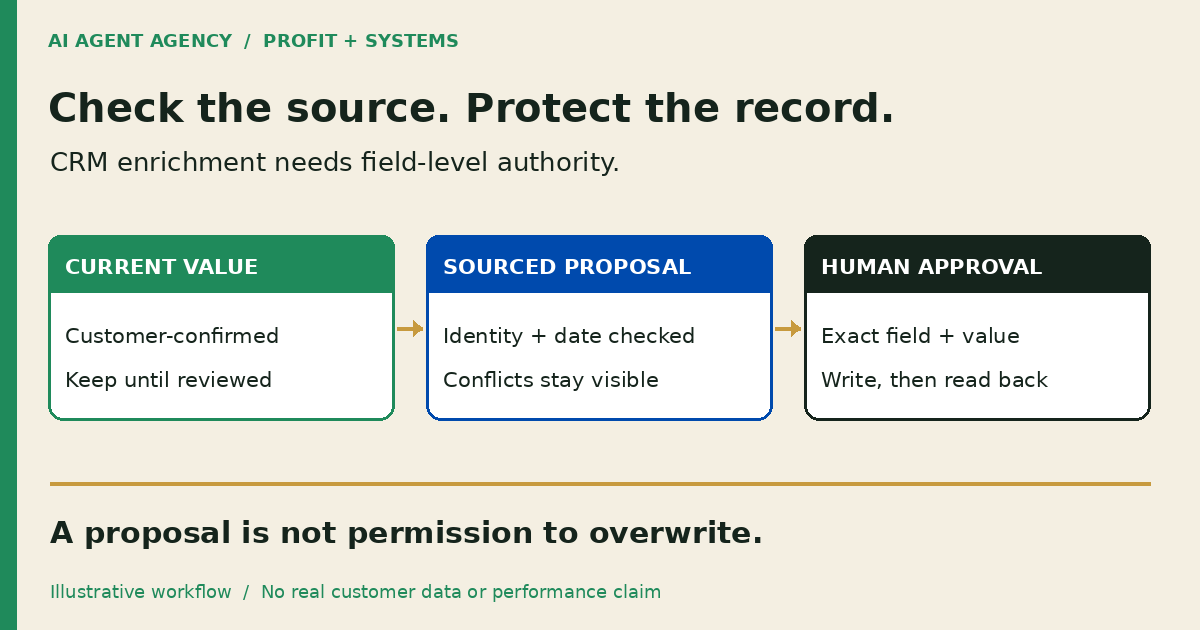
AI CRM enrichment adds or updates company and contact details from additional sources. Before allowing updates, define permitted sources, field ownership, overwrite rules and review steps. Keep proposed changes separate from customer-confirmed information, record where each value came from, and resolve conflicting or personal information before approving a write.
For New Zealand business owners, the useful question is not how many blanks AI can fill. It is whether your sales team can explain and trust each change. Start with a review queue, not unrestricted access to customer records.
What is CRM enrichment—and when is cleanup enough?
Enrichment brings additional facts into a record, such as a company's published website or business location. Cleanup corrects the records you already hold: duplicates, inconsistent stages and missing owners. If two records describe the same customer, enriching both does not resolve the underlying problem.
Use the CRM cleanup checklist before adding external facts. This guide tackles a different decision: which source may change which field, under whose authority?
Check native settings before adding an agent
Your CRM may already provide enrichment, property mapping and activity history. Check the features and permissions available in your account before commissioning another integration. The HubSpot workflow guide covers the wider sales-preparation decision; enrichment alone is not a reason to build an agent.
Copy a source-to-field review register
Use one row per proposed field change, rather than approving a whole contact with a vague “looks good”. Keep this register in a controlled document or staging area accessible to the reviewer.
| Field | What to record |
|---|---|
| Destination | CRM, object type, exact record ID and field |
| Existing value | Current value, source and confirmation date if known |
| Proposed value | Exact replacement or addition; keep uncertainty explicit |
| Evidence | Source URL or permitted document reference and supporting passage |
| Timing and identity | Retrieval date, source date and evidence of the company match |
| Authority | Field owner, permitted source and update rule |
| Conflict | Contradictory evidence, missing context or privacy question |
| Decision | Reviewer, approved value, decision time or reason to hold |
| Completion | Previous value, write result and destination read-back |
Do not copy unnecessary personal information into the register. A model's confidence score is not evidence that a source describes the right person or company.
Run one small, reversible enrichment test
Choose a limited set of approved company-level fields and records. Keep customer messages, consent fields and sensitive notes outside the initial write scope. Company records can still contain personal information; check the actual contents.
2. Confirm the identity and source
Match the company using an approved identifier and supporting context, not its name alone. Check whether the page is current and describes the right branch or legal entity. If the match is ambiguous, hold the proposal rather than guessing a domain, job title or contact address.
3. Test every route that can write
HubSpot's enrichment settings documentation describes mapping and overwrite rules, but warns that conversational enrichment and the Enrich record workflow action can overwrite properties regardless of mapping rules. Test the actual method you will use; a fill-empty setting elsewhere is not sufficient protection.
4. Approve, write and read back
Approve the exact field and value. Immediately before writing, recheck the current value; if someone has changed it since review, stop for another decision. After writing, read the exact destination record and compare it with the approval. Retain the previous value and a recovery procedure. Do not reverse a later legitimate customer correction during rollback.
Worked example: hold a conflicting company location
This is a fictional Christchurch business example, not a client result or tested integration. Record DEMO-CRM-14 has a customer-confirmed city of Christchurch. An older directory proposes Auckland, while the company's current website lists both locations without naming a head office.
The reviewer records both sources and holds the city change. More sources do not settle which location the CRM field is supposed to represent. First define whether the field means billing city, branch or head office, then obtain appropriate confirmation. A separate blank website field could be reviewed independently; approving it would not approve the disputed city.
Check privacy and downstream permissions before expanding
5. Review collection and vendor terms
The Privacy Commissioner's IPP3A guidance explains notification requirements for indirect collection of personal information from 1 May 2026, with exceptions. Have your privacy lead review the purpose, sources, notification position, retention and access before enriching contact records. Public availability is not a blanket permission for every subsequent use. This checklist is operational guidance, not legal advice.
Review the vendor's current data-sharing and AI-training terms separately; do not assume one opt-out describes every use. Record the settings and terms checked. Use the AI privacy impact assessment guide to prepare the questions.
Enrichment approval is not outreach approval. Keep sending, list enrolment, lead reassignment and other downstream actions blocked during the test. Check whether a field update triggers an existing workflow before granting write access.
Frequently asked questions
How is CRM enrichment different from CRM cleanup?
Cleanup corrects existing records and ownership problems. Enrichment proposes additional facts from other sources. Resolve duplicates and unclear field definitions before adding more data.
Can enrichment overwrite information a customer gave us?
It can if the chosen update method permits it. Protect customer-confirmed fields, stage proposals separately and test every writer rather than relying on one mapping setting.
Do we need an AI agent if our CRM already offers enrichment?
Not necessarily. Configure native controls first. Consider an agent only when source review, cross-tool context or a recurring approval queue requires more than the native workflow provides.
What should happen when two sources disagree?
Hold the change. Record both sources, check their dates and identity match, clarify what the field means, and ask the accountable owner to resolve the conflict.
What NZ privacy questions should we review before enriching contact records?
Ask what personal information is necessary, where it comes from, how it will be used, who can access it, and whether notification requirements or exceptions apply. Seek appropriate privacy advice before expanding collection.
Decide whether to configure, build or wait
Configure the CRM when native controls meet your needs. Consider a governed workflow when recurring source checks and approvals justify it. Wait when field ownership, privacy review or an available reviewer is missing.
Bring one enrichment workflow to the NZ$1,000 AI Agent Assessment to map source readiness, access and human approval before deciding what to build. The standalone assessment does not include CRM installation or a completed enrichment integration.