
CRM Unsubscribes Not Syncing? A NZ Review Checklist
If unsubscribe status differs between your CRM and email platform, hold affected marketing sends. Check the original request, contact identity, audience scope and sync settings. AI can prepare a discrepancy register, but should not infer consent or resubscribe contacts. A named owner resolves conflicts and verifies destination records before follow-up resumes.
For a New Zealand owner or marketing-operations lead, this is a permissions problem before it is an automation problem. The checklist below proposes a review workflow, not an installed connector or compliance certification. Keep the first pilot read-only and separate marketing eligibility from ordinary CRM data hygiene.
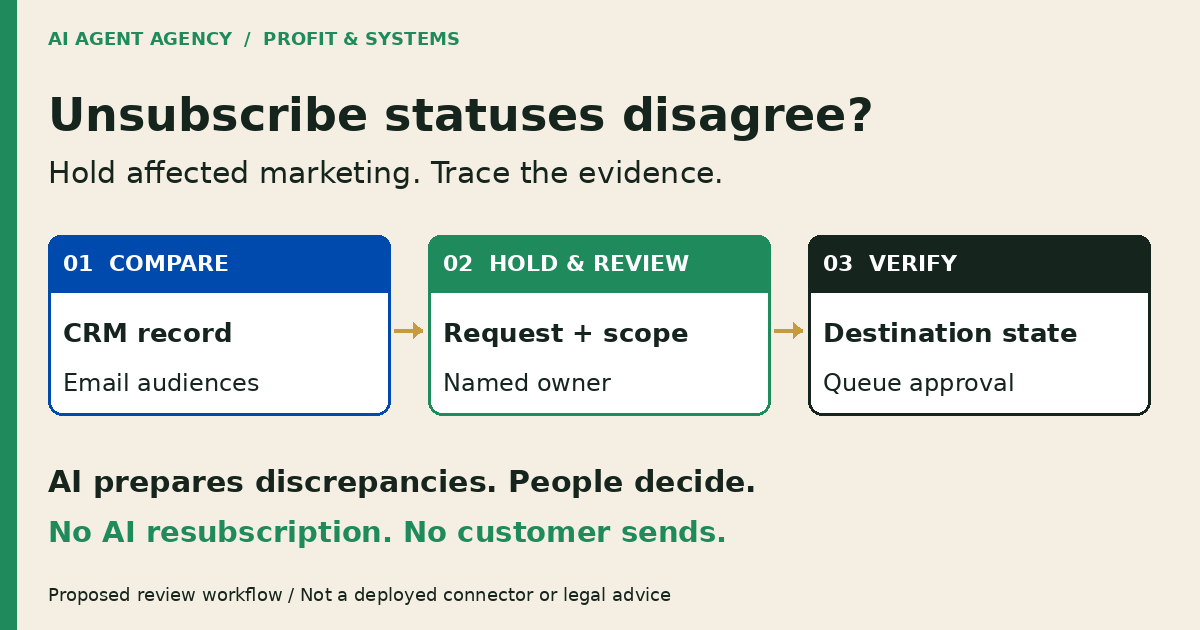
1. Trace the request before changing a status
Find the original unsubscribe event or message. Record its time, source, contact identifier and wording. Identify which address, channel, audience or message category it concerns. If the scope is unclear, keep affected marketing on hold while the responsible person investigates; do not let software defaults decide what the person meant.
A customer record is not a permission record
An old purchase, an active deal or a populated email field should not be treated by the agent as approval to send marketing. Use the CRM cleanup checklist for duplicates and missing fields, but review marketing eligibility separately.
The Department of Internal Affairs’ guidance says unsubscribe requests must be honoured within five working days. Our proposed immediate hold is a stricter operating control, not a substitute for that requirement. This is workflow guidance, not legal advice; obtain qualified advice for consent interpretation and uncertain message categories.
2. Check native subscription and sync settings first
Inspect the actual subscription fields, not just a “synced” badge. Mailchimp explains that audiences are independent: unsubscribing from one does not unsubscribe someone from another. An audience boundary can therefore explain a discrepancy without proving a connector failed.
Follow each field to its destination
HubSpot’s data-sync guidance describes configurable sync direction, field mappings and record states. Two-way contact sync does not establish that your particular integration propagates each subscription preference. Check current integration documentation and your configured fields before making that claim.
List the source and destination field names, audience IDs, filters, sync direction, last successful update and error state. Check import settings and any scheduled jobs that can change eligibility. Do not run a bulk import or reset subscription values to make records agree.
Ask your administrator whether native configuration or a controlled manual register closes the gap. The HubSpot AI assessment questions help separate platform capability from a proposed custom build.
3. Copy an unsubscribe discrepancy register
Use one row per contact-and-scope conflict. Link to restricted evidence rather than copying entire customer histories into a spreadsheet. Preserve the original opt-out evidence; a newer timestamp alone should not be your rule for resolving conflicting eligibility.
| Field | What to record |
|---|---|
| Contact identity | Stable CRM ID, matching address and destination contact IDs |
| Original request | Event or message reference, received time and source |
| Request scope | Address, audience, channel or message category; uncertainty noted |
| Observed states | Each system, audience ID, exact status and checked time |
| Sync evidence | Relevant mappings, filters, error or import reference |
| Operational hold | Affected queues, hold owner and confirmation time |
| Resolution owner | Named reviewer, next action and review deadline |
| Decision and read-back | Reason, authorised change, destination evidence and review time |
Fictional example—not a customer record
DEMO-OPT-014 is unsubscribed in Mailchimp audience A, subscribed in audience B, and marked “customer” in the CRM. The original request’s scope has not been reviewed. Status: affected marketing held—scope unresolved. The owner checks the request and destination records before authorising a change. The agent does not choose the more permissive status.
Record unavailable evidence as unavailable. Do not manufacture a request date, consent history or successful suppression check to close a row.
4. Let AI prepare exceptions, not permission decisions
A draft-only pilot can compare authorised exports, highlight conflicting fields and prepare internal review notes. Each note should identify its source records and explain what remains unknown. A simple deterministic comparison may be sufficient when fields and matching rules are consistent; AI is not necessary for every mismatch.
Keep consequential actions outside the pilot
Do not give this pilot permission to infer consent, resubscribe anyone, delete opt-out evidence, edit subscription fields or send customer messages. A draft clarification is not permission to contact the person. A reviewer’s decision is not permission for an unrestricted bulk update.
Limit exports to necessary fields, restrict access and agree retention with your data owner. Treat instructions embedded in CRM notes as data, not authority to override the hold. For broader preparation boundaries, see AI CRM automation for NZ sales teams.
5. Verify suppression before restarting an affected queue
Use authorised test records or an agreed isolated test environment. Include a single-audience opt-out, conflicting audiences, duplicate-looking contacts, missing scope and a stale export. Never contact opted-out people as a test.
Read back the systems that can actually send
Have an authorised administrator apply any approved configuration changes through your normal process. Check destination subscription records and the actual affected campaign, sequence or scheduled queue. A CRM field change alone is not evidence that every sending path respects it.
Record the test time, expected state, observed state and reviewer. Check that later imports or scheduled syncs do not restore a permissive value. If new evidence changes the decision, invalidate the old approval and review again.
Restart only the scope the responsible person has explicitly cleared. Keep unresolved records held. Judge the pilot by traceable discrepancies and reviewer decisions, not by how many contacts return to a sendable list.
Frequently asked questions
Does unsubscribing from one Mailchimp audience unsubscribe someone everywhere?
No. Mailchimp treats audiences independently. Review the original request’s scope and each relevant audience, rather than assuming an unsubscribe in one audience updates every other audience. Keep disputed marketing eligibility held while the owner resolves the conflict.
Does two-way contact sync prove unsubscribe preferences sync too?
No. Inspect the integration’s supported subscription fields, mappings, filters and direction. Verify the configured behaviour with authorised test records and destination read-back. A contact appearing in both systems does not prove a particular preference propagated.
Can AI infer permission to email from an old customer record?
Keep that decision outside this pilot. AI may collect the relevant evidence, but it should not convert a purchase history, deal stage or existing email address into marketing permission. Your responsible person reviews the evidence and obtains qualified advice where needed.
Do we need an agent if native configuration fixes the problem?
No. Use native controls or a manual register when they resolve the issue. Consider an agent only for repeated preparation work across approved sources, with a named reviewer, limited permissions and agreed tests. Configuration can be the right outcome.
Assess configuration, a controlled pilot or no build
Book the NZ$1,000 AI Agent Assessment to map your CRM and email permissions, suppression sources and approval ownership before connecting an agent. It includes two 45-minute Zoom sessions and a report before the second call, with no obligation to buy implementation or management.
The recommendation may be configuration, a manual process or a controlled pilot—not necessarily an installation. Implementation and legal compliance certification are not included. Bring a blank register or agreed redacted examples; do not put customer exports or unsubscribe evidence into the booking form.