
AI Agent Cost Controls NZ: Set Budgets, Alerts and Stop Rules
Control AI agent spending by naming a budget owner, separating fixed fees from usage charges, configuring alerts and enforceable limits where supported, and bounding runs, retries and paid tool calls. Decide what pauses at each limit, preserve unfinished work, and require human approval before increasing spending.
For New Zealand owners, the question is not just “what does the agent cost?” It is “who notices unexpected consumption, and what actually stops?” Use this worksheet before a pilot expands.
What are AI agent cost controls?
Cost controls are the settings and operating decisions that govern what a workflow can consume. Pricing tells you what you buy; controls define the allowance, warning, stopping point and responsible person.
Separate software subscriptions, model usage, paid searches or connectors, hosting, implementation and human review. Record which charges are included in a supplier fee and which arrive separately. A service agreement is not automatically a cap on third-party consumption.
For contact-based subscriptions, use the HubSpot pre-import billing checklist to distinguish the paid tier from a configured maximum and review who may change billable contact status.
For purchasing context, use the AI agent cost guide. This article addresses operating boundaries, not typical prices or a new service package.
Budget alerts, hard limits and workflow limits are different
An alert asks someone to respond. An enforceable provider limit blocks covered consumption. A workflow limit restricts the work your own system starts or continues. Design all three rather than assuming one billing field covers everything.
OpenAI's API spend-limit documentation provides a specific example: spend alerts notify while traffic continues; enforced organisation or project hard limits make affected requests fail with a 429 error. Enforcement is not instantaneous, so recorded spend can slightly exceed the configured amount. Hard limits can interrupt production.
Do not generalise that behaviour to other providers, subscriptions or connected tools. Ask your implementer to show the applicable setting, account scope, reset period and failure response. Record what remains chargeable after that boundary. A provider limit is not a guarantee of zero overspend across your whole workflow.
Five checkpoints before approving more usage
1. Name the workflow, payer and decision-maker
Record the workflow, provider account or project, invoice payer, budget approver, technical owner and backup reviewer. One person can hold several roles, but “the agency handles it” is not a clear escalation path.
2. Bound the work, not just the invoice
Specify maximum inputs per batch, run duration, model calls, output length where supported, concurrent runs and paid tool calls. Ask how those bounds are enforced outside the model. A prompt saying “keep costs low” is not a tested execution control.
3. Include retries and connected services
Set a retry allowance and stop condition. A billing-limit failure should not trigger an endless retry loop or automatic switching to another paid account. Treat uncertain actions separately using the duplicate-action prevention checklist.
4. Record currency and the NZD assumption
Write down each provider's billing currency, the dated conversion assumption used for your NZD budget, applicable fees or tax treatment to confirm, and renewal dates. Keep usage estimates separate from AI Agent Agency service fees. Do not mistake a foreign-currency dashboard figure for an NZ-dollar total.
5. Test the warning and stop paths
In an authorised test environment, use a small approved allowance or simulate the limit response. Confirm who receives the warning, which work stops, and what remains queued. Inspect the saved state and owner notification—not only a screenshot of a configured budget.
Complete a pilot spending-control worksheet
Copy these columns into your working document. The rows below are illustrative control entries, not typical NZ costs or evidence of an installed system. Replace each instruction with an agreed setting, named person and dated test result before launch.
| Cost category | Billing basis | Allowance | Warning trigger | Stop behaviour | Owner | Evidence checked |
|---|---|---|---|---|---|---|
| Software subscription | Seats and renewal period | Record approved plan | Renewal or seat change | Require upgrade approval | Name payer | Plan and invoice |
| Model API | Provider usage units | Set project and run bounds | Set early spend alert | Block covered usage; hold queue | Name technical owner | Settings and stop test |
| Paid tools and connectors | Calls, credits or tasks | Set tool-call allowance | Unexpected use or low balance | Disable new paid calls | Name workflow owner | Tool logs and billing |
| Hosting and storage | Capacity and billing period | Record agreed resources | Usage outside agreed range | Pause optional jobs safely | Name technical owner | Resource report |
| Human review | Time spent checking work | Agree review capacity | Queue exceeds capacity | Pause new draft batches | Name reviewer | Queue and review log |
Add the workflow name, billing currency, budget period and backup contact above the table. For every row, answer: does this control notify, block consumption, or require a manual decision? “Budget configured” is not enough evidence.
What should happen when a limit is reached?
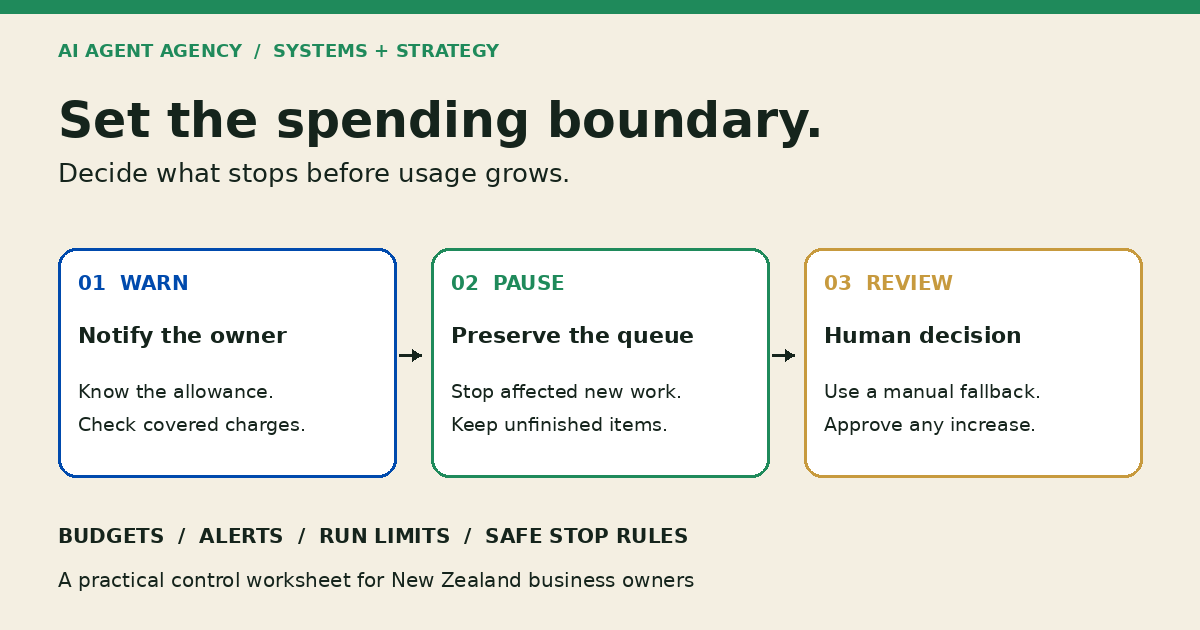
Write the stop behaviour before enabling live work. Our recommended sequence is:
- Pause new work and additional paid calls within the affected workflow.
- Save pending items, completed outputs and the reason for stopping.
- Notify the named owner through an agreed route that does not depend on the stopped agent.
- Move urgent items to the agreed manual fallback.
- Require approval for a budget change or controlled resumption.
Do not silently discard the queue, replay completed actions, or let the model approve its own larger allowance. After a billing period resets, decide whether the workflow should resume automatically or await review; test the choice.
Spending permission is not action permission. Keep emails, DMs, booking handoffs, public publishing and sensitive CRM or financial changes behind human approval. Business.govt.nz's safe AI guidance likewise recommends human review of important work and using AI for drafts rather than final approvals.
Review cost alongside accepted work
At the pilot review, compare provider charges, accepted outputs, rejected work, reviewer effort and unresolved items. Cheap drafts that nobody can use do not establish value. Nor does hitting a spending cap prove that the workflow is efficient.
Use the AI agent ROI worksheet for the business-case assumptions and the monitoring checklist for ongoing review. Decide whether to continue, narrow the task, improve the inputs, pause or stop. Keep any claimed savings separate from estimates until you have your own evidence.
If repeated work comes from stale source material, use the knowledge base update checklist to verify changed sources and affected answers before funding another refresh.
Frequently asked questions
Does a budget alert automatically stop an AI agent?
Not by itself. Check the provider's documented behaviour. OpenAI's API spend alerts notify without stopping traffic; enforced hard limits behave differently. Your workflow also needs its own tested run and tool-use boundaries.
What should happen when an agent reaches its spending limit?
Pause affected new work, preserve pending items, notify the owner and use the agreed manual fallback. Do not keep retrying indefinitely. Review the cause before approving a larger allowance or restarting held work.
Who should approve an increase to an AI workflow budget?
The named business budget owner should approve it, informed by the workflow and technical owners. Record the reason, revised allowance and review point. The agent should not authorise its own increase.
Map the controls before funding a larger pilot
Bring your provider invoices, account settings, workflow volumes and completed worksheet to the NZ$1,000 AI Agent Assessment. Map the workflow, tools, approval points and success measures before implementation.
The Assessment includes two 45-minute Zoom sessions and a report before the second call, with no obligation to purchase implementation or management. The worksheet is preparation, not a promised additional deliverable. Configuring billing controls, implementing stop logic and production testing are not automatically included.