
HubSpot Marketing Contact Billing: A Pre-Import Checklist for NZ Teams
Check who can change billable status before importing contacts
In HubSpot accounts using marketing contacts, marketing status affects the billable contact tier; it is not proof of consent. Before an import or AI workflow changes contacts, check status defaults, usage, the next update date and the configured maximum. Have an authorised owner approve the batch, then read back the results.
For your New Zealand team, the practical question is who can turn an ordinary CRM update into a billable change. Use this preflight before a migration, integration or AI pilot. It is a proposed review process, not an inspection of your HubSpot account.
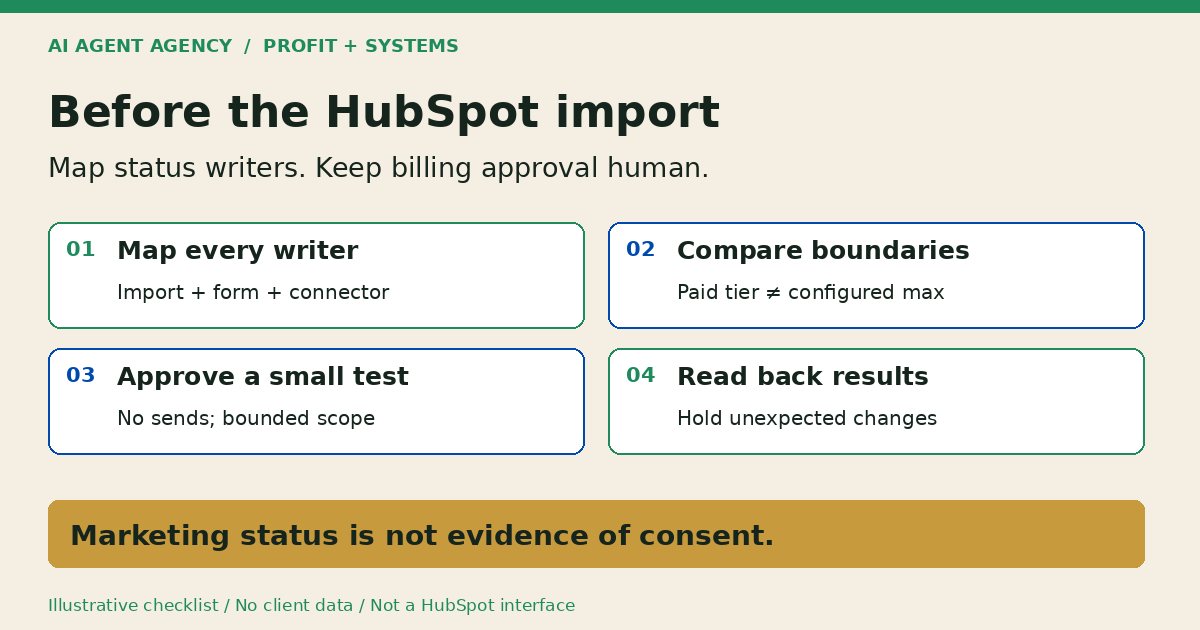
1. Separate billing status from permission to send
Confirm your subscription includes marketing contacts using HubSpot's account and property guide. It identifies current status, pending status changes and the source of the latest status change. Do not assume every legacy account uses this billing model.
Keep three decisions separate
Record billing classification, subscription preferences and deliverability separately. Our recommended rule is to require a reviewer to check all three before approving a campaign. A marketing label alone is not your permission record; a bounce is not a billing instruction.
Use the CRM unsubscribe synchronisation checklist for preference-handling controls. This preflight concerns billable status writers, not permission to contact someone or advice on legal compliance.
2. Inspect the exact import and every later writer
Check the actual creation path rather than relying on a remembered default. HubSpot's defaults guide describes different behaviour across forms, imports and integrations, including configurable settings for some tools.
Resolve documentation differences before proceeding
The defaults guide says multi-object imports create non-marketing contacts, but the current multi-object import instructions describe an optional marketing-contact checkbox. Verify your exact importer and account; if the behaviour remains unclear, hold the batch and ask HubSpot support. Neither page justifies a universal import rule.
Map later forms, integrations, workflows and manual edits as possible writers. For a form-to-CRM onboarding process, first use the external-document intake checklist to settle collection permissions. Then review the CRM connector separately; approved document collection does not approve billable contact changes.
3. Check the paid tier, timing and configured maximum
Read HubSpot's marketing-contact billing guide with your billing owner. Crossing the paid tier triggers an automatic upgrade. Setting contacts to non-marketing takes effect on the next update date; it does not immediately reverse an upgraded tier. HubSpot states tiers do not downgrade mid-term.
The configured maximum and paid tier are separate. HubSpot documents a maximum that limits additional marketing classification, but setting it above your paid tier still leaves room for a billable upgrade. Have an authorised administrator or billing user review the setting.
Record the account's terms, not a generic NZ price
Capture current usage, paid tier, next update date, renewal date, configured maximum, billing currency and notification owner. Do not assume a processing boundary is midnight in New Zealand. Resolve timing questions before scheduling work near an update date.
For broader allowances and stop rules, use AI agent cost controls. A vendor contact tier is a different control from an AI model's usage budget.
4. Copy a pre-import status-writer register
Keep one private register per entry path. These are recommended fields, not a HubSpot feature or a completed account audit. Write “not verified” wherever evidence is missing.
- Entry path: Importer, form or connector and the proposed batch reference.
- Owner: Person responsible for that integration or import.
- Matching identifier: Approved method for distinguishing new records from updates.
- Intended status: Expected marketing classification and the business reason.
- Possible writers: Creation settings, later workflows and manual changes to inspect.
- Intended count: Expected new records, updates and possible promotions.
- Current headroom: Usage compared with the paid tier, checked at a recorded time.
- Update date: Account date and applicable processing-time question, if unresolved.
- Configured maximum: Verified setting, scope and person authorised to change it.
- Reviewer: Named billing approver, technical operator and backup.
- Stop condition: Unexpected promotion, unresolved mapping or unexplained count difference.
Fictional example: a connector with an unknown setting
DEMO-IMPORT-02 is fictional, not a client record. A team wants to bring enquiry records into HubSpot. Its operator knows the field mapping but has not verified the connector's status setting or later workflow behaviour.
The reviewer marks both “not verified” and holds the import. AI may draft the missing questions; it cannot approve the uncertainty. No refund, savings or successful tenant test is implied.
6. Let AI prepare the review, not authorise billing
Give an agent a narrow preparation role: compare an approved input file with a permitted export, flag unclear mappings and draft an exception list. Keep personal information out of broadly shared review notes; prefer redacted samples while planning.
Our recommended starting boundary blocks automatic marketing promotion, deletion, resubscription, contract changes and customer outreach. A human decides whether a proposed change should happen. The agent must not raise its own allowance to clear a blocked batch.
For the broader build decision, see native HubSpot versus custom agent workflows. Native settings and a manual preflight may solve this without another agent.
Frequently asked questions
Does importing a contact always make it a marketing contact?
No universal rule is safe. Inspect your exact import options and downstream writers, resolve documentation differences and verify observed status before approving the full batch.
Does setting contacts to non-marketing immediately lower my bill?
No. Status-change timing and subscription-tier commitments are separate. Review the next update date and renewal terms with your billing owner; do not assume an immediate downgrade or refund.
Does marketing-contact status prove someone consented to marketing?
No. Treat billing classification and permission evidence as separate review items. Do not send or resubscribe someone merely because a billing property says marketing.
Is a marketing-contact limit a substitute for reviewing imports and integrations?
No. Check its value against the paid tier, and still inspect each writer and resulting records. A configured maximum above the paid tier is not protection against crossing that tier.
Can native HubSpot settings solve this without a custom AI agent?
Yes, they may. Start with native settings, permissions, monitoring and a named reviewer. Add draft-only assistance only when recurring preparation work warrants it.
Assess the workflow before approving a larger import
Bring a redacted contact-creation map and billing questions to the NZ$1,000 AI Agent Assessment. Assess your CRM workflow to decide whether native settings, a manual preflight or a draft-only agent is appropriate.
The Assessment is not a HubSpot billing dispute or refund service and does not guarantee cost reductions. Installation is separate scope. Do not submit contact exports, credentials or customer documents through the booking form.