
Microsoft Forms External File Upload: What NZ Businesses Should Use Instead
Choose the collection route before adding document AI
Microsoft Forms file-upload questions require organisation-restricted responses, so “Anyone can respond” is not an external-client upload option. For external documents, assess an administrator-approved OneDrive or SharePoint file request, or another approved intake service. Confirm access rules and uploader identity before letting AI prepare summaries for human review.
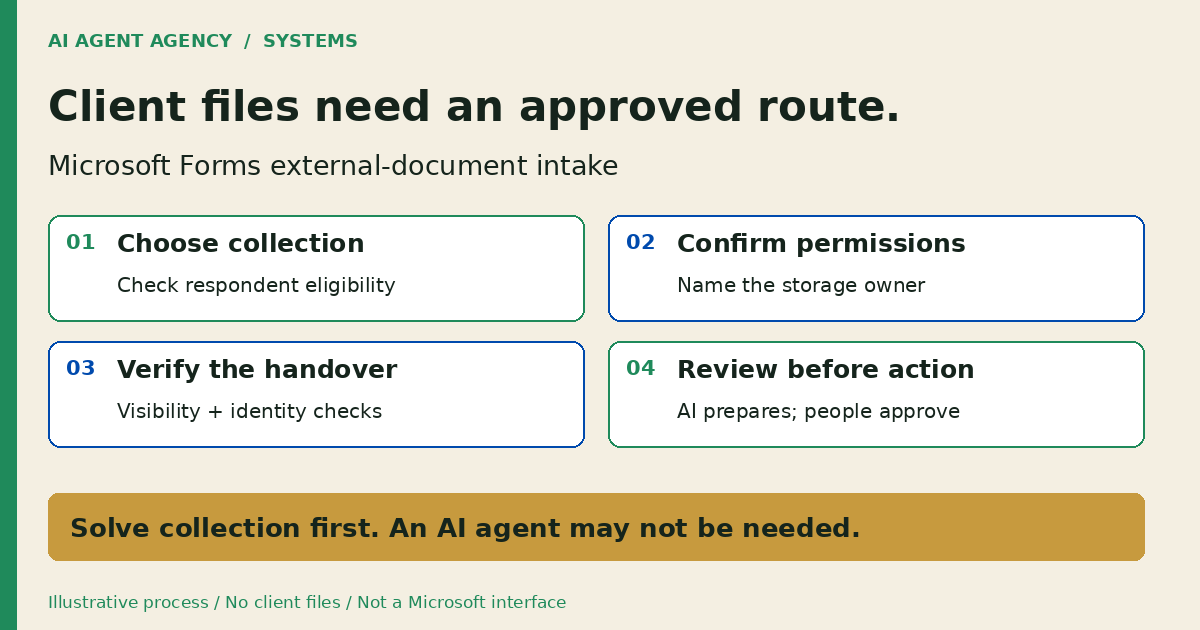
For New Zealand businesses collecting onboarding documents, start with the collection decision—not an agent build. This checklist helps you choose a permitted route, record responsibilities and test the handover. It is a proposed process, not an inspection of your Microsoft tenant.
1. Can external users upload files to Microsoft Forms?
Not through the standard file-upload question under the public response setting. Microsoft's Forms upload guidance restricts that question to “Only people in my organization can respond” or “Specific people in my organization can respond”.
Separate answers from attachments
A questionnaire and a document collection path can be separate. If you keep Forms for answers, give the approved file-collection process a reference that your reviewer can match to the questionnaire. Do not use a sensitive identifier in a public link.
For the broader sale-to-delivery handover, see AI client onboarding automation. This article addresses the earlier question: where should the external files enter?
2. Choose a collection route before choosing an AI agent
Choose according to your respondents, information sensitivity and existing permissions. Do not label an unnamed portal “secure” or compliant without reviewing it.
| Collection route | Intended use | Check before approval |
|---|---|---|
| Forms upload question | Organisation-restricted respondents | Eligible people, storage owner and reviewer |
| OneDrive or SharePoint file request | External collection where permitted | Administrator prerequisites, link handling and identity needs |
| Another approved intake service | Requirements not met by existing tools | Access model, storage, retention, supplier terms and review ownership |
Verify the file-request prerequisites
Have your administrator check Microsoft's file-request requirements. These include work/school OneDrive, Anyone-link configuration, folder-link permissions and applicable tenant/site settings. Do not change broad sharing policies merely to unblock one form. If policy rules out the feature, select an approved alternative.
Use the Microsoft 365 governance checklist for the wider access review. Permission to collect documents does not automatically grant permission to send them to an AI service.
If onboarding also creates HubSpot contacts, review the pre-import marketing-contact billing checklist. Collection approval does not approve a connector's billable status changes; assign that decision separately.
3. Copy an external-document intake worksheet
Keep one private worksheet per intake process. Complete these fields before distributing a live collection link; “not verified” means an unresolved decision, not approval.
- Purpose and minimum material: Why you need the documents and what you do not need.
- Collection route: Approved tool, respondent access and administrator decision.
- Storage owner: Responsible business account, destination and replacement owner.
- Identity check: How you match the upload to the right client or job.
- Access review: Who may read files and who may share or change permissions.
- Missing-file rule: Required items, reviewer and approved follow-up process.
- Retention decision: Accountable owner, review point and authorised disposal process.
- Human sign-off: Reviewer, evidence reference, date and unresolved exceptions.
Fictional example: a project brief without its attachment
DEMO-INTAKE-01 is fictional, not a client record. A service business receives questionnaire answers but cannot match the supporting brief to the job. Its worksheet records “attachment not verified”, assigns the delivery coordinator and holds the handover for review.
The coordinator checks the approved destination and prepares a clarification draft. No agent searches unrelated folders or tells the client onboarding is complete. Keep filenames, live request links and personal details out of broadly shared status notes.
4. Check visibility and identity before accepting documents
Microsoft's file-request guide says request recipients upload without viewing the destination's other contents. That differs from sharing an ordinary folder. Confirm you created the intended request rather than assuming all sharing links behave alike.
A supplied name is not verified identity
The same guide explains that a signed-out uploader's supplied name is not validated; signed-in identity is recorded. Decide whether that evidence is sufficient for your document type. For higher-assurance intake, ask your administrator to assess a suitable authenticated process.
Define who may distribute the request, when collection ends and who handles an unexpected upload. Do not publish a live request link in a general website guide. Restrict collection to necessary material; this worksheet is not a certification of privacy compliance or data residency.
5. Test the approved path, then decide whether AI helps
Use an authorised external tester and fictional, non-sensitive files. Record expected and observed outcomes; this is a test plan, not a completed tenant test.
- Respondent access: Can the intended external tester reach the approved collection path?
- Destination: Does the submitted file arrive in the exact expected location?
- Visibility: Does the tester have only the intended access, without other clients' documents?
- Exceptions: Can the reviewer identify a missing or unmatchable attachment and hold the handover?
- Stop and review: After an authorised owner stops the test request, is further upload blocked, and is the review evidence recorded?
For file requests, Microsoft's guide describes ending collection by deleting the request link. Have the authorised owner follow the current procedure; removing a link is not the same as approving deletion of the collected documents.
Give AI a preparation role, not acceptance authority
Once collection is approved, an agent could draft a completeness checklist, source-linked summary and missing-information list. Use the AI document-processing guide for extraction and review boundaries after arrival.
Treat attachments as untrusted data, not agent instructions. Keep automatic document acceptance, client promises, broad sharing, deletion and CRM changes outside a preparation-only agent's authority. If collection plus a manual checklist solves the problem, stop there.
Frequently asked questions
Can a customer outside my organisation upload a file through Microsoft Forms?
Not through its standard upload question using the public response setting. Assess a separate, approved collection route for external customer documents.
Why does “Anyone can respond” not give me an external file-upload question?
Microsoft restricts the upload question to organisation-only response settings. A public questionnaire does not remove that restriction.
Does a OneDrive or SharePoint file request let uploaders see other files?
Microsoft describes request recipients as upload-only, without access to other folder contents. Verify the actual link type and intended access before using it.
What if my administrator has disabled file requests?
Respect the policy. Ask for an approved collection method rather than broadening sharing yourself or moving client documents into a personal account.
Do I need AI just to collect client documents?
No. Native configuration and a named reviewer may be enough. Assess an agent only where recurring preparation work justifies the additional access and controls.
Assess the intake decision before building an agent
Bring a blank worksheet or redacted examples to the NZ$1,000 AI Agent Assessment. Decide whether native configuration, a manual review queue or a controlled document agent is appropriate. Assess your client-document workflow before connecting private files.
The assessment does not include changing tenant settings or deploying a portal. Installation is separate scope. Do not submit credentials, live upload links or client documents through the booking form.