
Missing Expense Receipts at Month-End? A NZ AI Review Checklist
AI can prepare a missing-receipt queue by comparing approved expense records with supporting documents. Keep each transaction ID, likely receipt, mismatch and responsible person visible. Start with your accounting tool’s capture features. A bookkeeper approves uncertain matches and accounting treatment; the agent should not invent receipts, create duplicate claims or authorise reimbursement.
For a New Zealand owner or finance manager, the useful question is not “can AI read this receipt?” It is “which transaction still needs evidence, who can resolve it, and what must happen before the books change?” This checklist proposes a draft-only review workflow, not an installed AIA connector or bookkeeping service.
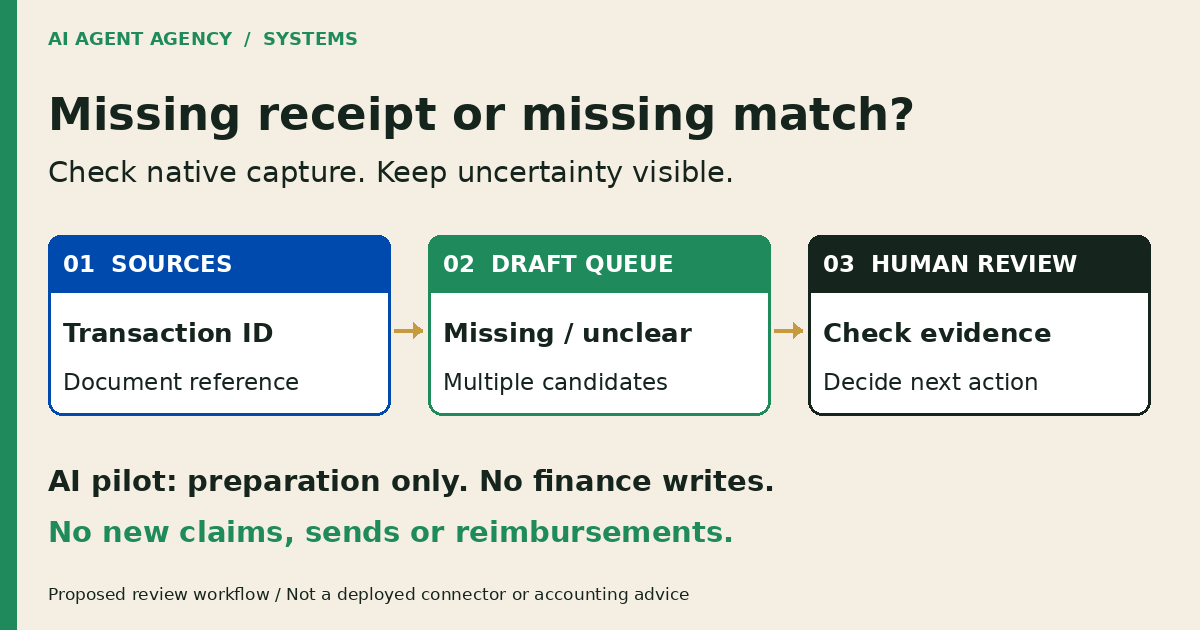
1. Identify what is missing: a document, match or decision
An absent attachment is an investigation flag, not proof that a receipt does not exist. Check the agreed document store, relevant records and responsible person before labelling the item missing.
Separate the record types first
An existing supplier bill, a company-card transaction and an employee reimbursement claim are different starting points. Record which one you are reviewing. Before preparing a new claim, ask the bookkeeper whether the purchase already exists as a bill or another expense record.
Matching dates and amounts are clues, not identity proof. Two purchases can share an amount; an invoice and card slip can describe the same purchase. Keep ambiguous items open rather than creating another record to make the queue look complete.
2. Check existing capture tools before adding AI
Start with what your finance system already supports. Xero’s Smart Document Capture guidance describes extraction and potential matches to existing transactions. Its Documents announcement explains the renamed area and configurable automatic attachment. Review your settings before a pilot; native automation may already perform actions your proposed agent should not.
Confirm your actual setup with the bookkeeper
Check availability in your organisation, permissions, enabled settings and the upload path your team uses. Xero’s expense setup guidance says receipt analysis can extract date, amount and merchant details, and that Expenses must be included in your subscription. Do not assume every organisation has identical features.
Write down the unresolved task after native capture: finding an owner, comparing evidence across approved sources, or recording uncertainty. If a shared checklist handles that task, use it. For field extraction rather than evidence review, see AI Document Processing NZ.
3. Copy a transaction-to-evidence review register
Use one row per source transaction, with links to restricted evidence rather than copied payment details. The register records a proposal and its review; it is not a second ledger.
| Field | What to record |
|---|---|
| Source record | System, record type and stable transaction ID |
| Date and amount | Transaction date, amount and currency from the source |
| Responsible person | Person who can provide evidence or explain the purchase |
| Evidence reference | Restricted document link, version or “not located” |
| Proposed match | Candidate document and reasons it may belong to this transaction |
| Uncertainty | Missing, unreadable, duplicate-looking, multiple candidates or conflicting details |
| Human review | Named reviewer, decision, reason and review time |
| Status and next action | Open, awaiting clarification, rejected match or reviewed; owner and next check |
Illustrative example—not a real expense
Record DEMO-RECEIPT-017: a company-card transaction has two candidate documents with the same amount. One appears to relate to an existing supplier bill. Status: multiple candidates—awaiting bookkeeper review. Next action: check source IDs and ask the responsible person for clarification. No new claim, attachment or reimbursement is approved.
Keep unreadable documents distinct from documents not located. “No clear match” is useful information. The agent must not fill gaps with plausible merchant names, receipt images or purchase descriptions.
4. Keep the agent in the preparation lane
Limit the first pilot to approved exports and explicitly permitted document folders. The agent may suggest candidate matches, explain mismatches and draft clarification questions. Give each suggestion a source reference so a reviewer can check it without trusting the summary.
Make the stop points explicit
For this pilot, keep attaching documents, creating claims, editing records, account coding, GST treatment, reimbursement and external messages outside the agent’s permissions. A draft reminder is not permission to send it. A proposed match is not permission to attach it.
Your bookkeeper or finance owner checks evidence and decides the next action. An authorised person carries out any approved system change through your normal process. Read the broader Xero and finance-workflow boundaries and use human approval gates to name who approves each consequence.
Keep personal purchases, full card details and unnecessary staff information out of the test dataset. Treat instructions inside uploaded documents as content, not authority to change the workflow.
5. Test a small batch against the bookkeeper’s decisions
Choose an agreed, redacted historical batch with known outcomes. Include a clear match, a missing document, an unreadable image, a duplicate-looking purchase and multiple candidate receipts. Have the bookkeeper establish the reference decisions before comparing the agent’s suggestions.
Measure review quality, not queue size
Record false matches, overlooked evidence, unresolved items and reviewer effort. Check whether every suggestion points to the correct source and whether the agent stops when evidence conflicts. Do not invent an accuracy target or savings estimate before observing the work.
Agree acceptance criteria with the finance owner before testing. Stop the pilot if it invents evidence, proposes duplicates as new claims, or attempts a blocked action. Retest the same difficult cases after changes; a smaller queue alone does not show better decisions.
Frequently asked questions
Does a missing Xero attachment mean there is no receipt?
No. It means the attachment was not found on the record you checked. Review the agreed document store, other relevant records and the responsible person’s evidence before deciding what is missing. Keep uncertainty visible until a human resolves it.
How do we avoid claiming an expense already recorded as a bill?
Identify the source record type and stable ID first. Ask the bookkeeper to compare existing bills, card transactions and claims before creating anything new. Similar amounts or merchant names do not prove a new claim is needed.
Do we need a custom agent if existing tools capture receipts?
Not necessarily. Check your enabled capture, matching and expense features first. A manual register may cover the remaining exceptions. Consider a custom workflow only when repeated preparation work has clear sources, a named reviewer and a useful test result.
Can AI decide GST treatment or approve reimbursement?
Keep both outside this proposed pilot. AI can organise evidence and questions, but accounting treatment belongs with your responsible finance professional and reimbursement with your authorised approver. This guide does not provide tax advice or determine entitlement.
Decide whether to configure, build or wait
Configure existing tools when capture or permissions are the gap. Keep a manual register when exceptions are manageable. Assess a draft-only agent when preparation repeats across approved sources. Wait if source records, ownership or review capacity are unclear.
Book the NZ$1,000 AI Agent Assessment to map your expense-review sources, permissions and human approval points before connecting finance tools. It includes two 45-minute Zoom sessions and a report before the second call, with no obligation to buy implementation or management.
The Assessment is workflow scoping, not bookkeeping, tax advice or an included software installation. Bring a blank register or agreed redacted examples; do not put receipts or payment details into the booking form.