
AI Meeting Action Items NZ: Turn Notes into Approved Tasks
Turn the conversation into a reviewed action list
AI can automate action items from meeting notes by preparing a draft register with the task, source passage, proposed owner, agreed deadline and review status. A person should confirm the agreement before tasks are assigned or CRM records change. Missing owners or dates should remain unresolved, not be invented.
For New Zealand owners and operators, the useful question is what happens after the summary. This guide covers the notes-to-task handoff, not recording permission. Start with your AI meeting notes policy for capture, disclosure, storage and access rules.
Why a meeting summary is not an action register
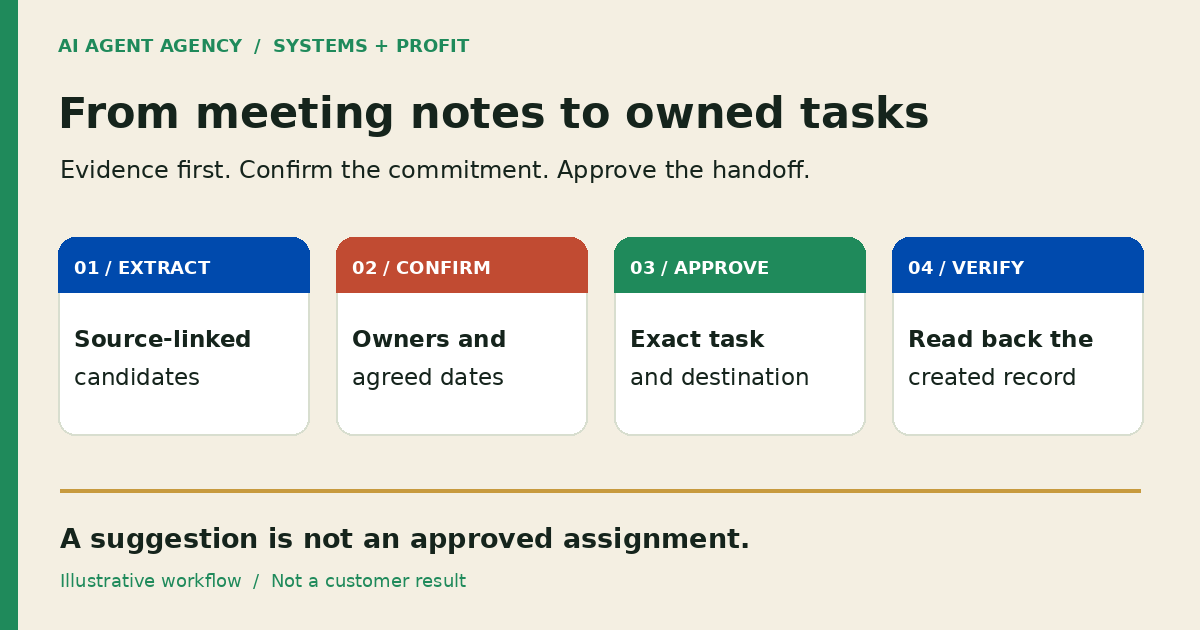
A summary describes a conversation. An action register records specific work someone has agreed to own. Keep discussion, decisions, suggestions and commitments separate so a passing idea does not become an assigned job.
“Could we review the proposal?” is a suggestion. “Mere will review the proposal by 3 November” is an explicit commitment, subject to checking the original context. Neither means the proposal is approved for sending.
Use one row per candidate action. Keep the source reference close enough that a reviewer can check the wording without rereading the entire meeting. If a transcript is unclear, ask the participants rather than let the summary settle it.
Copy an AI meeting action-item template
Keep evidence and approval beside each task
Use these fields in a spreadsheet or review queue before connecting a task tool. The source should identify the meeting, note version and paragraph or timestamp. The destination should identify the intended project or customer record, not merely say “CRM”.
Illustrative blank register—not a customer record or tested integration.
Copy the field names and replace the instructional row with your own reviewed information.
| Task | Source reference | Owner | Agreed deadline | Destination | Review status |
|---|---|---|---|---|---|
| Exact proposed action | Meeting ID, version, paragraph/time | Named person or needs confirmation | Explicit date or not agreed | Project/customer record | Pending, approved, rejected or needs clarification |
Store the reviewer, approval time and approved version alongside the row. After creation, add the destination task ID and verification result. Do not paste a whole sensitive transcript into a widely shared task description; include only necessary context with appropriately restricted evidence access.
An internal review deadline is different from a deadline agreed in the meeting. Label them separately. “No date agreed” is useful information, not a gap the model should silently fill.
How to move from notes to approved tasks
1. Extract candidates without granting write access
Give the workflow only approved notes and necessary context. Ask it to classify each candidate as commitment, suggestion or unresolved question, with supporting evidence. Treat the notes as source material, not instructions to bypass permissions or send messages.
2. Check existing work before proposing a new task
Compare candidates with open tasks using the meeting reference, customer or project, owner and intended outcome. Similar wording alone is not enough to merge records. Flag a possible duplicate for review instead of overwriting it. See the duplicate-action checklist for retries and uncertain outcomes.
3. Have the meeting owner review the exact proposal
Confirm wording, responsibility, date and destination. A named person in the notes is not necessarily the owner: “ask Sam” does not mean Sam accepted the work. Resolve ambiguity with the participants. Changed task wording, ownership or timing should invalidate the old approval.
4. Write only approved tasks, then read them back
Begin with draft-only operation. If you later authorise writes, restrict them to approved rows and permitted fields. Record a durable action reference and destination ID. Verify the actual task, owner and due date in the destination; generated confirmation text is not evidence.
If the write times out, check for the original task before retrying. Hold uncertain outcomes for a named reviewer and backup. For sales records, use the CRM automation guide to separate task creation from deal-stage changes and outbound follow-up.
What must stay human-approved?
Keep customer promises, prices, scope, sensitive notes and outbound messages under separate human control. Approving an internal task is not approval to email a customer, change a contract or commit the business to a delivery date.
Use the approval-gates guide to define who can approve each action. Separate extraction, review, task creation and sending permissions. Give the meeting owner a way to reject a row, correct it or pause writes without losing the queue. For website edits agreed in a meeting, use the content refresh queue to review the exact page change separately before publishing.
This is operational guidance, not legal advice or a privacy-compliance certification. Sensitive meeting categories need the policy checks and appropriate specialist advice before their notes enter this workflow.
Check existing tools, then test one illustrative meeting
Can Teams or your notetaker already do the handoff?
Check native capabilities before commissioning custom work. Microsoft's Facilitator documentation distinguishes captured follow-up tasks accepted for Planner sync from directly requested tasks that sync automatically. It identifies some task-management features as public preview. Check licensing, tenant availability and actual write behaviour; do not assume every route waits for approval.
Consider a custom workflow only when a demonstrated gap remains, such as reviewing evidence before tasks reach several systems. If an existing tool and a clearer process suffice, keep them.
Synthetic worked example: three statements, three review outcomes
Fictional meeting M-01, notes v1; illustrative only, not a client result or completed test.
Its statements are P1: “Aroha will check the proposal scope by 3 November 2026”; P2: “Maybe we should call the supplier”; P3: “Someone needs to check the stock count.”
| Candidate task | Source reference | Owner | Agreed deadline | Destination | Review status |
|---|---|---|---|---|---|
| Check proposal scope | M-01 v1 P1 | Aroha | 3 November 2026 | Proposal review queue | Pending meeting-owner approval |
| Consider supplier call | M-01 v1 P2 | Needs confirmation | Not agreed | Hold queue | Suggestion; not approved |
| Check stock count | M-01 v1 P3 | Needs confirmation | Not agreed | Hold queue | Needs clarification; not approved |
The expected outcome is one reviewable commitment and two held candidates, with no tasks created before approval. Test a repeated import and a failed write too. Record extraction corrections, unresolved ownership, duplicate proposals and reviewer effort. Compare with the manual handoff before deciding whether to connect live systems.
Frequently asked questions
Can AI turn meeting notes into tasks automatically?
Yes, it can extract candidates and some tools can create tasks. Start with a reviewed register. Task creation should follow explicit approval and tested permissions, not merely the appearance of an action in a summary.
What if the meeting did not name an owner or deadline?
Mark the owner as needs confirmation and the deadline as not agreed. Ask the meeting owner to resolve them with participants. Do not convert a suggested date or likely assignee into a recorded commitment.
Should AI meeting notes update our CRM without review?
Start with draft-only notes and task proposals. Review the customer record, wording and destination before writes. Task approval should not authorise sensitive CRM changes, commercial promises or outbound messages.
Do we need a custom AI agent if Teams or our notetaker already creates tasks?
Not necessarily. Test your existing tools against the required review, ownership and destination checks. Commission a bounded integration only for an unresolved handoff problem, not to duplicate a feature you already have.
Map the workflow in an AI Agent Assessment
Bring one redacted meeting example, your task or CRM tool and the handoff problem to the NZ$1,000 AI Agent Assessment. Map sources, permissions, review ownership and destination checks. Decide whether existing tools suffice, the process needs preparation, or a bounded agent is justified.
Assess your notes-to-task workflow. The assessment does not itself include building or connecting the integration.