
AI Content Refresh NZ: Which Website Pages Should You Update First?
Use AI to prepare a refresh queue, not rewrite your whole website
To update website content with AI, start with a prioritised refresh queue: the page, evidence of a problem, exact proposed edit and named reviewer. Correct inaccurate business information first, then answer important buyer questions. Leave accurate pages unchanged. Approve publication separately from drafting, and verify the live result after release.
For New Zealand business owners, the problem is often a service page that no longer matches what your team tells customers. This guide covers content decisions, not the weekly technical checks in the website maintenance checklist.
Which website pages should you review first?
1. Start with wrong facts and blocked enquiry paths
Prioritise business-critical errors: an outdated service, conflicting contact details or an offer the team cannot deliver. Confirm the replacement with its business owner before drafting. If a form is broken, route it for technical investigation rather than asking AI to rewrite the surrounding copy.
For local information, use the AI local SEO guide to check consistency without inventing offices or service areas. A page is not evidence that the business still offers everything it describes.
2. Find unanswered questions on important service pages
Review the pages people use before enquiring. Compare their answers with approved service documents and recurring questions from sales conversations. Can buyers understand scope, exclusions and the next step? Ask AI to identify a missing answer and its source, not generate a longer page by default.
3. Treat search changes as a reason to investigate
Compare equivalent Search Console windows with the same filters. Check the affected queries, pages and indexing status before calling a decline content decay. Seasonality, changing demand or technical problems may need a different response. With little data, prioritise verified inaccuracies and customer questions rather than tiny impression movements.
What should an AI content refresh queue contain?
Record the evidence, decision and exact edit
Use one row per proposed change. This copyable template is illustrative, not a customer record or a tested integration.
| Page URL | Issue and source | Decision | Proposed edit | Owner and approval | Release check |
|---|---|---|---|---|---|
| Exact existing URL | Current passage plus approved document/version | Leave, correct, expand or investigate | Exact replacement or no change | Named reviewer; pending or approved version | What must be checked live |
Keep the original wording, source location, capture date and proposed replacement beside the row. Record the reviewer and approval time. If the page or proposal changes, review that version again. Restrict access to private source documents; do not copy customer details into a public draft.
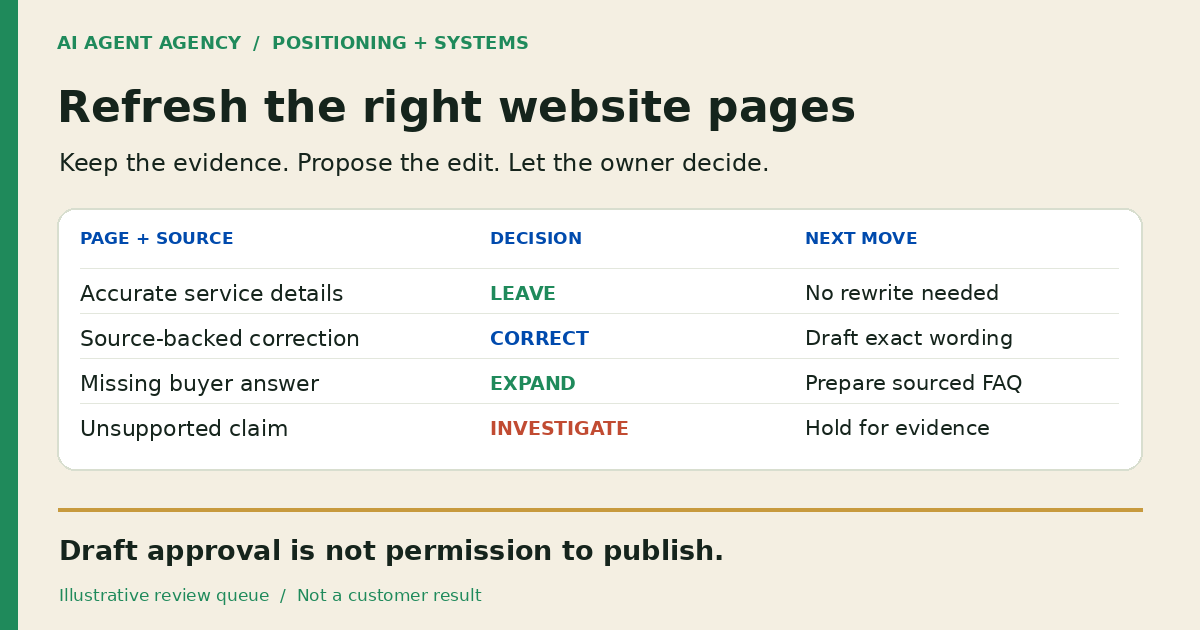
Use leave for accurate, useful content; correct for a supported factual replacement; expand for an unanswered question with an approved answer; investigate when evidence is missing or conflicting. An unsupported claim is an evidence gap, not an invitation to invent a stronger promise.
Refresh the existing page or create a new one?
Improve the page that already answers the same buyer question. Add a missing explanation there instead of publishing a near-duplicate article with a slightly different keyword. Preserve its established URL unless a separate, reviewed site-structure decision justifies a move.
A new page makes sense when the reader has a distinct problem requiring its own explanation. For example, this refresh-triage guide complements the broader maintenance cadence rather than repeating it. Link related pages where the next question genuinely follows; do not force unrelated links into every paragraph.
For catalogue changes, use the product-claim change register to match supplier updates to exact variants and reopen affected copy approvals.
If the source is already accurate and you need another format, use the source-to-draft content repurposing workflow. It keeps evidence attached to LinkedIn and email drafts instead of creating a near-duplicate website page.
What can AI prepare, and what should you approve?
AI can compare approved sources with page text, draft a replacement, suggest an FAQ or flag a broken internal reference. Give it read-only inputs and a draft destination initially. The AI webmaster role guide explains the wider operating responsibility.
Keep prices, service scope, customer proof, business promises, schema and public release under accountable human review. Approval to draft is not permission to publish, delete pages, create redirects or change forms, tracking and canonicals. Limit tool permissions accordingly; a written instruction alone is not a publishing control.
If a meeting creates a refresh request, the notes-to-approved-task workflow helps record who owns it. Agreement to investigate a page is still not approval of its replacement copy.
Worked example: keep, correct and expand
A fictional NZ service-business review
This is an illustrative example, not a client result or measured performance claim. Assume the fictional business has an owner-approved service sheet, version 3, stating that it serves Christchurch and accepts enquiries through its existing form.
- Leave unchanged: the service-area paragraph matches that sheet. Record the check; no rewrite is needed.
- Correct: the page says nationwide service, but the approved sheet supports Christchurch only. Propose a narrower statement and ask the owner to resolve the conflict before release.
- Expand: customers ask how to request a quote, and the sheet confirms the existing enquiry route. Add that answer without promising a response deadline.
- Investigate: “New Zealand’s most trusted provider” has no supporting evidence. Flag it for the owner; do not replace it with invented awards or results.
Before and proposed after
Before: “We help customers nationwide. Get in touch.”
Proposed after, pending owner approval: “We serve Christchurch. Use our enquiry form to describe the work you need and ask about scope.”
The proposal changes only supported facts and the next step. Keep the actual form destination unchanged. If the owner cannot confirm the source, hold the edit rather than treat this example as permission.
How should you check a refresh before and after release?
4. Review the exact version before publishing
Check every changed claim against its source. Preview desktop and mobile text, headings, links and the enquiry CTA. Preserve working forms and established canonical URLs. Ensure metadata still describes the page and structured data matches visible content. Keep a recoverable copy of the previous version and identify who can restore it.
5. Read back the live page, then monitor outcomes
After an authorised release, open the actual public URL. Confirm the new wording, title, canonical, FAQ answers and links; a successful upload is not proof the right page is live. Use a controlled form test only when authorised, with receipt checked separately.
Log the release date and what changed. Compare equivalent reporting windows and qualified enquiries, noting other changes that could affect results. Do not promise rankings or AI citations. Google’s AI features guidance says ordinary SEO foundations apply and no special AI schema is required.
Frequently asked questions
Can AI update our website content without publishing it?
Yes. Use read-only page access and a separate draft queue without deployment credentials. A named reviewer approves the exact edit, while publishing remains a separate authorised action.
Which pages should we review first if we have little Search Console data?
Start with inaccurate business details and important service pages missing answers customers need before enquiring. Use approved documents and sales questions as evidence. Leave accurate pages alone.
Should we update an existing page or publish a new article?
Refresh the existing page when it already owns the same question. Create a new article only for a distinct reader need, then link the two naturally rather than repeat the same answer.
Does changing a page's date improve SEO or AI visibility?
A new date alone is not a useful refresh. Google’s helpful-content guidance warns against changing dates without substantive changes. Record genuine edits accurately; neither a timestamp nor a rewrite guarantees visibility.
Assess whether a recurring refresh workflow is worthwhile
Bring three important page URLs, approved service information and any available Search Console export to the NZ$1,000 AI Agent Assessment. Map a draft-only refresh queue and decide whether an agent, a clearer process or occasional manual review fits the work.
Assess your website refresh workflow. The assessment does not include building or connecting the workflow, or carrying out a website refresh.
For the date-change guidance, see Google’s people-first content checklist.