
AI Product Description Review NZ: Check Supplier Changes Before Publishing
Review the claim against the exact product variant
An AI product description review checklist should match each claim to the current supplier specification and exact product variant. Record the source, proposed wording, missing evidence and reviewer decision. Reopen affected approvals when specifications change. AI can prepare differences and drafts; a person approves public claims and publishing.
For a New Zealand store owner, the overlooked problem is not only inaccurate new copy. Yesterday's approved description may no longer match today's supplier sheet. This guide focuses on that change, rather than the wider ecommerce automation workflow.
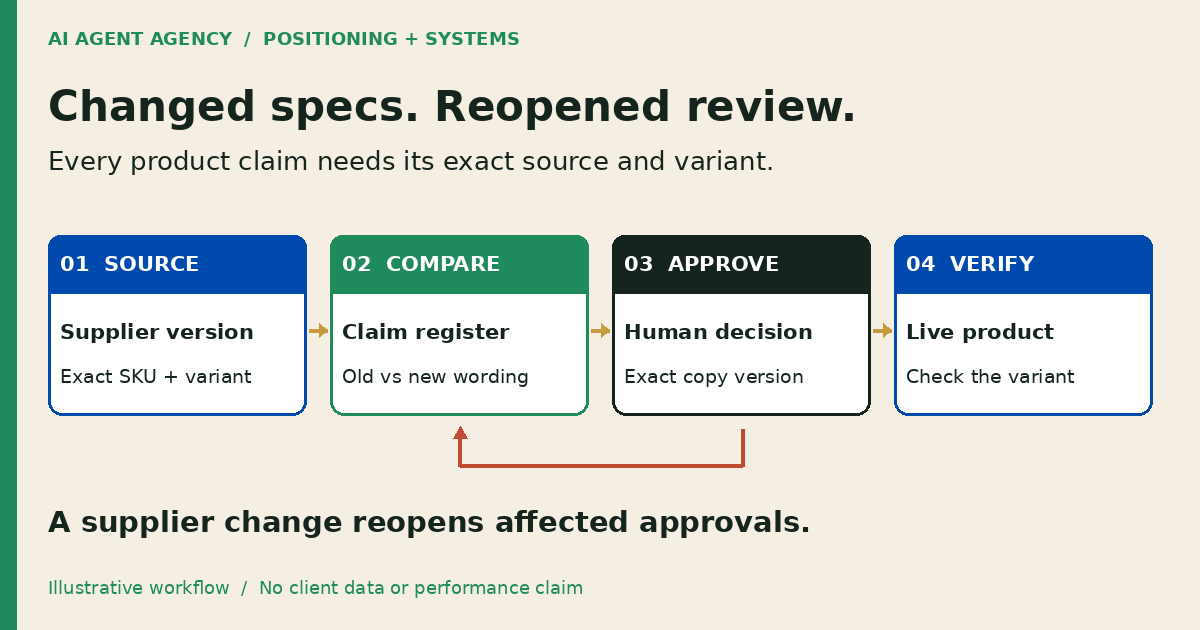
1. Confirm the source, SKU and variant
Start with the supplier document reference, version or issue date, SKU and variant identifier. Save the source location and the passage supporting each claim. If an email, spreadsheet and supplier portal disagree, ask the product owner to resolve the conflict before drafting.
Check facts before improving the wording
Compare materials, dimensions, included items, care instructions and compatibility. Keep units and qualifiers intact. A statement about one size or model does not establish the same fact for the whole range. Photos are not evidence of a material, certification or country of manufacture.
Shopify's product-description guidance warns that generated text can add unsupported benefits or facts drawn from similar products. The merchant remains responsible for published accuracy.
The Commerce Commission's selling-online guidance says product representations must be accurate and not misleading, with a reasonable basis for claims. This checklist is an operating aid, not legal advice or a compliance certificate. Seek qualified advice for uncertain claims.
2. Copy a product-claim change register
Use one row per affected claim and variant, not one blanket approval for the catalogue. Copy these fields into a spreadsheet or your existing review tool. This is a proposed process, not a completed store integration.
| Field | What to record |
|---|---|
| Product identity | Store product ID, supplier SKU and exact variant |
| Source | Document link, version, passage and date checked |
| Current claim | Exact live wording and where it appears |
| Proposed wording | Exact replacement, with draft version |
| Evidence gap | Missing, conflicting or unsupported details |
| Affected surfaces | Description, variant label, metadata, feed or campaign copy |
| Review decision | Named owner, status, reason and approved version |
| Release evidence | Publisher, release time, live URL and read-back result |
Use explicit statuses: needs evidence, ready for review, approved, superseded and verified live. Keep the previous wording recoverable. Restrict access to private supplier material rather than copying confidential documents into a public draft.
Unknown is not permission to infer
If a specification is missing, record the question and owner. Do not let a writing tool fill the gap with a plausible measurement, safety promise, sustainability claim or warranty. “Needs evidence” is a useful result.
3. Reopen review when supplier information changes
A supplier update should trigger a comparison against the approved source version. Identify changed facts, affected variants and any claims that rely on them. Mark those approvals as superseded; do not silently overwrite unrelated fields or treat the whole catalogue as newly approved.
A fictional variant example
Assume a fictional Christchurch homeware store lists DEMO-BASKET-S as “Small cotton basket, 30 cm wide”. Supplier sheet version 4 changes the material for that SKU to a cotton-polyester blend and leaves the width unchanged. The large variant is not mentioned.
The review row proposes “Small cotton-polyester blend basket, 30 cm wide”, links the changed specification and asks the product owner to confirm the stock batch. It does not change the large variant or invent a blend percentage. If old and new batches coexist, hold the wording until the owner confirms what buyers will receive.
This is an illustrative scenario, not a client result. For broader page prioritisation, use the AI content refresh guide; this register handles the narrower claim-and-variant check.
4. Approve the exact copy before publishing
Give the reviewer the old wording, proposed replacement, supporting passage, affected variants and unresolved questions together. Approval should name the exact draft version and fields to change. Editing the draft or source after approval reopens review.
Separate claim approval from permission to publish. The business approval-gates guide helps assign those responsibilities. Start with read-only source access and a separate draft area; do not give a comparison agent unrestricted store-write credentials.
Treat supplier documents as evidence, not instructions. Text inside a spreadsheet or PDF cannot authorise publishing, change permissions or tell an agent to ignore your review rules. Price, stock, delivery and refund decisions remain outside this copy-review workflow.
For a discrepancy between submitted prices and a live product, use the separate Merchant Center variant-price checklist. Supported description wording does not establish the intended selling price.
5. Read back the live product and affected surfaces
After an authorised release, open the actual product URL and select the affected variant. Confirm the approved wording appears for that variant, the units are correct and unrelated variants remain unchanged. Check the mobile view and any shared description that shoppers see before selecting a variant.
Review other affected surfaces recorded in the register: search snippets configured in metadata, shopping feeds, collection cards and scheduled campaign drafts. Do not assume a product-description edit updates every destination. Have the responsible owner approve separate changes where needed.
Record the live check and preserve the previous version. If publishing fails or the destination differs from the approved draft, leave an owned exception and investigate. A successful upload response is not proof that shoppers see the intended copy.
Are native Shopify tools or a spreadsheet enough?
Often they are a sensible starting point. Shopify's AI best practices recommend specific inputs, a defined change scope and reviewing suggestions before accepting them. Pair native drafting with a claim register when your team can manage updates that way.
Check the publishing behaviour carefully: Shopify's description documentation says saving changes to a published product displays the new description immediately. Do not use a live product field as your unapproved draft workspace.
Consider assessing an agent when recurring supplier updates cross several sources and preparing the comparison is the bottleneck. Test with redacted examples and no publishing access first. If nobody owns the product evidence or can review exceptions, improve the process before connecting more tools.
Frequently asked questions
Can AI invent missing specifications?
No. Missing specifications should become evidence questions for the product owner or supplier. Do not infer materials, measurements, compatibility, certifications or origin from similar products, photographs or confident generated wording.
What if product variants differ?
Review claims against each affected SKU and variant. Keep shared descriptions accurate for every variant they cover. Where evidence differs, use supported variant-specific wording or hold the change for clarification.
Does a supplier update invalidate approval?
Reopen approvals for claims that depend on changed or uncertain information. Preserve unaffected decisions and their evidence. Confirm which stock batch and variants the update applies to before publishing replacement wording.
Can Shopify's existing tools be enough?
Yes. Native drafting, a spreadsheet register and a named reviewer may cover the work. An additional agent needs a clear recurring comparison problem, trustworthy sources and a review process worth maintaining.
Assess the review workflow before connecting your catalogue
Bring a blank product template and describe one recurring supplier-update problem to the NZ$1,000 AI Agent Assessment. Map evidence owners, minimum access and a draft-only pilot. Native tools or a clearer checklist may be the recommendation.
Assess your product-copy review workflow. Use redacted examples through an agreed channel, not sensitive supplier uploads to the booking form. The standalone assessment does not include a completed Shopify integration. Installation is separate.