
AI Content Repurposing NZ: Turn One Approved Source into Reviewed Drafts
Keep the source evidence attached to every draft
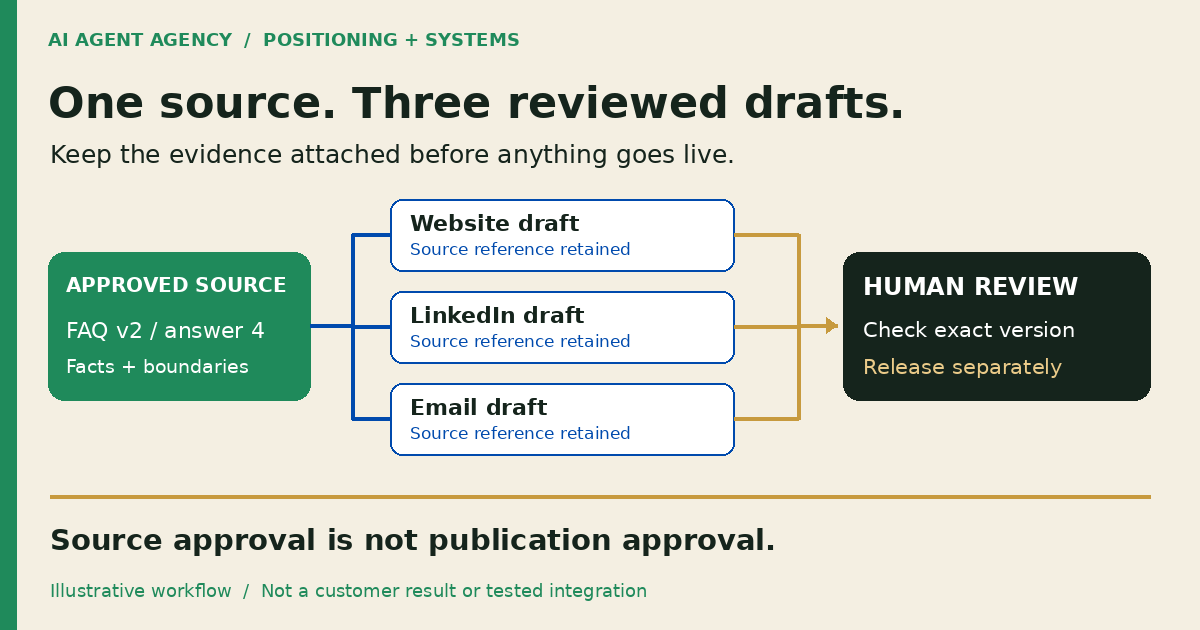
An AI content repurposing workflow turns one approved business source into channel-specific drafts while preserving its meaning and evidence. Record the source version, supported claims, audience and reviewer. Check each draft against that source, approve the exact final wording, and keep publishing or sending as a separate authorised action.
For New Zealand owners and marketing operators, the useful output is not a pile of posts. It is a reviewable set of drafts: you can see where each claim came from, who needs to check it and what remains unapproved.
What is content repurposing, and how is it different from a refresh?
Repurposing adapts useful material for another format or audience: an approved article becomes a LinkedIn explanation or an email introduction. The underlying facts stay consistent, but each draft answers a particular reader need. Copying the same paragraph everywhere is distribution, not thoughtful adaptation.
A refresh corrects or improves an existing page. If the buyer question has not changed, refresh the existing page instead. Do not create another website article merely to repeat the same answer with a different keyword. Repurposing should give the reader a useful new format or context.
Choose the source and agree what may be reused
1. Freeze a current, approved source
Choose one service FAQ, article or presentation that your business owns or has permission to reuse. Record its location, version, approval date and owner. Confirm current prices, service areas and exclusions with that owner; an old public page is not automatically a reliable source.
Start with material already cleared for public use. Keep confidential calls, personal information and unapproved customer stories outside the drafting input. If permission or accuracy is uncertain, hold that material for review rather than asking AI to disguise it.
2. Define the audience and the boundary
Specify what each reader needs: a website visitor needs an explanation; a LinkedIn reader needs one focused idea; an email recipient needs a relevant introduction. State the intended CTA and prohibited additions, including invented results, guarantees and customer quotations. Initially give the drafting tool no publishing credentials.
Copy a source-to-draft review sheet
Keep the supporting passage beside each proposed claim. Use a document or spreadsheet your reviewer can open without installing another tool. This is an illustrative template, not a customer record or tested integration.
| Field | What to record |
|---|---|
| Source | Document location, version and exact passage reference |
| Supported claim | What the passage actually permits you to say |
| Audience and format | Reader question, channel and intended CTA |
| Draft | Exact wording and draft version |
| Evidence gaps | Missing facts, assumptions or unsupported additions |
| Owner and reviewer | Named preparer and accountable approver |
| Status | Draft, changes requested, approved version or held |
| Release record | Authorised publisher, destination and live check |
Distinguish a supported fact from a paraphrase or opinion. Mark a proposed opinion clearly and ask the owner to approve it. If a draft adds a factual claim that has no source, remove it or obtain evidence. Another AI-generated answer is not verification.
Worked example: one approved FAQ, three proposed drafts
A fictional source with a clear limit
Assume a fictional Christchurch service business has approved FAQ v2, answer 4: “We serve Christchurch. Send photos and a description through our enquiry form so we can discuss scope.” These are invented example facts, not an AIA customer story or measured result.
Keep the reference “FAQ v2, answer 4” attached to each draft in the review sheet.
- Website explanation: “Planning work in Christchurch? Send photos and a description through our enquiry form so we can discuss scope.”
- LinkedIn post: “For a Christchurch project enquiry, start with photos and a description of the work. Send them through our enquiry form so we can discuss scope.”
- Email introduction: “If you are planning work in Christchurch, our enquiry form lets you send photos and a description so we can discuss scope.”
All three drafts remain pending owner review. The email is sample copy, not permission to contact anyone. For a real draft, verify the actual form link and intended audience before release.
Remove the claim the source does not support
Reject an AI-added sentence such as “Get a guaranteed quote within 24 hours.” The source supports neither a response deadline nor a quote guarantee. Shortening it to “Get a fast quote” still introduces an unsupported promise. Delete the claim; do not soften it into something equally unverified.
Review before distributing anything
3. Check every draft against its evidence
Read the source and draft side by side. Check scope, location, numbers, names and exclusions. Preserve qualifications: “may suit” must not become “will deliver.” Check whether a shorter version has dropped an important limitation. Review tone and usefulness separately from factual accuracy.
4. Approve the exact final version
Record the reviewer, time, channel and approved draft version. Source approval does not approve every derivative. A material edit, changed offer or different destination reopens review. Keep publication permissions separate from drafting access; an instruction saying “do not publish” is not an access control.
5. Verify the destination after authorised release
The publisher checks the live wording, image, link and CTA, not merely a successful upload message. Keep the released version and destination in the sheet. For a reusable way to separate execution status from the actual result, use the completion-evidence worksheet. For email, review audience and sending authority separately. Use the website maintenance checklist for ongoing checks once content is public.
Do you need an agent, a template or a clearer process?
Start manually if you have occasional sources or no available reviewer. A reusable brief and review sheet may solve the problem without integration work. Consider an agent when sources recur, responsibilities are clear and reviewers can keep up with the proposed drafts.
Existing software may already provide the required controls. RobinReach's repurposing documentation describes draft, approval and automatic-publishing modes. That is a documented feature comparison, not an AIA-tested recommendation or integration claim. Check the actual settings before connecting channels; keep automatic publication off for a draft-only process.
Choose tools after agreeing the evidence and approval process. More output does not help if nobody can verify it.
Frequently asked questions
Can AI repurpose content without publishing it?
Yes. Give it approved inputs and a separate draft destination without publishing credentials. A person reviews the wording before an authorised publisher releases it.
Does approving the source automatically approve every draft?
No. Each draft can change emphasis or introduce unsupported claims. Approval should identify the exact wording, version and destination. Material changes require another review.
Can we repurpose client calls or customer stories?
Only use material your business has confirmed it is authorised to reuse for that purpose. Keep private details and unapproved stories out of drafting inputs. If permission is uncertain, hold the source.
When should we refresh a page instead of creating another article?
Refresh when the existing page already answers the same buyer question. Repurpose when a different audience or format has a useful purpose, rather than publishing a near-duplicate website page.
Assess your content repurposing workflow
Bring one approved source and the formats you need to the NZ$1,000 AI Agent Assessment. Map source readiness, ownership and approval boundaries before deciding whether an agent is worthwhile.
Assess your content repurposing workflow. The standalone assessment does not include content production, software installation or connecting publishing accounts.