
AI Automation Says “Success”—But Did Your CRM Actually Update?
Check the record, not just the green tick
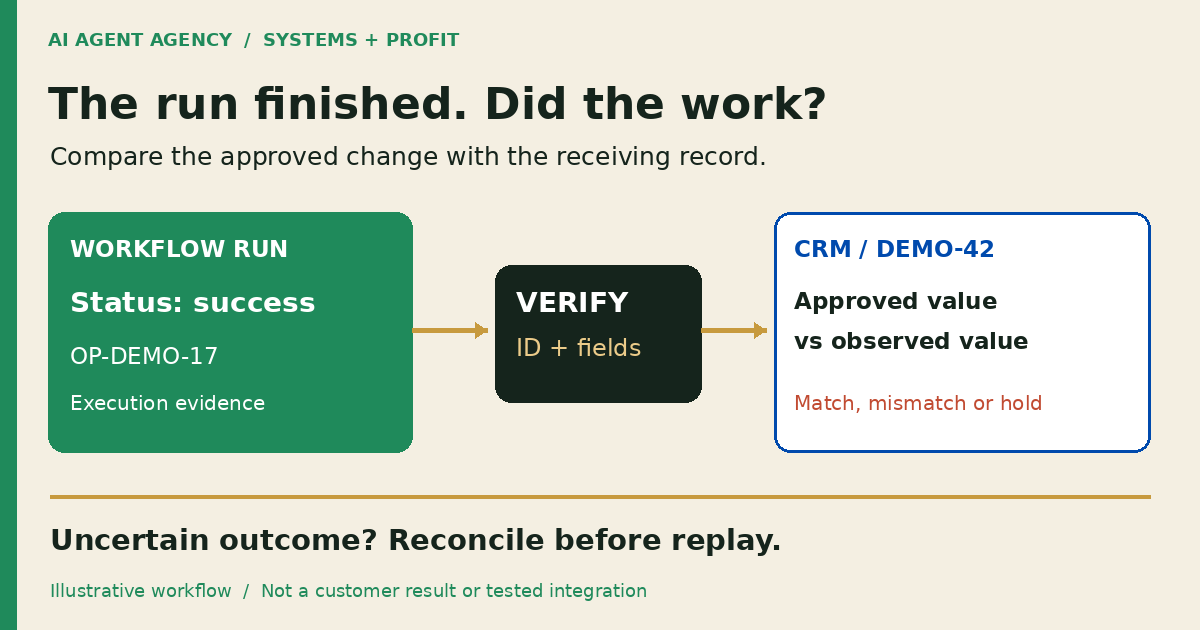
A successful automation run does not prove that the intended CRM update happened. Check the destination record against the approved record ID and expected field values, then save the observed result and verification time. If access, processing delays or conflicting evidence prevent confirmation, mark the outcome unresolved rather than reporting success or retrying blindly.
For New Zealand owners and operations managers, this is a practical handover question: can your team show what changed, where, and how it was checked? Use the worksheet below for one approved CRM update before expanding the workflow.
What does a successful run actually prove?
Separate three things: the automation finished its instructions; the receiving service acknowledged a request; and the intended business result was verified. These may coincide, but one status label should not silently stand for all three.
Microsoft's Power Automate troubleshooting guidance describes successful runs with wrong outputs and recommends comparing action inputs and outputs with expectations. That is product-specific guidance, not evidence that every CRM behaves identically or that AIA has tested your integration.
A request can target the wrong record or field. A later edit can also change a correct result. Start with the wider CRM workflow, then define the particular change you need to verify. This is a post-action check, not a replacement for pre-launch acceptance testing or ongoing monitoring.
Define “done” before connecting the workflow
1. Specify the exact destination and approved change
Write down the CRM environment, record type, stable record ID, field names and expected values. “Update the customer's next step” is too vague. “Set the approved next-action field on deal DEMO-42 to the reviewed wording” gives the verifier something concrete to compare.
Record the relevant starting values and approval reference. Do not match records by display name alone. Keep outreach, pricing, booking handoffs, deal-stage changes and sensitive CRM updates behind human approval; verifying an action does not authorise it.
2. Name the verifier and the verification window
Agree who checks the result, what access they need and when they will check. Use the receiving system's documented processing behaviour rather than inventing an instant-consistency promise. Record times with a timezone or UTC offset so NZ teams and overseas suppliers can compare evidence.
Copy a completion-evidence worksheet
Keep one row per intended operation, with additional observation rows when needed. This template records requirements and findings; filling it in is not proof that an integration works.
| Field | What to record |
|---|---|
| Operation reference | Stable intention ID and associated run or request references |
| Approval | Reviewer, approved version and permitted change |
| Destination | CRM environment, record type and stable record ID |
| Expected result | Exact fields and approved values, including relevant starting values |
| Observed result | Values read from the destination, with an evidence reference |
| Verification | Who checked, method, time and timezone |
| Outcome | Verified, failed or unresolved, with a reason |
| Next owner | Named person, next check and release decision |
Use access-controlled evidence references rather than copying customer details into a shared report. Keep credentials out of screenshots and logs. Your AI agent audit trail should connect the request, approval and observation without collecting unnecessary information.
Verify the result in the receiving system
3. Read the authoritative record using permitted access
Open the exact record manually or use a supported read operation. Confirm the environment and stable ID before comparing fields. Read-only access may be sufficient; do not grant extra write permissions merely to check a result.
An agent repeating its own success message is not independent evidence. Neither is a screenshot of the sending workflow alone. Save the receiving record reference and observed values, using a protected capture where appropriate.
4. Compare values and investigate conflicting evidence
Check each approved field, not just whether a record exists. An expected next action stored in a general notes field does not satisfy a requirement to update the next-action field. Verify dates, dropdown values and empty fields against the agreed specification.
If processing may be delayed, schedule a bounded read-only recheck consistent with documented behaviour. If another person changed the record, inspect available history before attributing the result. A current match proves the observed state at that time; without supporting history, it may not prove which operation caused it. Keep uncertain attribution explicit.
Worked example: the next-action field is unchanged
This is a synthetic example, not a client incident or completed integration test. A fictional Wellington service business approves operation OP-DEMO-17 for deal DEMO-42: change next action from “Review enquiry” to “Prepare scope questions”. No customer message or deal-stage change is approved.
The workflow reports success. The verifier opens DEMO-42 in the agreed environment and sees “Review enquiry” still in the next-action field. A notes field contains “Prepare scope questions”. The intended result is not verified.
Record the mismatch and observation time. Ask the implementer to compare the approved fields with request inputs, response details and record history. Wrong-field mapping is a hypothesis, not a proven cause. Wrong-record targeting, delayed processing or concurrent edits need different evidence; do not diagnose them from the green tick.
5. Hold consequential work until the outcome is reconciled
Pause dependent actions that require the missing result. Do not overwrite the record or replay the workflow just to obtain a reassuring status. Preserve the original operation identity and reconcile before retrying. Route the unresolved outcome to a named person using your workflow exception rules.
Give your manager a completion report, not a run log
Define status labels locally: attempted means a request was initiated; acknowledged means a service returned its documented acknowledgement; verified means destination evidence matched the approved outcome. Use failed for a confirmed unmet requirement and unresolved when evidence cannot settle the result. These are suggested working definitions, not a universal standard.
A useful handover says: “OP-DEMO-17 remains unresolved pending mapping review; destination checked; owner assigned; no replay authorised.” If later evidence confirms the cause, append the decision and approved recovery rather than rewriting the earlier observation.
The same distinction applies when repurposing approved content: producing a draft, approving it and checking its released destination are separate checkpoints. Native CRM rules and read-back checks may be enough; add AI only where interpretation or preparation justifies it.
Frequently asked questions
Can an automation succeed while producing the wrong result?
Yes. A run can complete while using the wrong inputs, condition or target field. Compare the receiving record with the approved outcome instead of relying on the run label alone.
Is an API success response enough to prove the intended CRM change?
Read its documented meaning. It may provide useful confirmation, but it does not by itself establish that you selected the intended record and values. Verify the business requirement against destination evidence.
What should we do if the destination cannot be checked immediately?
Mark the outcome unresolved, record why, and assign an owner and next check. Use permitted read access and documented processing windows. Do not present unavailable evidence as success or definite failure.
Should an agent rerun a task when it cannot confirm completion?
Not blindly. Preserve the original operation identity and reconcile the receiving system first. Use supported recovery rules and require human review before replaying consequential work with an uncertain outcome.
Define what “done” means for one workflow
Use the NZ$1,000 AI Agent Assessment to map the destination, approved changes, verification evidence, owner and exception path before commissioning implementation.
Assess your workflow's completion checks. The standalone assessment does not include building the integration, conducting production tests or providing assurance that a system is error-free.