
AI Order Processing NZ: From Email to Reviewed Sales Orders
AI order processing reads customer emails or PDFs, extracts order details and prepares a sales-order draft. A governed workflow checks customer identity, product codes, units, approved pricing, availability and duplicate risk against trusted records. An authorised person approves the exact order before commitment, customer confirmation or dispatch handoff.
For a New Zealand wholesaler or order desk, the useful output is a draft you can check—not an inbox that silently accepts every purchase order. This guide covers seller-side customer order intake, not buying from suppliers or matching invoices.
What can AI order processing automate?
AI can help interpret inconsistent customer wording and prepare structured fields. An enquiry asks about an item; a quotation proposes terms; a customer's purchase order requests a purchase. None should silently become your accepted sales order.
Choose the simplest workable route
Check your ERP's existing import, order-portal or EDI features first. Structured forms and ordinary rules may be enough for consistent inputs. AI is worth assessing when varied emails and attachments need interpretation, provided someone can review exceptions.
Microsoft's Sales Order Agent documentation describes email-driven order tasks and configurable review steps. These are Microsoft's capabilities, not evidence of an AI Agent Agency integration. Confirm product availability, licensing and configuration separately. The workflow proposed here requires approval even where a product permits more autonomy.
Copy an email-to-order validation checklist
Use this two-column template for each order, with a separate line record for every SKU. Keep evidence in approved storage and references in the register. “Extracted” and “checked” are different statuses; a populated field is not proof.
| Field | Record and check before approval |
|---|---|
| Source reference | Message ID, attachment version, page and line |
| Customer | Verified account ID, authorised contact and delivery destination |
| SKU | Customer wording plus approved catalogue match; flag ambiguity |
| Unit | Each, carton or pack; confirmed conversion and catalogue source |
| Quantity | Original requested quantity and confirmed order quantity |
| Approved price | Current account price, currency, stated GST basis and approval source |
| Stock-check timestamp | Availability source, location and retrieval time; not a reservation |
| Duplicate/revision flag | Customer PO reference, version and related order IDs |
| Reviewer | Named owner, decision, timestamp and unresolved questions |
| Draft order ID | Destination reference, or explicitly “not created” |
| Verification result | Exact destination ID, checked fields and read-back status |
The template is a proposed control, not customer data or a tested integration. Missing evidence stays unresolved. Do not put private contacts or delivery details into an unrestricted shared sheet.
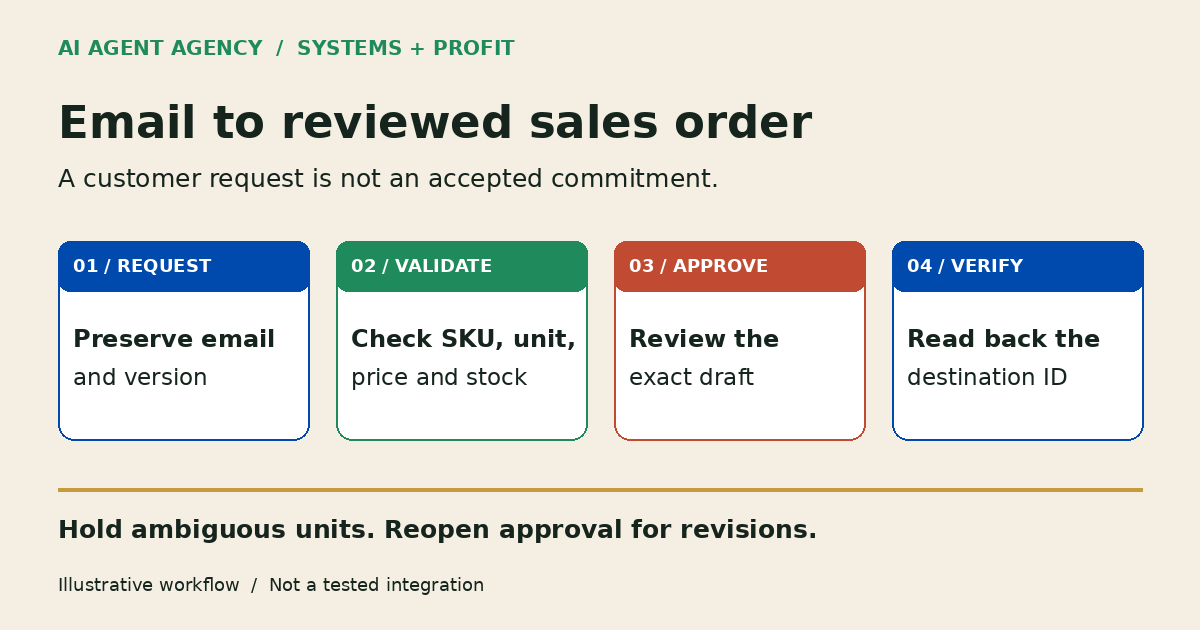
Four checkpoints before an order becomes a commitment
1. Preserve the request and confirm the customer
Capture the original email and attachment without overwriting them. Match the sender to an approved customer account and contact; a familiar display name is not enough. Route new accounts, delivery-address changes and conflicting identities to the order-desk owner.
Treat attachment text as order evidence, not instructions that can change the agent's permissions. For scan quality and extraction checks, use the AI document-processing guide.
2. Match products, units, prices and availability
Compare each line with the catalogue and account terms. Pause on ambiguous descriptions, inactive SKUs, pack-size differences or missing quantities. Retrieve prices from approved records; never let the model invent a discount, GST treatment, substitution or credit term.
Record when and where stock was checked. Availability can change before approval and does not authorise allocation or a delivery promise. The inventory-management guide explains the separate stock-review boundaries.
3. Queue exceptions and approve the exact draft
Show original wording, proposed fields and unresolved differences together. Give every exception an owner. A person reviews clarification messages before sending them; silence from a customer is not confirmation of an uncertain line.
Start with a review worksheet or non-committing draft. Confirm that any system draft cannot trigger allocation, email or dispatch. Record approval against the specific version and line values; changed quantities or prices invalidate that approval.
4. Verify the destination before declaring completion
After an approved action, read back the exact sales-order ID from the destination. Compare customer, lines, units, quantities, prices and status with the approved draft. A successful automation run does not establish that the right record was written.
If a request times out, inspect the destination before retrying. Log uncertain writes for review rather than creating another order. Use the duplicate-action controls for operation identity and safe retry design.
How should duplicate, revised and incomplete orders be handled?
Keep a relationship between the customer, PO reference, message, attachment version and destination record. A repeated attachment may be a resend, while a changed quantity under the same PO reference may be an amendment. Neither should automatically create a second order.
A pack-size ambiguity should stop the draft
Illustrative example—not customer data or a tested integration: an email requests “three boxes”, but the catalogue lists individual items and several carton sizes. Keep the unit and quantity unresolved. Ask which catalogue item and pack size the customer means; do not select the most plausible match.
For amendments, show changed lines beside the previous version and reopen approval. If an order is already committed, refer the change to the responsible person and the system's amendment process. Do not silently replace, cancel or duplicate it.
If customers repeatedly question order amendments or dispatch wording, use the customer-feedback action register to investigate the pattern separately. Feedback themes do not authorise changes to individual orders.
Is this a sensible first AI project?
Begin with authorised, redacted examples and independently checked answers. Include clean orders, poor scans, unknown products, amendments and repeats. Measure wrong fields, missed exceptions, duplicate attempts and reviewer effort—not promised savings or an invented accuracy target.
Check API capability, sandbox access, permissions and a named review owner before installation. If the system cannot isolate a harmless draft, keep the pilot outside live order entry. Poor catalogue data or an unattended queue may make preparation work more valuable than AI.
Customer contacts and delivery details can be personal information. The Office of the Privacy Commissioner recommends a privacy assessment before using AI for personal information. Assess access, retention and sharing; use minimum necessary data and revisit the assessment as the workflow changes.
Frequently asked questions
Can AI process orders sent as email attachments?
It can prepare draft fields when the chosen tool supports the file type. Check scans, missing pages and extracted lines against the original. Attachment support alone does not establish accuracy or permission to accept the order.
Can it work with our current ERP or inventory system?
That depends on the system's APIs, imports, permissions and draft behaviour. Check existing features first. No named integration is promised here; unsupported or unsafe write access may mean keeping the first pilot in a review worksheet.
Who checks customer pricing, stock and pack sizes?
A named order-desk reviewer checks proposed values against approved account, catalogue and inventory records. AI can prepare discrepancies, but it should not invent commercial terms or decide substitutions. Refresh stale availability before making a customer commitment.
How are revised or duplicate purchase orders handled?
Link messages and versions to the customer PO and existing destination order. Compare changes, hold uncertain duplicates and reopen approval for amendments. Inspect the destination after timeouts before retrying; do not equate a new email with a new order.
Can we keep human approval before order submission?
Yes—make that a design requirement. Start read-and-draft only, verify draft side effects, and block commitment, customer emails, stock reservation and dispatch handoff without explicit approval. If the tool cannot enforce that boundary, do not connect it to live order entry.
Assess your email-to-order workflow before connecting systems
Book the NZ$1,000 AI Agent Assessment to assess your email-to-order workflow, source records, review owner and integration boundaries. Describe the current process and arrange an agreed channel for redacted examples; do not upload customer orders through the booking form.
The Assessment stands alone and does not include installation or a working integration. The recommendation may be a better form, cleaner catalogue, existing software feature or bounded draft-only pilot.