
AI Quote Revision Workflow NZ: Approve Scope Changes Before Resending
Review the change, not just the new total
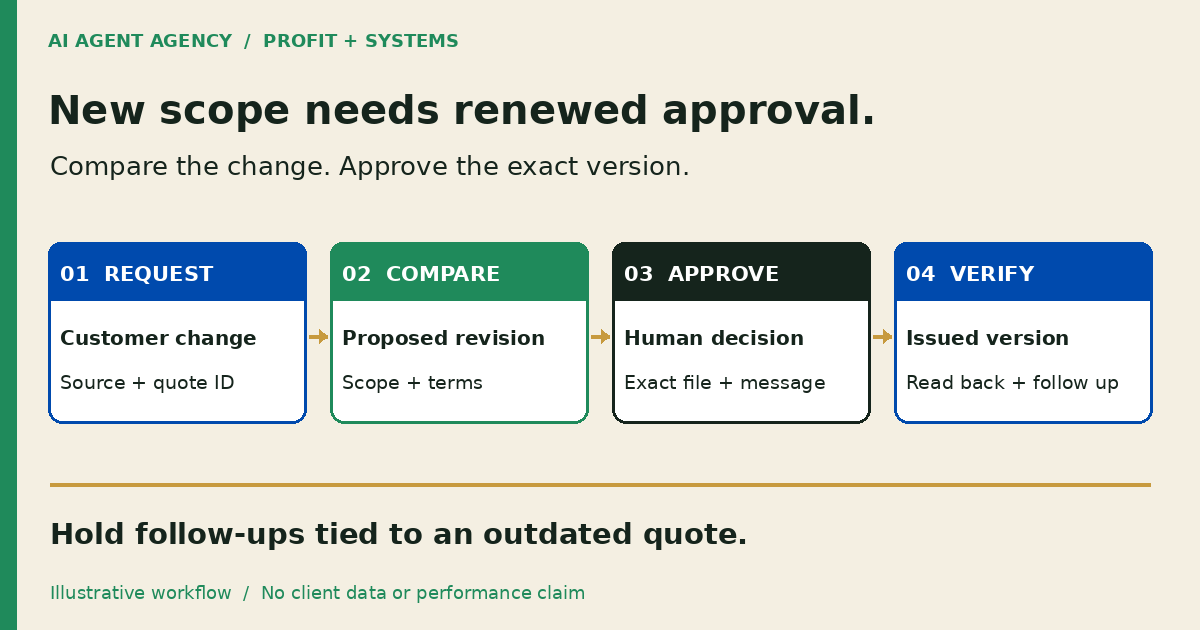
An AI quote revision workflow compares a customer's requested change with the current approved quote, prepares a change summary and routes it to the responsible person. It identifies the version, scope, price and timing implications, and affected follow-ups. A person approves the exact revised quote and customer message before either is sent.
For a New Zealand service business, this is a Profit and Systems workflow: keep the commercial decision with your estimator or owner while making the review packet easier to check.
What changes when a customer requests a revised quote?
A revision reopens a specific decision. Adding a service, removing an item or moving a deadline can affect inclusions, exclusions, assumptions and the follow-up already scheduled. The new total alone does not explain what the customer will receive.
The quote-preparation guide covers the original enquiry and draft. This guide starts after a seller-issued quote exists. Comparing suppliers is a different job again: here, you are controlling changes to your own offer.
Check native quote controls first
Microsoft's Dynamics 365 quote documentation describes draft, active and closed states, including closing a quote as revised. It also explains that the overall amount is locked in the active state. That is a product-specific example, not a rule for every quoting tool. Check your system's revision history, permissions and reminder behaviour before adding an agent.
1. Identify the current approved version
Start with the quote record ID, revision identifier, source system, issue date and exact document sent. Link the customer's request and note who received it. Do not select a file simply because its name contains “final” or its download timestamp is newest.
Stop when the source is ambiguous
If the inbox attachment differs from the CRM copy, hold the revision. Ask the quote owner to confirm the authoritative baseline. Preserve the original; do not overwrite it while preparing the comparison.
Record whether the quote is awaiting a decision, withdrawn or already accepted. An accepted quote needs the responsible person's change process, not an agent silently replacing the document. This is an operational checklist, not advice about contractual effect.
2. Copy a quote-change review register
Use one register entry per proposed revision. Attach a line-by-line comparison where useful, with source references beside uncertain changes. The following is a reusable design, not a tested software integration.
| Field | What the reviewer needs |
|---|---|
| Identity | Customer, quote ID, source link and current issued version |
| Request | Customer's exact requested change, source and received date |
| Proposed revision | New version identifier and draft location |
| Scope difference | Added or removed inclusions, exclusions and quantities |
| Commercial difference | Approved rate references, proposed total, currency and GST treatment |
| Timing and assumptions | Changed dates, dependencies and unresolved questions |
| Decision | Named reviewer, exact version, decision time and hold reason |
| Customer message | Approved recipient, wording and attachment |
| Completion evidence | Send result, destination read-back and next-action owner |
Keep unnecessary customer information out of shared registers. “Not established” is a useful entry when evidence is missing; a confident AI summary is not a substitute for the source.
3. Compare scope before calculating a new price
Ask the agent to prepare a factual difference list: what changed, where the request says so, and which quote lines may be affected. Keep proposed changes visibly separate from approved commercial terms.
Leave rates and capacity with the responsible person
The estimator checks quantities, labour, materials, discounts, exclusions and the proposed total against approved sources. AI must not invent a rate, infer available capacity or remove a caveat to make the new quote read smoothly. Leave unresolved amounts and dates on hold.
If revised terms affect pipeline value or timing, use the sales forecast-input checks before proposing a CRM correction. Quote approval is not approval to change forecast assumptions.
For example, a fictional Christchurch maintenance firm has issued DEMO-Q17 version 2 for one site. The customer asks to add a second site and retain the same completion date. The draft register records the added location and an unresolved capacity check. It does not assume twice the price or promise the original deadline. This is an illustrative scenario, not a client result.
4. Approve the exact revision and message
Approval should identify the document version, commercial changes, recipient, attachment and customer wording. “Please update it” is not approval of an unseen total or deadline. Use the human approval-gates guide to assign authority and escalation rules.
If the customer changes the request again after review, invalidate the pending approval and prepare another comparison. Do the same if an authorised colleague edits the document before sending. Approval belongs to specific content, not every future file under the same name.
Keep sending, DMs, booking handoffs and sensitive CRM changes blocked until an authorised person reviews the exact action. No customer acceptance or order status should be inferred from silence or an email-open event.
5. Hold stale follow-ups and verify the handoff
While a revision awaits review, flag reminders tied to the earlier version for an authorised hold. Check CRM tasks, quoting-tool reminders and scheduled email sequences; changing one status may not stop another tool. Approve the hold itself where it changes a live workflow.
After the revised quote is approved and sent, read back the destination record. Confirm the issued version, attachment reference, send result, owner and next review date. A successful API response alone does not prove that the intended record changed.
Resume follow-up only against the approved issued version, using the proposal follow-up workflow. If sending or verification fails, leave an exception with an owner rather than retrying blindly and risking duplicate messages.
Frequently asked questions
How is quote revision different from preparing a new quote?
Preparation builds the original offer from the enquiry and approved business rules. Revision starts with an issued quote, compares a specific change request and seeks renewed approval for affected terms and the exact customer message.
Can AI compare two quote versions without changing the price?
Yes. Give the comparison workflow read-only source access and a separate draft area. It can highlight differences and missing evidence without permission to edit pricing, overwrite the issued quote or contact the customer.
Who should approve changed scope, exclusions and timing?
The person with commercial authority should approve the terms. An estimator may review scope and an operations lead may confirm capacity, but name one accountable approver and record whose checks are required before sending.
Should follow-up reminders stop while a quote is being revised?
Hold reminders that could chase an outdated offer, using an authorised process. Record which queues were paused and who will resume them. Check every connected tool rather than assuming one CRM change pauses all messages.
Do we need an AI agent if our quoting software already tracks revisions?
Not necessarily. Native version history, permissions and reminders may be enough. Consider an agent only when recurring cross-tool comparison and approval preparation justify the additional controls and maintenance.
Assess the revision handoff before connecting automation
Configure native controls when they cover the workflow. Consider a reviewed agent when requests, versions and follow-ups cross tools. Wait if nobody owns the quote source or can review commercial changes.
Use the NZ$1,000 AI Agent Assessment to map your quote-revision handoff, trusted source and approval points before connecting automation. The standalone assessment does not include a completed quoting integration.