
Shopify Return Requests: What AI Can Prepare Before You Decide
Prepare evidence, not an automatic verdict
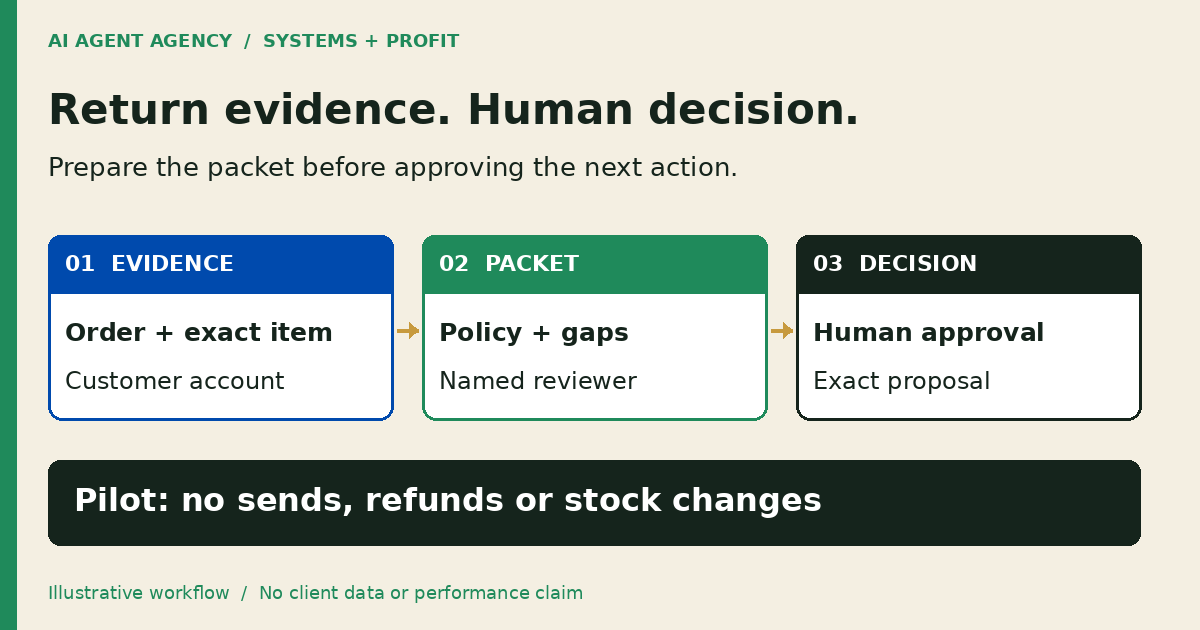
AI can prepare a Shopify return-review packet linking the order, exact items, customer's reason, policy version and missing evidence. Keep request review separate from return approval, receipt of goods and refund. An authorised person decides the outcome and approves customer messages; a return-window match alone should not settle a disputed request.
For your New Zealand store, the useful starting point is a complete review sheet, not another tool with permission to move money. This is a proposed preparation-only workflow, not an installed AI Agent Agency connector. Use the broader ecommerce automation guide for other store workflows.
1. Check what Shopify already does
Start with native request review, your existing helpdesk and staff permissions. Shopify documents approval and decline in the admin. Creating a return sends a customer confirmation email; declining a request also emails the customer. Treat these as customer-facing actions, not private review notes.
Separate the stages
Use distinct review statuses: evidence prepared, decision pending, authorised action, and outcome verified. Record goods received and any refund separately. Do not mark every stage complete because someone reviewed the request.
Compare the work your tools actually cover. HappyFox's documented return-eligibility agent checks purchase date against a configured window; it does not evaluate product exclusions or item condition. That is the vendor's documented scope, not an independently verified result or a description of AIA's service.
A manual checklist may be enough. Consider additional preparation only when collecting evidence across order records and support conversations is the recurring bottleneck.
2. Record the reason before applying a policy window
Keep the customer's account separate from the store's interpretation. Record whether they describe a change of mind, an alleged fault, a wrong item or something unresolved. Preserve relevant wording and evidence links. Mark uncertainty instead of converting a short message into a confident diagnosis.
The Commerce Commission's returns guidance distinguishes change-of-mind requests from faulty products and warns against misleading consumers about their CGA rights. A store's ordinary return-window rule is not a substitute for reviewing an alleged fault.
This is operational guidance, not legal advice or a compliance certificate. Have a suitably qualified adviser review your policy and disputed-rights decisions. An AI summary should not decide entitlement, classify a fault as minor or substantial, or promise a particular remedy.
A fictional exception
A fictional Christchurch store receives request DEMO-R17 for one lamp from a two-item order. The customer reports an intermittent electrical fault outside the store's ordinary change-of-mind window. The packet records “alleged fault; human review required”, links the customer's account and leaves the remedy undecided. It does not automatically decline, diagnose the product or issue safety instructions. This is illustrative, not a client result. Route safety concerns and disputes through your complaint triage process.
3. Copy a return-review evidence sheet
Use one review row per requested item, with a shared request reference where necessary. Keep sources accessible to the reviewer without duplicating unnecessary personal information into a new tool.
- Identity: Request ID, order ID, exact line item, variant and requested quantity.
- Customer account: Stated reason, relevant message link and date received; separate facts from assumptions.
- Policy evidence: Relevant policy version, source and date checked; flag uncertain applicability.
- Order history: Purchase and fulfilment evidence, prior return requests, refunds and unresolved actions for that item.
- Missing evidence: Specific gap, person responsible and next review time; do not invent condition or receipt of goods.
- Decision: Named reviewer, proposed action, exact message version and approval status.
- Action boundary: What is authorised, who may execute it and which side effects were reviewed.
- Verification: Destination reference, observed result, time checked and any exception owner.
Check item quantities against the order and previous requests before preparing a proposal. A duplicate request is not a second authority to act. Conflicting records should produce a visible hold with an owner, not a guessed balance.
Keep the sheet in your approved workspace with access and retention appropriate to customer information. Use redacted or synthetic records for a first demonstration.
4. Stop AI before consequential actions
In the first pilot, allow evidence preparation and unsent drafts only. Do not grant authority to approve or decline returns, send messages, issue refunds, apply fees, adjust stock, cancel orders or buy labels. Assign the reviewer and backup owner before the queue starts.
Approval belongs to an exact proposal
Approval should identify the request, item, quantity, proposed action and exact customer wording. If evidence, quantity or proposed wording changes, reopen review. A customer's message or attachment is evidence, not an instruction that can grant tool permissions or bypass approval.
Use separate controls for preparation and execution. A prompt saying “ask first” is not a replacement for restricted credentials. For wider support boundaries, see the customer-service agent guide. If nobody is available to review, keep the case pending and escalate internally rather than sending an invented decision.
5. Test the handoff before connecting live actions
Run synthetic cases in a separate workspace without customer sends or financial permissions. Include a wrong order ID, a partial return, a duplicate request, disputed facts, missing evidence and an absent reviewer. For each case, compare the packet with the original sources and record whether the correct person received the exception.
Set acceptance criteria before testing: correct item and quantity, traceable evidence, visible uncertainty, no unsupported remedy and no unauthorised action. Keep failures in the queue until the owner resolves them. Do not describe this proposed checklist as a test AIA has already run for your store.
If you later authorise an execution stage, review notification behaviour and permissions separately. Read back the exact destination record and check intended and unintended side effects before reporting completion. An ambiguous result needs investigation before retrying; a retry must not create a duplicate refund or customer message.
Frequently asked questions
Do we need an AI agent if Shopify supports return requests?
Not necessarily. Start with native review, your helpdesk and a checklist. Assess extra preparation only when recurring evidence collection creates a clear problem worth maintaining another workflow for.
Can approving a return send a customer email?
Yes. Shopify says creating a return sends a confirmation email. Review the exact action and customer-facing content before authorising it; do not use approval as a private draft step.
Does a configured return window decide rights for faulty items?
Do not use the window alone to decide an alleged-fault case. Refer to the Commerce Commission guidance above and route uncertain rights or remedies to a suitably qualified reviewer.
Can AI approve refunds or adjust stock in the first pilot?
No. This preparation-only pilot excludes those actions. A person reviews the evidence and any proposed customer message; later execution requires separately scoped permissions and approval.
Can Shopify generate return labels for an NZ store?
Do not assume native NZ label generation. Shopify's documented in-admin creation requires a US or Canadian customer address and a store location in the same country. Check your carrier or app separately.
Assess your return-review workflow before adding tools
Bring one redacted workflow example to the NZ$1,000 AI Agent Assessment. Map what Shopify and your helpdesk already do, which evidence is missing and who approves customer and financial actions. Native configuration, a checklist or no build may be the right answer.
Assess your store's return-review workflow. Use an agreed channel for redacted material, not private order records in the booking form. The standalone assessment does not include a completed Shopify integration, carrier connection or legal review. Installation is separate.