
AI Spreadsheet Automation NZ: Check Weekly Exports Before Updating Records
To automate weekly spreadsheet checks, define the source files, stable record IDs, validation rules and person responsible for exceptions. Use formulas or query tools for repeatable comparisons. Add AI only where interpreting messy notes helps. Prepare a source-linked exception list first; keep original exports unchanged and require review before updating business records.
For a New Zealand owner or operations manager, the useful starting point is a recurring check—not unrestricted spreadsheet editing. This guide focuses on comparing weekly Excel, CSV or Google Sheets exports. It does not replace your management-reporting workflow: checked records feed that report, rather than becoming another dashboard.
Do you need AI, formulas or Power Query?
You may not need AI. When IDs, columns and rules are consistent, ordinary spreadsheet formulas or query tools can do the comparison. AI is a candidate for explaining inconsistent descriptions or drafting reviewer notes, not for deciding whether two amounts match.
Microsoft’s merge-queries documentation describes matching tables on one or more columns and using a full outer join to retain rows from both. Its left anti join guide shows how to find records in one table without matches in the other. Those are useful baselines before commissioning an agent.
- Formulas or validation rules: Check required fields, permitted statuses and exact value differences.
- Query tools: Repeat structured imports, join by agreed keys and produce unmatched-row lists.
- AI preparation: Suggest explanations for unclear free text, with the original wording beside each suggestion.
Choose the simplest approach that passes your test set. A fluent explanation is not proof that the comparison is correct.
Agree the export contract before comparing rows
Two files are comparable only when their scope is understood. Record the exporting system, owner, extraction time, date range, filters and column definitions. A current-week export and an all-open-jobs export answer different questions, even when their headings look identical.
Use a stable record key, such as job ID or order ID—not the row number or customer name. For line items, agree a composite key such as order ID plus line ID. Preserve leading zeros and make key types consistent. Duplicate keys should block ambiguous matching rather than multiply rows unnoticed.
Define date formats explicitly; a value such as 04/05/2026 needs an agreed interpretation. Specify currency, GST-inclusive or exclusive amounts, units and what blank means. Do not silently convert a missing value to zero. Resolve source-quality gaps using the data-readiness checklist before adding interpretation.
Run four checks on each weekly export pair
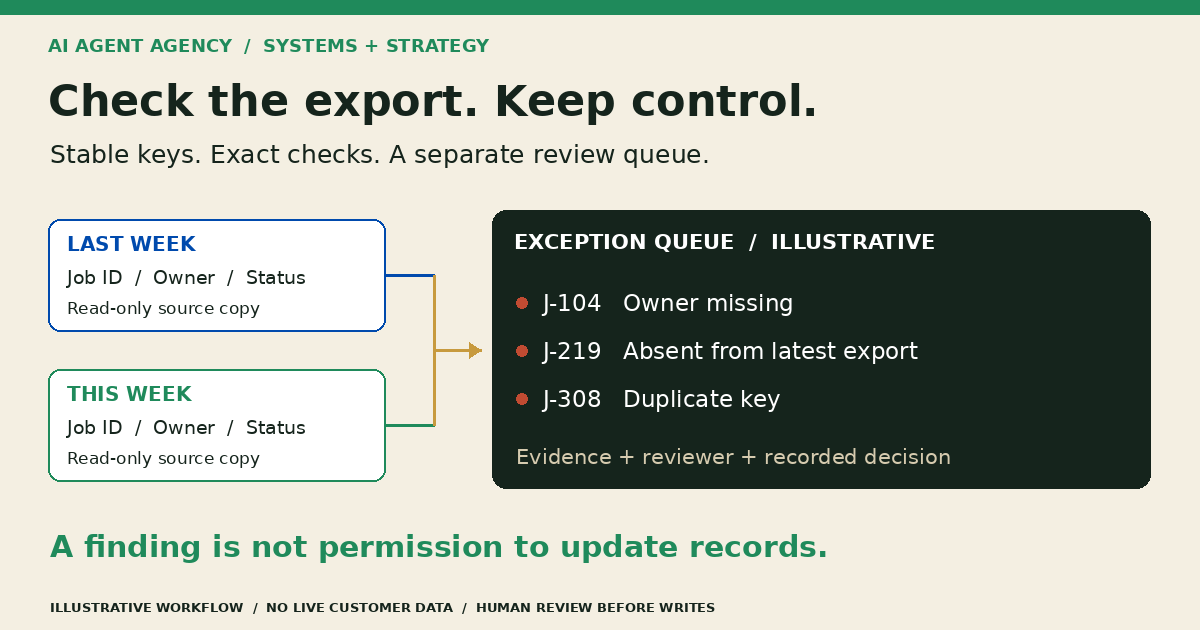
Keep dated, read-only source copies and write results into a separate review sheet. Record the run identifier and file versions so a reviewer can reproduce a finding after the files change.
1. Validate the files before comparing values
Check the expected headers, readable file format, extraction period and key completeness. Stop if a required column disappears or the export is unexpectedly empty. Compare record counts as a warning signal, not a pass certificate: equal counts can still hide different records.
2. Separate new, missing and duplicate records
Match by the agreed key. Label records present only in the latest export as new and records present only in the earlier export as absent from the latest snapshot. Absence is not deletion authority. Check filters, completed-job rules and export failures before proposing a change.
3. Compare named fields, not entire row positions
For matched keys, compare the fields that matter: status, owner, due date or agreed amount. Keep previous and current values side by side. Agree any normalisation or tolerance in advance and retain the raw values. Do not let a model invent acceptable differences.
4. Hold uncertain interpretation for a person
Where notes differ, AI may draft a proposed explanation and identify the source text. “Waiting on client” and “customer reviewing” might describe similar situations, but neither proves an approved status change. Keep interpretation separate from exact checks and assign unresolved items to a named owner.
Copy a weekly spreadsheet exception worksheet
Use one row per finding, with restricted links to the source records. The following fictional job-register examples are illustrative, not customer data or tested results.
- J-104 — changed owner: Previous owner Maia; latest owner blank. Flag “required owner missing”; ask the operations lead to verify assignment.
- J-219 — absent record: Present last week, absent this week. Flag “not in latest export”; check completion filters before marking the job closed.
- J-308 — duplicate key: Two latest rows share one job ID. Hold matching for that key until the source owner resolves the duplicate.
- J-411 — changed note: “Waiting on client” becomes “customer reviewing”. Preserve both notes; any AI summary remains a suggestion, not a verified status.
For each finding, capture: run ID; record key; exception type; previous value; current value; source file and row reference; reviewer; next action; decision; and decision time. Row references locate evidence, but the stable key identifies the record.
A reviewer should be able to find the evidence without trusting the summary. A resolved exception means a recorded human decision—not necessarily a source-system update.
Test read-only preparation before allowing updates
Build an independently checked sample containing clean rows, changed values, blank owners, duplicate IDs, a missing file and an altered header. Include a record that disappears because of an export filter. Confirm the workflow distinguishes those cases instead of treating every absence as deletion.
Track missed exceptions, false alarms, incorrect values, unsupported explanations and total review effort. Set acceptance criteria with the workflow owner using the agent acceptance-testing guide. If verifying the output takes longer than the original check, simplify or stop.
Keep write access disabled during the pilot. Before any later update phase, define approved fields, named approvers, a change log and a recovery path. Recheck that the source record has not changed since review. Customer messages, payment actions and sensitive record changes need separate approval; approving an exception list is not blanket permission to act.
For appointment exports, use the AI appointment booking checklist for live calendar permissions and confirmation checks. Weekly file comparisons cannot establish current slot availability or authorise a booking.
Frequently asked questions
How do I automate weekly spreadsheet checks?
Start with one recurring export pair, a stable key and explicit checks. Generate a separate exception list, verify it against an independently checked sample and name the reviewer. Expand only when the output is accurate enough and reduces total preparation and review effort.
How can I compare two exports for missing or changed records?
Match stable keys first, separating new, absent and duplicate records. Then compare selected fields for matched keys. Keep both source values and file references. A record absent from one export needs investigation; it does not prove the underlying record was deleted.
Do I need AI or Power Query?
Use deterministic tools for repeatable comparisons of structured records. Consider AI only for interpretation that rules cannot usefully handle, such as drafting explanations of inconsistent notes. Test that interpretation separately. You may find query configuration and better source data solve the problem without AI.
Can AI check spreadsheets without changing the original data?
Yes, a workflow can use read-only exports and produce a separate review sheet. Enforce that boundary through permissions, not merely instructions. Use authorised, minimal data in an approved environment; do not upload confidential exports to an unapproved public chatbot.
Assess your spreadsheet workflow before connecting records
Book the NZ$1,000 AI Agent Assessment to map your export sources, comparison rules, reviewer responsibilities and first-build decision. Bring a redacted example of the recurring check, not a live customer spreadsheet through the booking form.
The Assessment stands alone; implementation is separate. The recommendation may be cleaner exports, ordinary query tools, a reviewed AI preparation pilot or no build yet.