
AI Appointment Booking NZ: What to Check Before Connecting Your Calendar
A free calendar slot is not a booking decision
Before connecting AI to appointment booking, define eligible services, availability, permissions, approval points, and what counts as confirmed.
For a New Zealand service business, start with a booking link or draft request where possible. Permit calendar writes only after testing conflicts, time zones, customer confirmations, and handover to a named person. An agent saying “you’re booked” is not evidence that the right appointment exists.
This guide focuses on calendar authority, not phone scripts. For the conversation layer, read the AI voice agent guide.
Choose a booking link, workflow, or AI agent
You may not need AI for scheduling. A booking link can suit a standard consultation with a fixed duration and clear availability. A rules-based workflow can route a selected service to the right booking page. Consider AI when requests need interpretation, then keep uncertain service choices human-reviewed.
Google’s appointment schedule documentation describes scheduling windows, buffers, and daily booking limits. Some features require an eligible subscription. Check your account and settings before commissioning custom work.
Google also says co-host availability is not checked by default. Include the necessary calendars explicitly; adding another person is not itself a conflict check. These settings are not a guarantee against every booking failure.
Keep human scheduling for negotiated jobs, unclear scope, or exceptions involving customer commitments. Use enquiry triage to establish what the customer needs before offering times.
Write four booking rules before connecting the calendar
Turn service eligibility into a checklist.
1. Specify the service and resources
Record duration, location, staff skills, equipment, travel time, and preparation buffers. An empty hour is unsuitable if the qualified person or required equipment is unavailable. Name the authoritative booking system; do not assume a mirrored calendar is current.
2. Set capacity and notice periods
Write minimum notice, maximum advance booking, daily capacity, holidays, and closure overrides. For illustration, a workshop might accept a standard inspection but route an uncertain repair duration to a coordinator. This is a hypothetical rule, not a client result.
3. Resolve dates and time zones
Use Pacific/Auckland for mainland NZ scheduling rather than a fixed UTC offset. Display the full date, local time, and time zone in the proposed appointment. Ask what “next Friday” means instead of guessing. Confirm the relevant zone for Chatham Islands or overseas participants.
NZ clocks change between standard and daylight time; check Govt.nz daylight-saving guidance. Test dates on both sides of the change and ambiguous or repeated times.
4. Keep commercial exceptions with a person
Use approved deposit and cancellation policies. Do not let an agent invent fees, waive deposits, promise unusual turnaround, or change sensitive records. Collect only the customer details needed for scheduling; private event descriptions should not become general-purpose AI context.
Copy a booking-permissions matrix
Separate business authority from technical access
Start with free/busy information where sufficient. Google’s Calendar API scope documentation distinguishes availability access from event-reading and event-editing permissions. Ask the implementer to show the actual requested permissions, not merely describe an integration as “connected”.
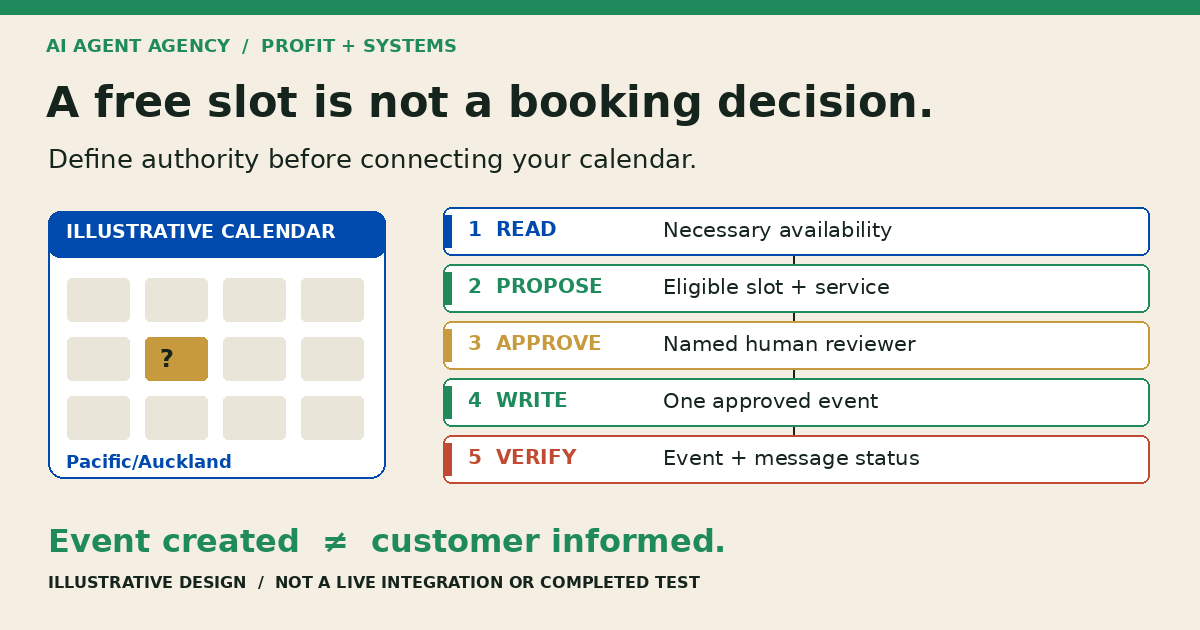
Illustrative design worksheet—not a live integration or completed test.
| Stage | Allowed starting action | Boundary and evidence |
|---|---|---|
| Read | Check necessary availability and approved service rules | Restrict calendars; avoid unrelated event details |
| Propose | Prepare service, staff, duration, time zone, and contact details | Mark the request as not yet booked |
| Approve | Named coordinator reviews the exact proposed appointment | Changed time or scope invalidates the approval |
| Write | Create only the approved appointment | Record request reference, event ID, and result |
| Verify | Read back the event and check notification status | Route missing or conflicting evidence to a person |
Permission to create must not imply authority to cancel or reschedule. The API may bundle those powers: enforce narrower action rules in the application and test the blocks. Keep calendar sharing, deletion, payment changes, and policy editing outside the initial workflow.
Define what “booking confirmed” means
Track the event and customer message separately
Use explicit states: requested, awaiting review, approved, event verified, notification pending, and confirmed under your agreed policy. Do not treat generated text or a successful-looking screen as proof of completion.
Before a write, recheck availability and eligibility. Require the implementation to handle competing requests through a reliable reservation or conflict-control mechanism; a read followed by a write alone does not reserve a slot. Stop if the system cannot establish the outcome.
Google’s event-creation guidance documents caller-supplied event IDs for duplicate protection and notification settings. Require equivalent safeguards in your chosen system. See the duplicate-action checklist for retry handling.
If the write times out, look up the original request before trying again. If the event exists but the email fails, flag notification pending and assign the coordinator. Do not create another appointment to repair a message problem. A notification accepted for sending is not proof that the customer received it.
Test the booking lifecycle before go-live
Use a test calendar and fictional customer details
Set expected outcomes before running these scenarios. Use the AI agent acceptance-testing guide to record results and sign-off.
- Competing requests: two customers choose one slot. Only the valid reservation proceeds; the other request gets alternatives or human handover, not a false confirmation.
- Unsuitable free time: remove the qualified staff member or required resource. The workflow must reject or escalate the slot.
- Date confusion: test “next Friday”, an overseas customer, and daylight-saving boundaries. Unresolved interpretation must stop booking.
- Timeout and retry: interrupt the response after creation. The retry must find the original event, not create a duplicate.
- Failed notification: preserve the verified event, assign a callback owner, and record customer-contact status separately.
- Change request: request a cancellation or reschedule without permission. The original event must remain unchanged pending review.
Set a response deadline and backup reviewer for exceptions. Start with draft-only requests, then decide whether any narrowly defined live writes are justified. Keep a stop switch that disables writes without losing the review queue.
If your team uses HubSpot, add the meeting-rotation leave and return checks before staff absences. Verify rotation eligibility separately from calendar busy time, without sending unapproved test invitations.
If you compare appointment exports weekly, use the spreadsheet export-checking workflow for downstream discrepancies. An export check does not establish live availability.
Frequently asked questions
Do I need AI if I already have an online booking system?
Not necessarily. Keep the booking system when its links, service choices, availability rules, and reminders meet your needs. AI may help interpret an enquiry, but that does not mean it needs calendar-write access.
Should AI book directly or prepare requests for approval?
Start with prepared requests and a named reviewer. Consider direct writes only for a narrow, tested service with clear eligibility, permissions, conflict handling, and fallback ownership. Keep exceptions human-approved.
Can a free calendar slot still be unsuitable for the job?
Yes. Staff skills, travel, equipment, location, preparation time, or service duration may rule it out. Availability is one input to eligibility, not the whole decision.
What should happen when booking confirmation fails?
Check whether the event exists before retrying. If it exists, repair the notification or contact the customer through the assigned person. If the outcome is uncertain, pause and investigate rather than promise confirmation.
Should rescheduling and cancellations need separate approval?
Yes during the initial workflow. They change an existing commitment and may affect fees, resources, or other customers. Define separate authority, identity checks, and review rules rather than inheriting permission from appointment creation.
Assess the workflow before granting calendar access
Bring your service list, booking rules, calendar ownership, and sanitised examples of failed or awkward requests to the NZ$1,000 AI Agent Assessment.
Assess your booking workflow before connecting it. Map eligibility, access, approval, and fallback handling; decide whether to keep existing tools, prepare first, or commission a governed integration. The assessment does not itself include building that integration.