
Missing Timesheets Before Payroll? A NZ AI Review Checklist
AI-assisted timesheet review can organise missing entries, duplicate submissions and conflicting records into a source-linked clarification queue. It must not invent hours, alter payroll or decide pay. A supervisor confirms the facts and payroll handles payment. Missing or incorrect timesheets do not mean employees can go unpaid.
Use this checklist when preparing the evidence is the bottleneck, not as a payroll calculator. The finance workflow guide explains the wider boundary between preparing information and acting on it. Start with one team, one pay period and an identified payroll owner.
1. Define the checks and the decisions AI cannot make
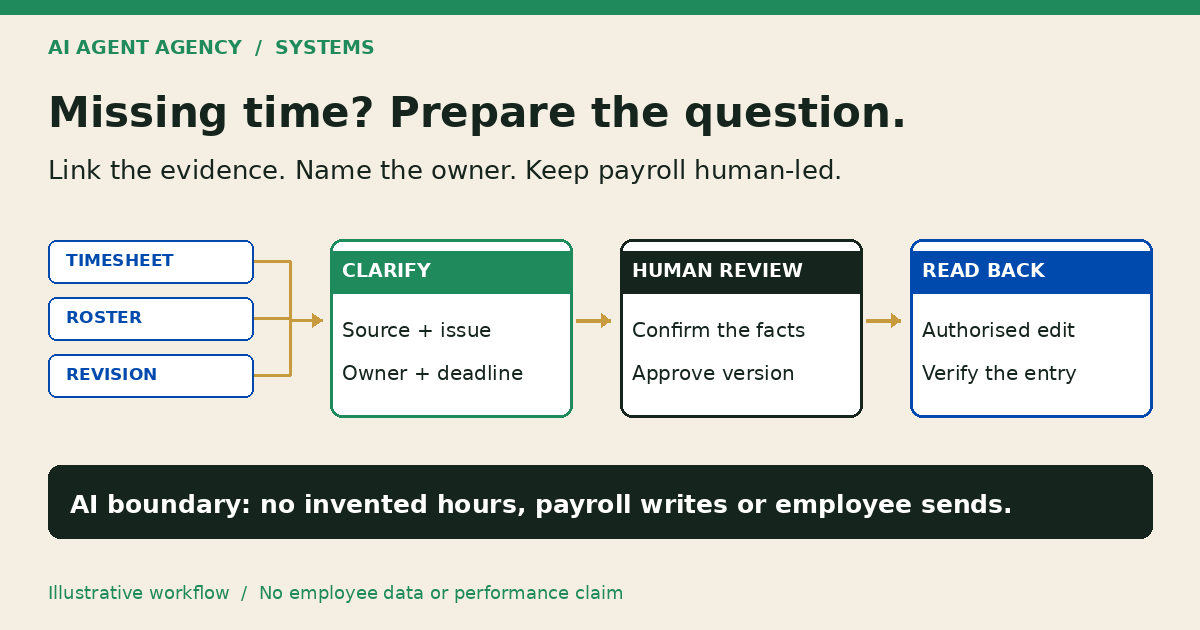
A preparation layer can identify blank fields, repeated entry IDs, unreadable attachments and disagreements between authorised records. It can draft a question for a supervisor. A flag is a request to check evidence, not proof of an error, misconduct or time theft.
Keep employment decisions outside the queue
Do not let the agent invent hours, deduct breaks, select pay rates, determine leave entitlements or recommend disciplinary action. Do not give it permission to send employee messages, correct source records or update payroll. Use a separate review workspace with access limited to the relevant period and team.
Name the person responsible for each clarification and the payroll owner responsible for unresolved cases. Set a review deadline and backup approver before the regular reviewer is unavailable.
2. Compare authorised sources without erasing disagreements
Collect the submitted timesheet, its entry ID and version, and only the supporting records needed for the check. These might include an authorised roster or approved job record. Keep links to the originals rather than copying every employee document into a general AI tool.
A roster describes planned work; do not automatically substitute it for missing actual hours. Preserve conflicting times and ask the responsible person to clarify. Employment New Zealand's record-keeping guidance explains the records employers need and when agreed usual hours can be recorded.
Check dates, duplicates and source quality
Use full dates rather than ambiguous labels such as “03/04”. For overnight entries, confirm both dates, timezone and the recording convention. Flag duplicate-looking submissions without deleting either: an apparent duplicate could be a corrected version.
Use checked software calculations for any duration comparison, not model arithmetic. Never infer a break deduction. For scanned forms, retain unreadable values as questions; the document-processing checklist covers extracted-field review.
3. Copy a timesheet clarification register
Keep one row per issue, linked to the exact entry version. A spreadsheet can be enough. Use restricted employee references where practical and keep the identity mapping with authorised staff. Exclude banking details and sensitive leave reasons from the preparation queue.
| Field | What to record |
|---|---|
| Entry reference | Employee reference, period, entry ID and version |
| Source evidence | Timesheet link and relevant authorised supporting record |
| Clarification needed | Missing value, possible duplicate or conflicting dates; no blame labels |
| Named owner | Supervisor or coordinator, backup owner and review deadline |
| Employee clarification | Question, authorised sender and factual response reference |
| Reviewed correction | Proposed correction, evidence and unresolved disagreement |
| Approval record | Named reviewer, timestamp and exact approved version |
| Destination check | Authorised updater, source-system read-back and outstanding exception |
Suggested statuses are needs clarification, ready for review, approved version, reopened and verified in source. Do not label a record paid merely because a preparation task completed. The payroll owner must track payment separately.
Fictional example: a possible duplicate
DEMO-TIME-017 and DEMO-TIME-018 refer to the same fictional shift, but one says “revised”. Keep both references. Ask the supervisor which version is current, record the clarification and approve that exact version. This is an illustrative process, not a client result or evidence of duplicate pay.
4. Keep payment decisions on a human-led exception path
Employment New Zealand explicitly says employees must still be paid when timesheets are missing or incorrect, and the employer needs to discuss the situation with the employee. An unresolved queue item is not permission to withhold wages.
Escalate missing information to the payroll owner before the deadline. That person coordinates clarification and the appropriate payment process; the agent must not choose an amount or delay payment. For disputed hours or employment-law questions, involve your qualified payroll adviser or employment specialist. This guide is workflow guidance, not legal advice.
Reopen review when the entry changes
If evidence or a timesheet changes after approval, retain the previous version and reopen the affected decision. After an authorised person updates the source system, read back the exact entry and record whether it matches the approval. An export or “success” message alone does not verify the correction. Preserve outstanding differences with a named owner.
5. Check native controls before testing an AI layer
Start with clearer forms, named approvers and your existing time-and-attendance settings. PayHero's approval documentation describes optional approval, locked approved weeks and unapproving a week before editing. It also warns that unapproved time is excluded from draft pays when that feature is enabled. That software behaviour does not remove the need to pay employees.
Employment Hero's Payroll Classic guidance describes an optional roster-matching approval setting. It is a product feature, not a reason to treat every roster as actual attendance. Check your product, plan and configuration with your payroll owner.
Test preparation without payroll-write access
Consider an agent only if mixed emails, scans and exports create recurring clarification work. Use synthetic or agreed redacted records first. Include a missing entry, duplicate-looking revision, cross-midnight shift, ambiguous date and post-approval edit. Check that each produces an evidence-linked question, not invented hours or a silent correction.
Use the agent permissions checklist to keep payroll writes and outbound messages disabled. If the queue loses sources or obscures unresolved cases, stop the pilot and fix the process before extending access.
Frequently asked questions
Can AI fill in missing hours?
No. It can identify a gap and draft a clarification question. A responsible person must establish the facts with the employee and authorised evidence. Do not use rostered or typical hours as an automatic replacement.
Can missing timesheets delay wages?
Missing or incorrect timesheets do not mean employees can go unpaid. Employment New Zealand says employees must still be paid. Escalate to the payroll owner and discuss the issue with the employee rather than allowing an AI queue to block payment.
Is a roster evidence of hours actually worked?
It is evidence of planned work, not automatic confirmation of actual attendance. Check differences and the applicable recording arrangements with your payroll owner; do not silently overwrite an employee's submitted hours.
Who approves a corrected entry?
Your named authorised reviewer approves the exact corrected version using the supporting evidence and employee clarification. An authorised updater changes the source system, and the result is checked. AI preparation is not approval.
When are existing payroll tools enough?
They may be enough when structured submissions, reminders, approval controls and clear ownership resolve the problem. Assess an additional preparation layer only when recurring mixed-source clarification work remains and someone can review its output.
Map the clarification workflow before connecting payroll
Bring a blank timesheet format and describe one recurring clarification bottleneck to the NZ$1,000 AI Agent Assessment. Map evidence owners, minimum access, review deadlines and a no-payroll-write pilot. A better form or existing software may be the recommendation.
Assess your timesheet preparation workflow. Share redacted examples only through an agreed channel, not employee records in the booking form. The standalone assessment does not include a completed payroll integration. Installation is separate.