
GA4 Form Submissions Don’t Match CRM Leads? A NZ Checklist
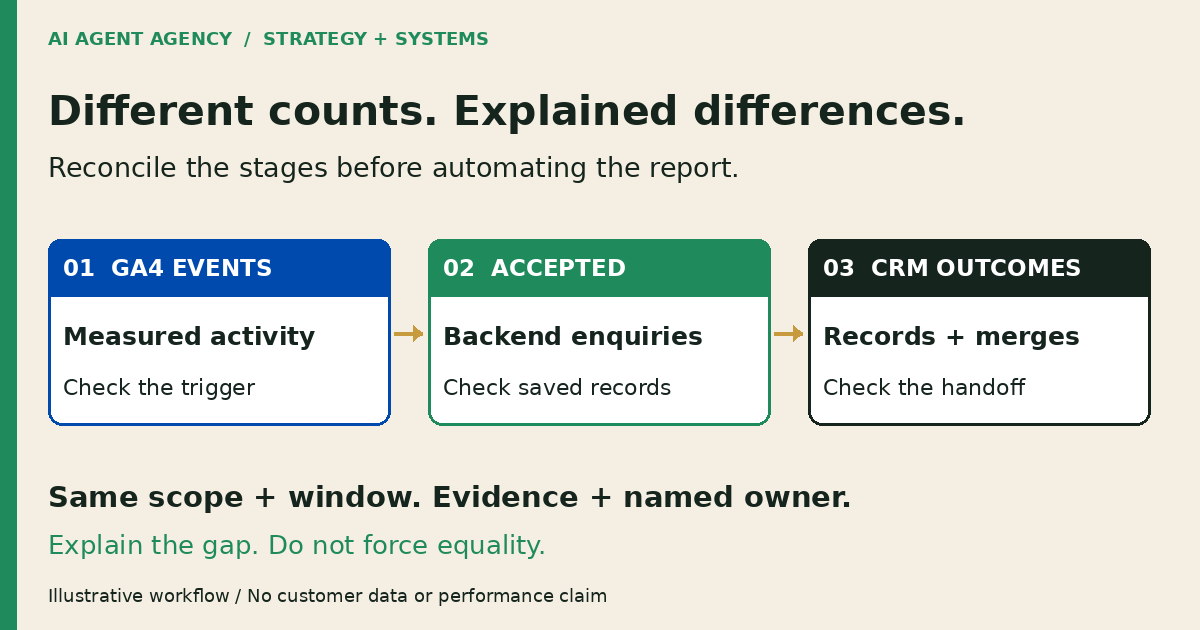
GA4 events, accepted enquiries and CRM records measure different stages. Compare the same form and reporting window, then check validation failures, repeated thank-you visits, consent settings and CRM deduplication. Use backend acceptance evidence—not a button click—to define a submitted enquiry. The goal is explained differences, not forced equality.
If your monthly report says one thing and your sales inbox says another, start with definitions before buying another tool. This checklist helps New Zealand owners separate measurement problems from missing handoffs. If an enquiry never reaches the responsible person, use the contact-form delivery checklist first.
1. Define what each count means
Write down the counting unit for each system. An event is not necessarily a unique person, and a new CRM contact is not the same as a new enquiry.
Events, accepted enquiries and CRM records
Google’s enhanced-measurement documentation describes `form_start` as the first interaction with a form in a session and `form_submit` as a form submission. Neither name alone verifies that your backend saved the enquiry or your team received it.
Google separately lists `generate_lead` as a recommended event. Recommended events require implementation context; renaming an event does not establish that context. Ask whoever maintains your form exactly which condition triggers your chosen lead event.
For this worksheet, define an accepted enquiry as a distinct submission retained by your authorised backend. Track rejection, spam classification and subsequent CRM handling separately. Decide whether your CRM measure counts contacts, enquiry activities, leads or deals.
2. Align the form and reporting window
Compare one form, one site and one agreed interval before comparing whole-business totals. Record the form identifier, GA4 property, backend source and CRM destination. Exclude unrelated newsletter forms, phone enquiries and imported prospects unless they are explicitly in scope.
Use full timestamps and consistent exclusions
Record both boundaries and the timezone: for example, midnight Monday to midnight the following Monday in Pacific/Auckland. Check whether each export uses Auckland time or UTC, including daylight-saving changes. Allow for documented processing delays and distinguish submission time from CRM creation time.
Write down treatment of internal tests, rejected spam, repeat submissions and merged contacts. Preserve the original export and extraction time. If the definitions change, label the new reporting basis instead of silently rewriting the historical comparison.
3. Copy a three-stage reconciliation worksheet
Keep the three measures side by side. Add evidence and ownership so the report produces a decision, not another argument about whose dashboard is correct. Replace the count instructions below with your own verified totals; no sample performance is implied.
| Metric definition | Source | Reporting window | Count | Explanation | Owner | Next action |
|---|---|---|---|---|---|---|
| Chosen event for the scoped form | GA4 event report and documented trigger | Agreed interval and timezone | Enter event total | Note consent, filters and trigger limits | Analytics owner | Check unexpected event patterns |
| Distinct accepted enquiries | Retained backend submissions | Same submission interval | Enter distinct accepted total | Separate rejected attempts and tests | Website owner | Check acceptance evidence |
| Downstream outcome for accepted enquiries | Restricted CRM reconciliation | Same cohort, with agreed processing cutoff | Enter linked outcomes by status | Separate new records, merges, repeats and failures | CRM owner | Resolve unlinked accepted enquiries |
Keep explanations separate from confirmed faults
Use categories such as legitimate contact merge, repeat enquiry, rejected spam, pending import, failed import and unexplained. A merge can be legitimate while the enquiry still needs a new activity and owner. Confirm that handoff rather than counting only contact creation.
Keep record-level matching references in restricted internal tools. Google’s PII guidance warns against sending personally identifiable information to Analytics, including through URLs. Do not put names, emails, phone numbers or free-text enquiries in analytics events, page URLs or campaign parameters. This worksheet does not require uploading reconciliation IDs to GA4.
4. Test paths that expose counting mistakes
Run controlled tests with the owner’s permission, preferably in staging. Use fictional details and a business-controlled address. Agree how tests are excluded from business reporting and prevent customer messages or consequential CRM actions. Do not submit real customer information to diagnose tracking.
Check success, rejection and repeat visits
- Successful submission: submit once and compare the observed event with backend acceptance and the intended CRM outcome. Keep evidence for each stage; a thank-you page is not the backend record.
- Validation failure: leave a required field invalid. Check what fires and confirm no accepted enquiry is created. Record actual behaviour rather than assuming every form implementation works alike.
- Repeated thank-you visit: reload or revisit the confirmation URL. Check whether a page-based lead trigger records another event without another accepted enquiry.
- Duplicate instrumentation: ask the maintainer to inspect whether a plugin, embedded tag and tag-manager rule send overlapping events. Do not delete tags merely because totals differ.
- Consent choices: check the permitted journeys with different consent states. Record measurement limitations; never bypass consent to make counts agree.
Google’s DebugView guide explains how to inspect diagnostic events from a selected device. It also notes that privacy controls or missing Analytics-cookie consent can prevent events appearing there. DebugView absence alone is not proof of failed form delivery. These are proposed checks, not findings from an audit of your website.
5. Fix the explanation before adding AI
Assign each confirmed fault to the person who can repair it. A clearer trigger, native CRM rule or scheduled export may be enough. Put routine checks into your website-maintenance checklist and recheck after approved changes.
Keep an agent read-only and accountable
If recurring exports need interpretation, an agent could prepare an aggregate exception brief: what differs, supporting source, confidence, named owner and next action. Use the management-reporting guide for reviewed reporting boundaries.
Do not authorise the agent to change tags, consent settings, customer records or outbound messages. A reviewer checks sources and approves any report or proposed repair. Keep unresolved differences visible; do not let a model invent missing leads or adjust totals to make a tidy narrative.
Frequently asked questions
Does GA4 form_submit prove that my enquiry was saved?
No. It records a measured interaction. Verify your implementation’s trigger and match the test to a retained backend submission. Check delivery and CRM handling separately.
Why can CRM contacts be fewer than accepted form submissions?
One person can enquire repeatedly, or a submission can update an existing contact. Check whether each accepted enquiry has the intended activity and owner. Fewer new contacts alone does not prove lost leads.
Can consent settings affect the comparison?
Yes. Consent and privacy controls can limit observed analytics activity. Document the measurement basis and restrictions. Do not weaken consent controls or expect every backend submission to appear as an individually traceable GA4 event.
Should an AI agent fix conversion tags automatically?
No. It can prepare a source-linked explanation and proposed checks. Your authorised maintainer reviews and approves changes, tests the relevant paths and verifies the result before relying on the report.
Assess your enquiry-to-reporting workflow
Not sure whether the problem is measurement, form delivery or CRM handoff? Use the NZ$1,000 AI Agent Assessment to map the workflow, evidence and approval points before connecting another agent.
The Assessment includes two 45-minute Zoom sessions and a report before the second call, with no obligation to buy implementation or management. It does not automatically repair tags, install integrations or include production testing. Bring a blank worksheet or agreed redacted examples, not customer records in the booking form.