
Website Contact Form Not Sending Emails? A NZ Delivery Checklist
If your website contact form is not sending emails, test the complete enquiry path: submit through the live website, confirm the server accepted and stored it, locate the notification, check the intended CRM or task record, and verify a named person can see it. A thank-you page alone does not prove delivery.
For New Zealand owners and operators, this is a delivery-evidence checklist—not advice to redesign your form or automate sales replies. Prove the enquiry reaches your business before adding AI triage.
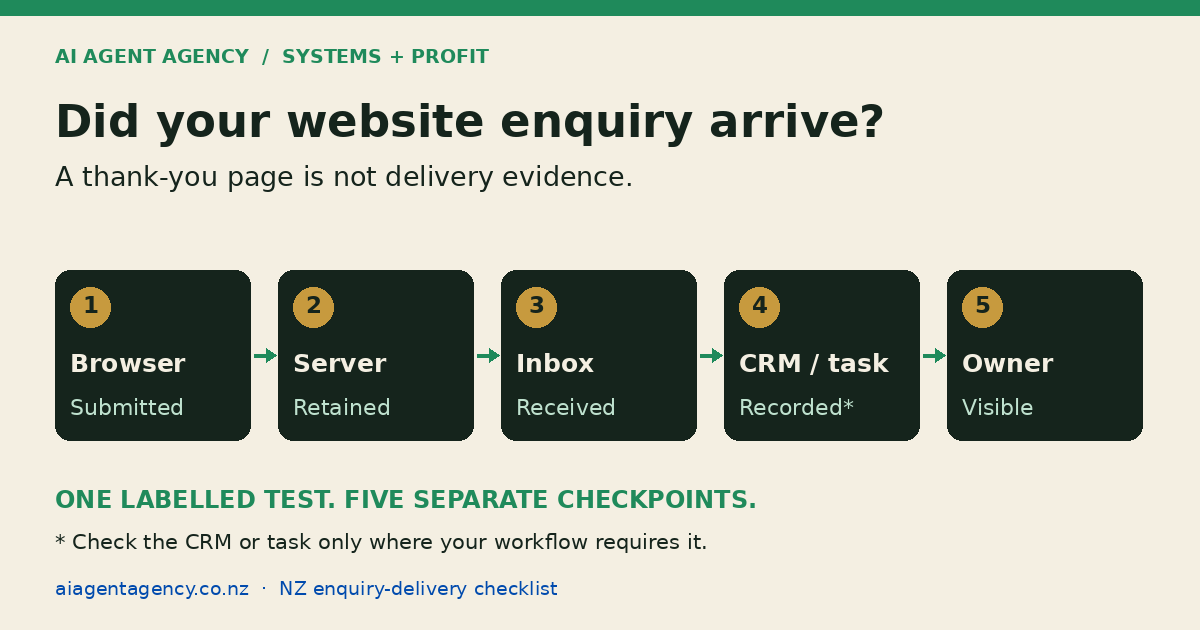
Where can an enquiry disappear?
A working page can hide a broken handoff. The browser may show success before a notification fails. An email may reach an old address, sit in quarantine, or arrive without creating the task your team expects.
Click n Call's trade-form guide highlights unmonitored destinations and spam-folder problems. EliteSpec's form-failure guide recommends endpoint checks, live-domain testing, alerts, and recurring synthetic submissions. These are agency recommendations, not evidence of your site's reliability.
Separate three questions: did the request leave the browser, did your systems retain it, and can someone act on it? A green response at one stage does not answer the others.
Build a browser-to-owner evidence sheet
Record each handoff separately. Use one clearly labelled test reference across the journey so you can trace the same submission without copying full message contents into every log.
| Checkpoint | Evidence to retain | What it does not prove |
|---|---|---|
| Browser submission | Live URL, device, timestamp, test reference | Server receipt or email delivery |
| Server acceptance | Response body, request ID, saved record | Notification reached the inbox |
| Notification | Matching message in the intended mailbox | CRM entry or human ownership |
| CRM or task | Record ID, source, assigned owner | Owner can access the queue |
| Owner visibility | Reviewer confirms the matched test | Future submissions will always arrive |
If the workflow intentionally uses only email, mark CRM as not applicable. Do not invent extra integrations to complete a checklist. Keep evidence in an access-controlled location, with a retention period appropriate to your business.
Five practical delivery checks
1. Prepare a safe, identifiable test
Get the website owner's permission and tell the receiving team when testing will happen. Use a business-controlled email address and fictional enquiry details. Label the message clearly as a test, not a genuine sales opportunity.
Agree how test records are excluded from reporting and follow-up. Do not trigger payment, booking, customer messages, or sensitive CRM changes. Where a form sends an acknowledgement, use only your controlled address and explicitly approve that test send.
2. Submit through the real public form
Open the production domain as a visitor would, including its normal consent and validation steps. Test on mobile as well as desktop. Note the time and reference before submitting once.
Ask your technical owner to inspect the request destination, method, response status, and response body. HTTP 200 can accompany an application error; a success message can be displayed prematurely. A direct endpoint test helps diagnosis but does not replace the browser journey.
3. Prove the enquiry was retained
Find the matching submission in the form service, application store, or intended system of record. Check the essential fields survived: contact details, message, source page, and reference.
If the design has no durable capture before email delivery, record that limitation. Ask the implementer how an email failure becomes visible and whether the original enquiry can be recovered. Do not assume notification logs contain a recoverable message.
4. Find the notification and downstream record
Check the configured destination, shared-mailbox access, inbox rules, spam, and quarantine. Ask the mail administrator for delivery evidence where available. Provider acceptance is not the same as finding the message in the working inbox.
Where promised by the workflow, locate the CRM record or task and match its reference. Check that routing selected the correct queue and did not assign it to a departed employee. Avoid repeatedly submitting while the outcome remains uncertain.
5. Ask the responsible person to confirm visibility
Have the owner open the enquiry using their ordinary account—not an administrator's account. Confirm the contact details and next action are usable, with a backup person identified for absence.
This closes the delivery check. Classification, qualification, and draft replies belong in AI Enquiry Triage NZ, after receipt is proven.
Monitor missing outcomes, not just website uptime
A homepage availability check will not tell you whether a form stopped emailing. Monitor the specific result your business depends on: retained submission, notification, and assigned record where applicable.
Set an explicit expected delivery window
Agree a realistic window with the implementer; do not borrow a universal one-minute threshold. Record which stage exceeded it and who investigates. For a small, low-volume site, a scheduled manual check may be enough. Higher-dependency channels may justify authorised synthetic tests and stage-specific alerts.
Use the AI Website Maintenance Checklist for the wider review rhythm. Repeat delivery checks after form, hosting, mail-routing, recipient, spam-filter, or CRM changes.
Make the alert path independent
Do not rely solely on the same mailbox connection you are monitoring. Agree a separate internal alert destination and backup owner. Distinguish a failed test from the monitoring job failing to run. Avoid placing customer message bodies or access tokens in alerts.
What should happen when a delivery check fails?
Pause automated follow-up for the affected test and preserve its reference, timestamp, and available records. Ask the technical owner to locate the first missing handoff rather than changing several systems at once.
Keep a clearly displayed, working alternative contact method available. Reconcile retained submissions against notifications and downstream records before deciding what needs recovery. An uncertain email outcome is not permission to resend every message. Use the duplicate-action prevention checklist to separate a safe retry from an unintended second action.
Approve repairs and any customer-facing recovery messages, then repeat the complete browser-to-owner test. Record the result and test-record cleanup. This checklist cannot reconstruct enquiries the system never retained.
Where can AI help with enquiry monitoring?
AI can summarise authorised test results, flag unmatched references, and prepare an investigation queue. Fixed checks are usually enough to compare IDs and delivery states; an agent is not required simply to run a test.
Keep sending, public form changes, credential access, and sensitive record updates behind defined approval gates. A monitoring agent should not quietly rewrite mail settings or contact prospects because a test failed.
Frequently asked questions
Why is my website contact form not sending me emails?
Possible causes include a failed submission endpoint, a disconnected notification service, outdated recipients, mailbox rules, or spam filtering. Trace one labelled submission through server retention, notification delivery, and owner visibility to locate the failing handoff before changing settings.
Does a thank-you page prove my enquiry arrived?
No. It shows what the browser displayed, not that a message reached the intended inbox or CRM. Match the test reference to retained records and ask the responsible person to confirm access.
How often should we test an enquiry form?
Choose a cadence based on how much the business depends on that channel. Repeat checks after relevant system changes. Record the expected delivery window, failure owner, and backup alert path rather than assuming one schedule suits every website.
Can AI monitor enquiries without replying to customers?
Yes. A scoped workflow can compare authorised records and prepare internal exception summaries without sending customer replies. Start with fixed checks where possible, limit data access, and require approval for consequential changes.
Decide what to fix before adding another agent
Enquiries arrive, but dashboard totals disagree? Use the GA4-to-CRM lead reconciliation worksheet to compare event definitions, accepted submissions and CRM outcomes. That is a counting check, separate from the delivery checks above.
Bring your delivery-evidence sheet to the NZ$1,000 AI Agent Assessment. Map the handoffs, owners, permissions, and success criteria before deciding whether to repair a connection, simplify the process, or scope an agent.
The Assessment includes two 45-minute Zoom sessions and a report before the second call, with no obligation to buy implementation or management. Form repairs, monitoring installation, and production testing are not automatically included.