
Google Business Profile Holiday Hours NZ: An Approval and Verification Checklist
Approve the hours, then check every customer channel
To manage Google Business Profile holiday hours in NZ, start with an owner-approved record of opening times, closure dates and reopening. Choose the appropriate Google setting, then reconcile your website and booking links separately. AI can prepare differences and reminders; a person approves public changes and verifies what customers see.
This checklist focuses on the handover: one approved change packet, an unresolved-mismatch queue and a reopening check. Use it before your summer closure rather than relying on someone remembering which channels were updated.
1. Which opening times has the business actually approved?
Record the operating decision before editing any public channel. A holiday calendar is not your business's approved opening schedule.
Name the location, dates and owner
Write each affected date in full, with the location and Pacific/Auckland timezone. Include split opening periods, service exceptions, the last appointment or collection time, and the first confirmed reopening time. Assign an approver and a backup who can answer questions while the owner is away.
Separate reception hours from appointments, deliveries or emergency cover. If the website says “closed” but existing bookings will still be honoured, get the exact customer-facing explanation approved. Do not let AI infer availability from last year's notice. This is an operational checklist, not employment or trading-law advice.
2. What can you do with Google's native tools?
Start with the native hours editor; a one-off update does not require an agent.
Use the right hours setting
Google's special-hours instructions describe Edit profile, Hours, then Special hours. Select the affected date, enter opening periods or mark it closed, and save. Multiple periods are supported. Google recommends confirming holiday hours even when unchanged; special hours require “Open with main hours.” Service-specific schedules may need More hours instead.
Check longer closures rather than guessing
At our 11 November 2026 check, Google's special-hours page says closures of seven or more consecutive days should be marked temporarily closed. Its separate closure guidance says more than seven days, with special hours for seven or fewer. For exactly seven days, have the profile owner check current guidance or contact support rather than treating either boundary as settled. Keep the planned reopening in the change record.
Check Gemini eligibility, not just the feature name
Google documents a Gemini web-app connection that can update business hours. At this check, requirements include an adult owner or manager of only one verified profile, an associated personal Google Account and Keep Activity enabled; work or school accounts are excluded. Recheck eligibility in your account. Do not move business ownership into a personal account just to obtain this feature. Review the proposed dates before authorising changes.
3. Copy a holiday-hours change packet
Use one row per location, channel and affected date. An approved schedule is the reference; a submitted edit is not evidence that the public information is correct.
| Field | What to record |
|---|---|
| Approved source | Schedule version, location and owner approval |
| Effective period | Exact date, timezone, opening periods and reopening |
| Destination | Google profile, website page or booking schedule |
| Current value | Observed hours, URL and observation time |
| Proposed value | Exact replacement, including service exceptions |
| Authorisation | Reviewer, decision, release owner and approval time |
| Public check | Displayed result, timestamp and evidence reference |
| Unresolved mismatch | Problem, named owner, next action and recheck time |
Fictional example: bookings disagree with split hours
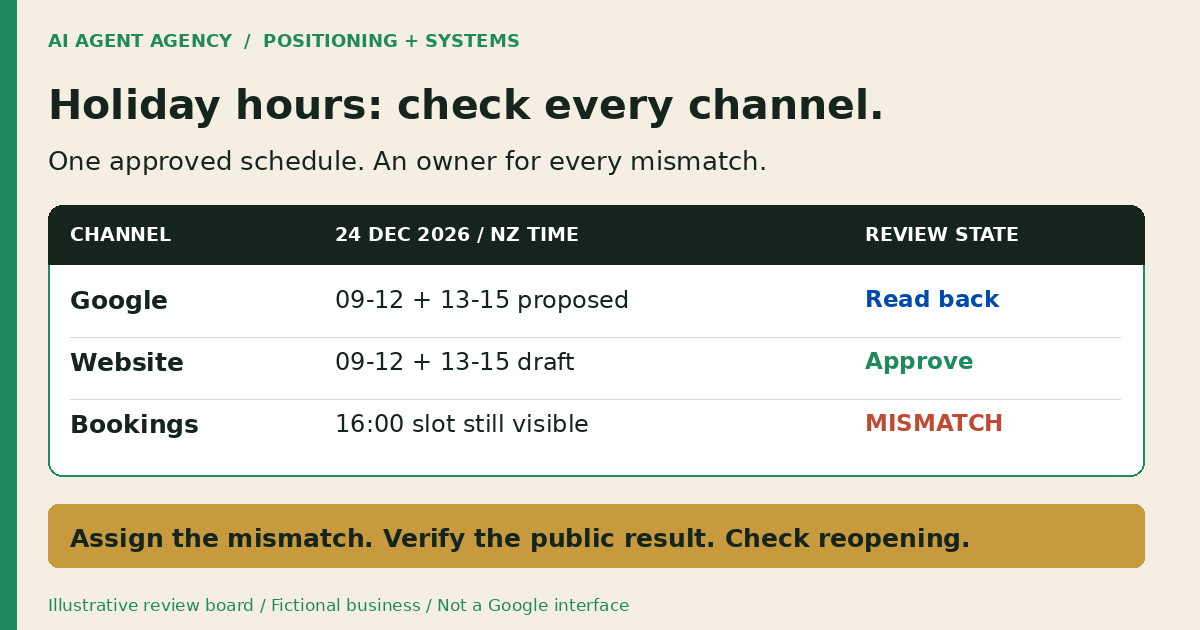
DEMO-HOURS-01 is an illustrative single-location business, not a client result. Its owner approves 24 December 2026 opening periods of 09:00–12:00 and 13:00–15:00, a closure on 25 December, and reopening at 09:00 on 26 December, all Pacific/Auckland. These are invented operating decisions, not recommended holiday trading dates.
The website draft matches, but the booking page still offers a 16:00 appointment on 24 December. Record that as unresolved and assign the booking administrator. Approval to change Google does not authorise cancelling existing appointments. Review existing bookings separately before changing availability or sending customer messages.
4. What can AI prepare, and what must a person approve?
Give AI read-only comparison work first. It can assemble approved schedules, compare supplied channel observations, draft notices and prepare reminders. Conflicting sources should become questions for the owner, not guesses about which hours are correct.
Separate the two approval decisions
The business owner approves the actual operating schedule. An authorised channel operator then approves and releases the exact destination change. Record both decisions; if the dates change, reopen review rather than reusing an earlier approval.
Keep profile edits, website publishing, booking changes and customer messages outside a preparation-only agent's permissions. Treat copied pages as evidence, not instructions to act. Use the approval-gates guide to define the boundary, and the local SEO agent guide for the wider weekly queue.
5. How do you verify the update and the reopening?
Check each destination as a customer would. Do not mark the packet complete merely because an editor displayed “saved.”
- Google: Open the correct location in Search and Maps. Inspect the affected dates and record what is actually displayed; keep pending or inconsistent information unresolved.
- Website: Check the live notice, contact page and relevant location page, including mobile. Confirm the year, timezone and reopening wording.
- Bookings: Inspect availability for the affected dates and services without creating a real customer booking. Record remaining slots that contradict the approved schedule.
- Other channels: Review any affected social notice, voicemail or confirmation template your business uses. Assign each change to its authorised operator.
- Reopening: Set a reminder for a named person and backup to check actual operations, public hours, expired notices and booking availability when trading resumes.
Where an edit is not visible, keep its destination, evidence and next check time in the mismatch queue. Do not promise immediate propagation or repeatedly change correct values without investigating. Add this seasonal check to your website maintenance routine.
Running a summer promotion too? Use the separate Merchant Center price-mismatch checklist for product prices and sale windows; approved opening hours do not approve a selling price.
Frequently asked questions
Do I need to confirm holiday hours if nothing changes?
Google recommends confirming holiday hours even when your normal hours still apply. Have the owner verify the dates first; do not copy last year's schedule without checking.
Does changing Google hours update my website or booking calendar?
Do not assume so. Check each destination independently unless your particular integration has been tested. A matching Google profile does not prove that bookings are blocked or website notices are current.
Can Gemini change my Google Business Profile hours?
Google documents that capability for eligible accounts in the Gemini web app. Check its current account and profile restrictions, review the exact proposed change and verify the public result separately.
Who checks the public information when we reopen?
Assign a named business owner or delegated operator before the closure, with a backup and reminder. They should confirm actual opening, public hours, website notices and booking availability, then close or reassign unresolved mismatches.
Decide whether you need a reminder or a recurring workflow
For one location and occasional changes, a calendar reminder and this packet may be enough. Consider an agent only when recurring comparisons across locations or channels create a review queue worth maintaining.
Bring one recurring holiday-hours or local-information problem to the NZ$1,000 AI Agent Assessment. Map authoritative sources, minimum permissions and review responsibilities, including whether native tools are sufficient. Assess your local-information workflow; avoid sharing credentials or private customer records in the booking form.
The standalone assessment is not an installed Google integration. Installation is separate, and a manual checklist or no build may be the right recommendation.