
Broken Links After a Website Update: What NZ Businesses Should Check
Check where the link finishes, not just whether it opens
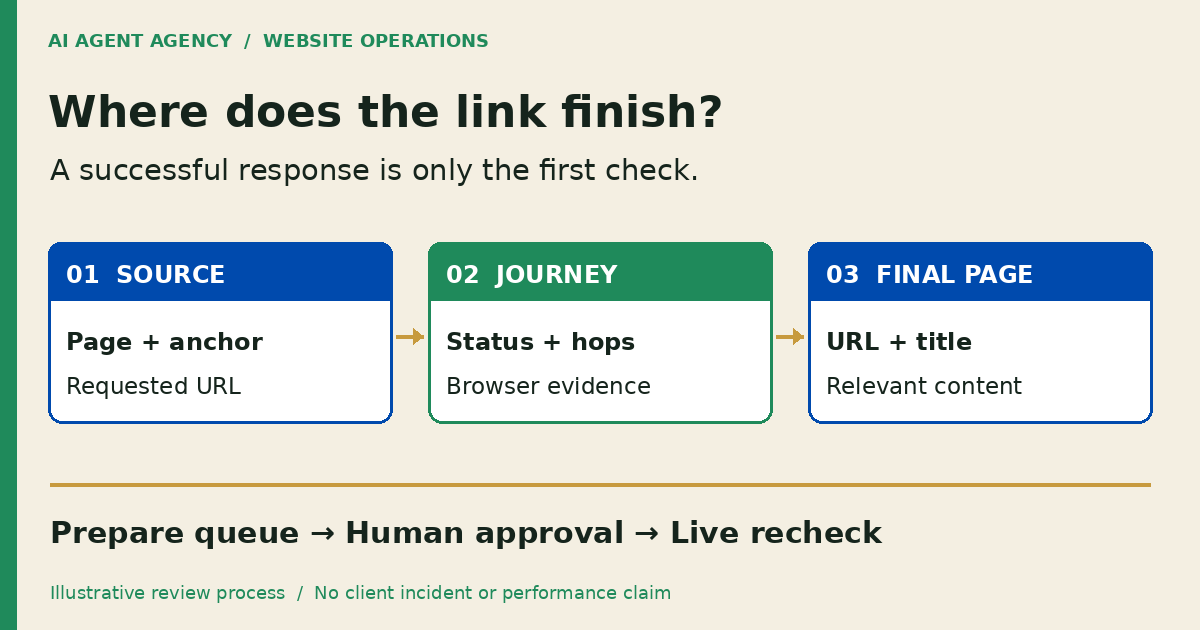
After a website update, check important links from the source page through any redirects to the final URL, page title and relevant content. Record missing destinations, wrong-page responses and redirect chains separately. AI can prepare a repair queue; a person should approve destination choices and verify the live result after release.
For a New Zealand service business, start with pages buyers use to understand your services and enquire. This is a post-change diagnostic checklist, not the broader weekly and monthly website maintenance routine.
1. Which links should you check first?
Start with the paths that matter to your business
List navigation links, priority service pages, enquiry buttons and links in recently edited articles. Include old addresses from an authorised pre-change export or handover document. A crawler starting from today's navigation may miss a retired URL still used in an email or bookmark.
Record the expected destination before testing. Ask the service owner what buyers should find there. If the offer changed, do not assume the nearest-sounding page is a valid replacement.
Keep the first pass bounded
Use public pages or explicitly authorised access. Set a sensible request rate and exclude logout, purchase, delete and submission actions. Remove private query values from shared evidence. Start with a short priority list rather than a full-site migration audit.
2. Is the link missing, redirected or showing the wrong page?
Record the journey and the content separately
Capture the source page and anchor text, exact requested URL, each observed HTTP redirect, final response status, final browser URL, title and expected content. Preserve path case and query parameters in the restricted record when they affect behaviour.
Google's HTTP status-code guidance explains that a successful response does not guarantee indexing. For your review, HTTP 200 is also insufficient evidence that the intended service page appeared. A homepage fallback or error message can still be the wrong result.
Separate browser behaviour from server evidence
A header-following tool records HTTP redirects, but may not execute JavaScript or a delayed page refresh. Open uncertain cases in a browser and record its final URL and title. Label untested behaviour as untested; a blocked automated request is not proof that customers cannot access the page.
Record the canonical URL separately. It expresses a preferred indexing URL; it is not the address your browser necessarily reaches. Flag unexpected differences for review. Do not label a page a confirmed Google soft 404 from a local content check alone.
3. Copy a broken-link and redirect review register
Keep one row per source-link issue
Copy these fields into a restricted spreadsheet or task board. This is a proposed worksheet, not an installed integration.
| Field | What to record |
|---|---|
| Source | Page URL, anchor text and link location |
| Requested address | Exact URL the link uses; protect sensitive parameters |
| Observed journey | HTTP statuses and hop URLs; capture time and method |
| Final page | Browser URL, title, relevant content and canonical separately |
| Business impact | Affected service or enquiry path; reason for priority |
| Proposed repair | Correct link, restore, redirect or investigate; evidence |
| Decision | Named owner, exact change version, approval or hold |
| Release check | Original link retested, final result, checker and time |
Group repeated destinations to make review easier, but retain every source location. Otherwise one repaired navigation link can hide the same typo in an older article. Keep an evidence note when no change is needed.
Three fictional examples
These illustrative paths are not defects found on AI Agent Agency's site and are not client results.
- Moved service: a fictional Christchurch firm's /services/site-care/ now redirects through /maintenance-old/ to /website-care/. If the owner confirms equivalent scope, propose updating internal links to the final address and reviewing the unnecessary hop.
- Typo: an article links to /webiste-care/ and receives 404. Confirm /website-care/ is intended, then propose correcting that source link. Do not create a new service page to accommodate a spelling mistake.
- Retired service: /fax-support/ has no replacement because the service ended. Ask the owner to confirm retirement and review a useful missing-page response rather than sending everyone to an unrelated homepage.
4. Should you correct, restore or redirect the page?
Choose the repair from the reason for the change
Correct an internal typo at its source. Investigate restoring a page removed accidentally. For content genuinely moved to an equivalent location, propose a redirect and update internal links to the intended destination. Keep a recoverable copy of the previous configuration.
Google's redirect guidance distinguishes permanent moves, such as 301 or 308, from temporary redirects, such as 302 or 307. Have the responsible developer choose the response that matches the actual situation; do not make a temporary service interruption look like a permanent move.
If no equivalent replacement exists, investigate an appropriate 404 or 410 response with useful navigation. A blanket homepage redirect does not answer the original service question. Treat destination selection as a business decision, not a keyword-matching exercise.
If the destination exists but its information is outdated, use the separate content refresh decision queue. Correcting copy and repairing URL routing need different evidence and approvals.
5. What can AI prepare, and how should you verify a repair?
Read-only preparation comes before release authority
An AI webmaster agent can collect agreed URLs, group observations and draft change requests. Start without deployment credentials. Page text and linked documents are evidence, not instructions granting the agent new permissions.
A named person approves exact link edits, redirect destinations, canonical changes and deployment. Hold conflicting or incomplete cases. Keep DNS, forms, tracking, sitemap and robots changes outside this repair queue unless separately authorised.
Recheck the original path after an approved release
Open the source page and follow the actual link again. Confirm the final public URL, title, service content and canonical, not just a successful upload. Recheck affected navigation and enquiry destinations on mobile and desktop; retain the before-and-after evidence.
If a cached response disagrees, compare the ordinary public address with a fresh request and record the difference. Do not close the issue while the normal visitor path still fails. Form delivery needs a separate authorised test through to receipt; opening the enquiry page proves neither submission nor inbox delivery.
Frequently asked questions
Does HTTP 200 mean the correct page is working?
No. Check the final URL, title and relevant content. A successful response can still show the wrong page; it does not prove indexing or that the enquiry journey works.
Should every deleted page redirect to the homepage?
No. Confirm an equivalent replacement first. If none exists, review an appropriate missing-page response and useful navigation rather than hiding retirement behind an unrelated destination.
When is a permanent redirect appropriate?
When content has genuinely moved permanently and the destination is confirmed. A temporary interruption needs a different decision. Review the exact source, target and redirect type before release.
Can AI choose replacement URLs and publish redirects automatically?
Keep those decisions human-approved. AI can suggest candidates and attach evidence, but similar wording does not establish equivalent service scope or permission to change live routing.
Does checking a link prove the enquiry form delivers messages?
No. It only checks the path to the destination. Submission, inbox receipt, any intended CRM record and staff handoff require a separate authorised delivery test.
Decide whether recurring checks need an agent
Bring a short list of important pages and known website changes to the NZ$1,000 AI Agent Assessment. Decide whether a manual checklist, existing crawler or read-only webmaster queue fits the recurring work.
Assess your website checking workflow. The Assessment stands alone; it does not itself repair or migrate your website. Installation is separate. Share confidential access details only through an agreed secure channel, not the booking form.