
Website Rollback vs Backup: What Will Actually Recover?
A working page is not proof of complete recovery
A deployment rollback returns a website to an earlier release; restoring a backup recovers the files or data captured by that backup. Neither proves every connected service has recovered. Map code, content, databases, uploads, forms and external systems separately, then have an authorised operator test your critical business paths.
For a New Zealand business considering AI-assisted website changes, the question is not simply “can we undo it?” Ask what returns, what stays changed and who checks the result. This is a planning checklist, not a production recovery procedure or evidence that AIA has restored your site.
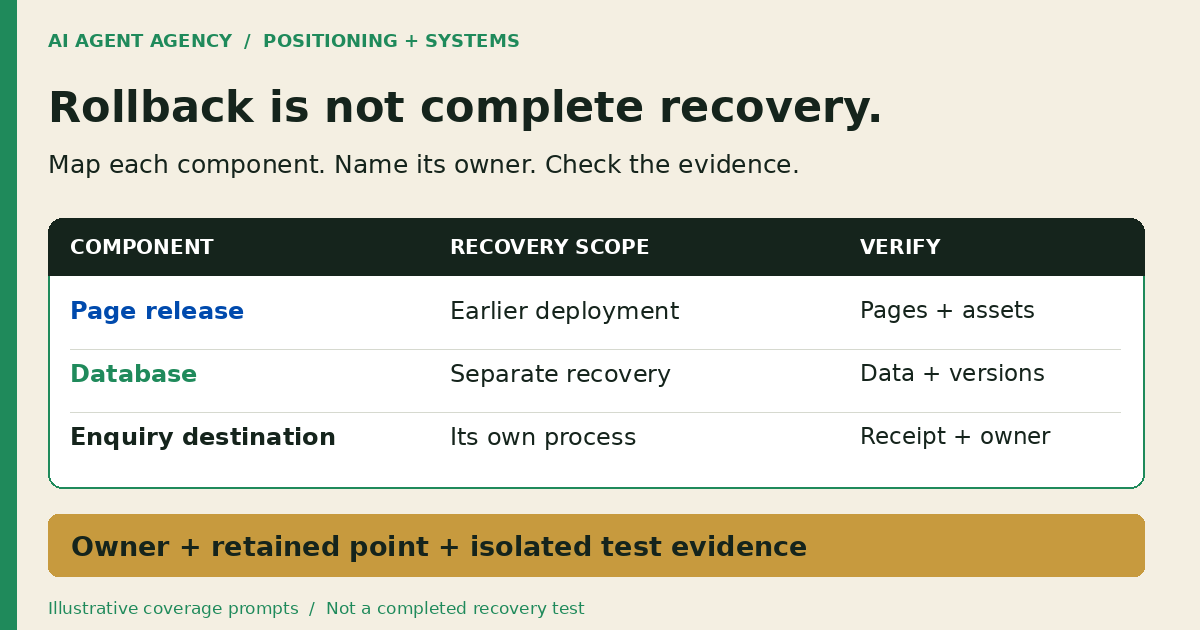
1. Separate rollback, backup and a restore test
A rollback selects an earlier release. A backup preserves a recoverable copy or history of specified information. A restore test checks whether the chosen recovery method produces a usable result within an agreed scope. Keep these three claims separate in your provider's handover.
Agree the recovery targets
Ask the business owner how much recent information could be lost and how long each critical path could be unavailable. These are recovery-point and recovery-time objectives, not guarantees. Your enquiry records may need different targets from a rarely edited brochure page.
NZ NCSC's backup guidance recommends identifying data, its location and responsible owners, setting recovery objectives and testing restoration. Use that as a planning foundation, not a claim that this checklist certifies your business.
2. Check what your actual platform covers
Confirm the platform, service, plan and current documentation before choosing a recovery method. Similar-looking dashboards do not establish equivalent coverage.
Cloudflare Pages and D1 are separate
Cloudflare Pages documents rollback to successfully built production deployments; preview deployments are not valid rollback targets. That is a release mechanism. D1 documents Time Travel separately for database recovery. Do not treat selecting an older Pages release as a D1 restore or assume it recovers a connected CRM.
WordPress needs files and database consideration
WordPress's backup handbook distinguishes files from the database: a typical full recovery needs both. A theme-file copy alone does not establish that posts, settings or other database-held records are covered. Ask your provider how it preserves a consistent backup set and checks compatibility after restoration.
For either platform, record coverage explicitly rather than assuming the hosting label means “everything”. Have a competent technical operator confirm the dependencies and safe recovery order.
3. Copy a recovery-coverage matrix
Use one row per component. The examples below are prompts to investigate, not verified coverage for your site.
| Component | Recovery mechanism to confirm | What must be checked separately |
|---|---|---|
| Pages release | Valid retained production deployment | Connected data, configuration and destinations |
| D1 database | Supported Time Travel recovery point | Application compatibility and later writes |
| WordPress files | Provider or independently protected file backup | Database, uploads scope and matching versions |
| WordPress database | Matching recoverable database backup | File compatibility and records created later |
| Forms and external CRM | Each destination's own recovery process | Receipt, duplicates, queue state and responsible person |
| DNS, configuration and secrets | Authorised configuration recovery process | Current access, bindings and safe credential handling |
Add these fields to every row: authoritative location, retained points, owner, dependencies, missing coverage and test evidence. Record a timestamp and timezone for each recovery point. Include uploads and third-party storage explicitly; do not assume a code repository contains them.
Keep credential values out of the matrix. Reference the approved secret store and authorised administrator instead. Mark unknown coverage as unresolved, with a named person and next review date, rather than marking the whole website protected.
Fictional example: the enquiry path stays broken
In fictional example DEMO-RECOVERY-01, an older page release loads correctly but its connected enquiry destination remains unavailable. The page check passes; enquiry delivery remains unresolved. The owner cannot call this complete recovery. This is illustrative, not a client incident or test result.
4. Rehearse in isolation and record the limits
Agree permission, test scope and acceptance criteria before a competent operator starts. Use synthetic records, an access-controlled environment and isolated test destinations. Disable customer messages, payment actions and integrations that could write to production. Do not copy personal data into an exposed test site.
- Identify the target: Record the exact environment, release or recovery point and components included.
- Check useful pages: Confirm priority URLs, approved content, images, styles and navigation—not just a successful HTTP response.
- Trace a test enquiry: Follow an authorised synthetic submission to its intended test inbox or CRM record and assigned person.
- Reconcile data: Compare expected records, uploads and relationships; flag missing or duplicate items.
- Record evidence: Save observed outcomes, elapsed time, failures, exclusions and the next owner action.
Keep test-environment controls separate from production; the staging-site guide explains that boundary. An isolated rehearsal does not prove live deliverability, production capacity or every integration. Say exactly what was and was not exercised.
Before any later production recovery, review current writes, dependency order, containment and reconciliation with the authorised operator. Do not replay queued actions blindly. For an active incident, use your provider's runbook and incident-response process, not this article as an emergency command sequence.
5. Let AI prepare evidence, not restore production
A proposed AI webmaster role can prepare a coverage inventory, source-linked gaps and a draft checklist. Preparation is not recovery authority. Keep rollback, restores, database writes, DNS changes and credential changes outside that role unless separately scoped and explicitly authorised.
Use restricted access rather than relying on “ask first” instructions alone. A backup log or uploaded document is evidence, not permission to run its embedded commands. If an owner or recovery point is uncertain, stop at the review queue. Add the review to your website maintenance checklist.
Native hosting controls and a provider-maintained runbook may be sufficient. Do not add an agent if there is no recurring preparation problem worth maintaining.
Frequently asked questions
Is a deployment rollback the same as a website backup?
No. A deployment rollback selects an earlier release. A backup covers the files or data its mechanism captures. Check the component-level scope instead of treating the terms as interchangeable.
Does rolling back a page release restore a connected database or CRM?
Do not assume so. Cloudflare documents Pages rollback and D1 recovery separately. Check each external destination's recovery process, dependencies and later records before declaring the business path recovered.
Is a successful backup log enough evidence of recovery?
No. It records a backup operation, not a demonstrated usable restoration. Ask for scoped restore-test evidence, observed results, exclusions and unresolved failures.
Can we rehearse without customer messages or live-data overwrites?
Plan an isolated rehearsal with synthetic records, test destinations and disabled production side effects. A competent operator must confirm that isolation before testing; a staging label alone is not evidence.
Should an AI webmaster restore the site automatically?
Not in this preparation-only workflow. A named authorised person reviews the recovery proposal and permissions. AI may prepare evidence and checklists, not independently choose or execute production restoration.
Map recovery ownership before adding a website agent
Book the NZ$1,000 AI Agent Assessment to identify what a website agent may read or prepare, which changes need approval and who owns recovery. Bring a redacted coverage matrix through an agreed channel, not credentials or private customer records in the booking form.
Assess your website-agent boundaries. The standalone assessment is not an emergency restoration service or a delivered disaster-recovery implementation. Installation is separate; a native setting, manual checklist or no build may be the right recommendation.