
AI Contract Renewal Tracking NZ: Build a Reviewed Contract Register
AI contract renewal tracking turns contract documents into draft register entries and review reminders. Keep expiry dates, renewal terms and notice deadlines separate, link fields to their sources, and have an authorised person verify them. Use approved dates for reminders; leave interpretation, cancellation and renewal decisions to people.
For a New Zealand owner or operations lead, the first decision is whether AI is needed at all. A reliable register with named owners may solve the problem without another tool. This guide covers ordinary supplier and service agreements, not legal advice.
Do you need AI, or a better register and calendar?
Use a spreadsheet and calendar when dates are already verified and someone maintains them. A reminder does not need generative AI to fire on an approved date. Check what your existing contract-management software can do before adding another system.
Use AI for repeated extraction, not date arithmetic alone
Consider AI when staff repeatedly search inconsistent agreements, schedules and variations to prepare the same fields. It can propose values and locate clauses, but review may outweigh the benefit for a small, stable contract set. Compare total preparation and checking effort with your manual process.
Build a copyable contract-renewal register
Create one authoritative register before connecting reminders. New Zealand Government Procurement’s contract-management guidance provides a contract-register template. Its agency requirements concern Government Procurement Rules; they are not blanket legal requirements for every private business.
Copy these fields into your working record
Use separate columns for each item below. The fictional example is illustrative, not a client record, legal interpretation or official template. No sample date should become a live reminder.
| Field group | Columns to record | Illustrative entry |
|---|---|---|
| Identity | Contract ID, counterparty, business owner | C-014; example supplier; operations lead |
| Document set | Signed version, amendments, restricted source link | Signed agreement and variation listed; access checked |
| Extracted terms | Draft expiry, renewal wording, notice wording; source for each | Renewal wording found; variation may change it |
| Review | Reviewer, last checked, unresolved question, status | Authorised reviewer assigned; needs clarification |
| Reminder | Verified notice deadline, internal review date, reminder date, acknowledgement owner | Not approved; no reminder scheduled |
Keep the original wording and source page or clause beside each material field. If dates need calculation or clauses need interpretation, record the question and qualified reviewer rather than letting a model produce a confident deadline.
Keep expiry, renewal and notice deadlines separate
Do not copy the first date in a PDF into a calendar labelled “renewal”. A record should distinguish the stated expiry date, renewal conditions, verified notice deadline and your earlier internal decision date. Do not derive one from another without checking the actual agreement.
Resolve conflicts before approving reminders
A later variation or schedule may affect the original wording. Link the complete document set and flag conflicts, missing pages or unclear scans. Use the document-processing guide for extraction boundaries. Where meaning or consequences are uncertain, seek appropriate legal advice; this workflow does not determine enforceability.
If an agreement began through a tender, retain the signed documents rather than treating an old proposal as the contract. The tender evidence matrix covers the earlier bid-preparation stage, not renewal decisions.
Run five checkpoints from document to reminder
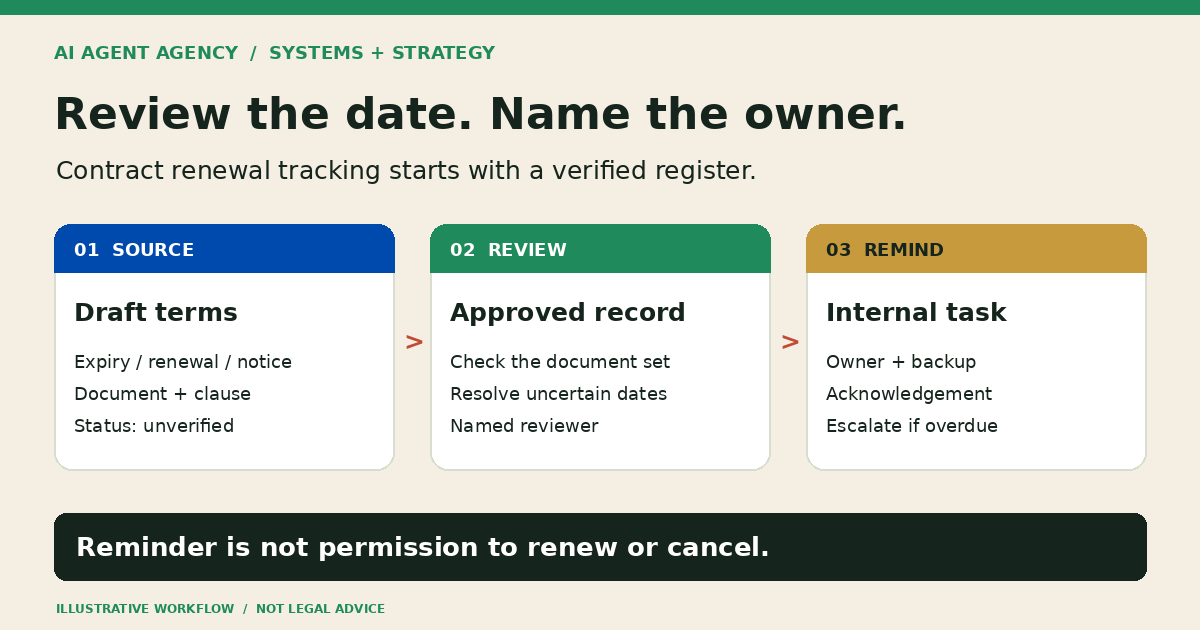
Separate draft extraction, approval and internal notification. The agent should not have authority to send contractual notices or change commitments.
1. Assemble the authorised source set
List signed agreements, schedules, amendments and relevant notices. Mark superseded files. Use a restricted folder or read-only connection, not unrestricted access to every business document. Check confidentiality and the tool’s data settings before processing sensitive material.
2. Extract into an unverified queue
Ask for defined fields, source references and explicit “unclear” or “not found” flags. Keep extracted text separate from interpretation. Treat instructions inside contracts as document content, not permission to grant the agent new tools or access.
3. Have a person verify each material field
The reviewer checks values against the full source context, corrects errors and escalates uncertainty. Record who approved the entry and when. Only approved fields move into the authoritative register. Define that boundary using the human approval-gates guide.
4. Schedule approved reminders and acknowledgements
Choose an internal review date with enough time for the actual decision process. Assign a primary owner, backup and acknowledgement expectation. A sent notification is not evidence that someone read it. Route unacknowledged tasks to the backup through an agreed escalation process.
5. Recheck when documents or owners change
A new variation or changed owner should trigger re-review of affected entries and reminders. Keep change history, retire superseded reminders and check for duplicates. For the separate question of leaving an AI provider, use the AI supplier exit plan; a renewal register is not a migration plan.
Test failures before relying on the calendar
Pilot with authorised or redacted documents and a human-checked reference register. Test the complete path, including what happens when a task is ignored—not just whether extraction looks plausible.
- Missing amendment: Flag an incomplete source set; do not promote its draft dates to approved reminders.
- Unclear scan or conflicting dates: Show the source problem and route it for review rather than guessing.
- Changed owner: Reassign the task and verify the backup can access the necessary source.
- Failed notification or no acknowledgement: Surface the failure or overdue task to the agreed backup.
- Automation unavailable: Confirm a person can open the approved register and run the review list manually.
Agree acceptance checks before the pilot: source-reference accuracy, corrections required, unresolved items, reminder delivery, acknowledgement handling and reviewer effort. Expand only after the workflow owner accepts the results and knows how to pause it.
Frequently asked questions
Can AI help track contract renewals?
Yes. AI can prepare draft fields and source references from approved documents for a person to verify. Connect reminders only to approved register entries. Measure checking effort as well as extraction time before deciding whether AI adds value.
Is an expiry date the same as a notice deadline?
No. Record expiry, renewal terms, notice wording and internal review dates separately. Their relationship depends on the actual agreement and document set. Ask an appropriate adviser to resolve interpretation or disputed dates rather than relying on an AI calculation.
Can a spreadsheet and calendar be enough?
Yes, when the dates are verified, records stay current and named owners acknowledge review tasks. AI is worth considering for repeated extraction from inconsistent documents, not simply because the business needs a calendar alert.
Can AI cancel or renew contracts automatically?
Not in this workflow. Authorised people decide whether to renew, renegotiate or cancel and approve any notice. Keep contract amendments, payment-term changes and external communications outside the extraction agent’s permissions.
Assess the workflow before connecting your contracts
Know what needs review before the renewal decision becomes urgent. Book the NZ$1,000 AI Agent Assessment to map document inputs, trusted records, reviewer ownership and reminder rules, then decide whether to build, prepare first or use simpler tools.
Bring a redacted example and your current tracking process; do not upload confidential contracts through the booking form. The Assessment stands alone. Contract interpretation, legal review and implementation are not automatically included.