
AI Invoice Reminders NZ: When Xero Is Enough—and When to Add a Review Queue
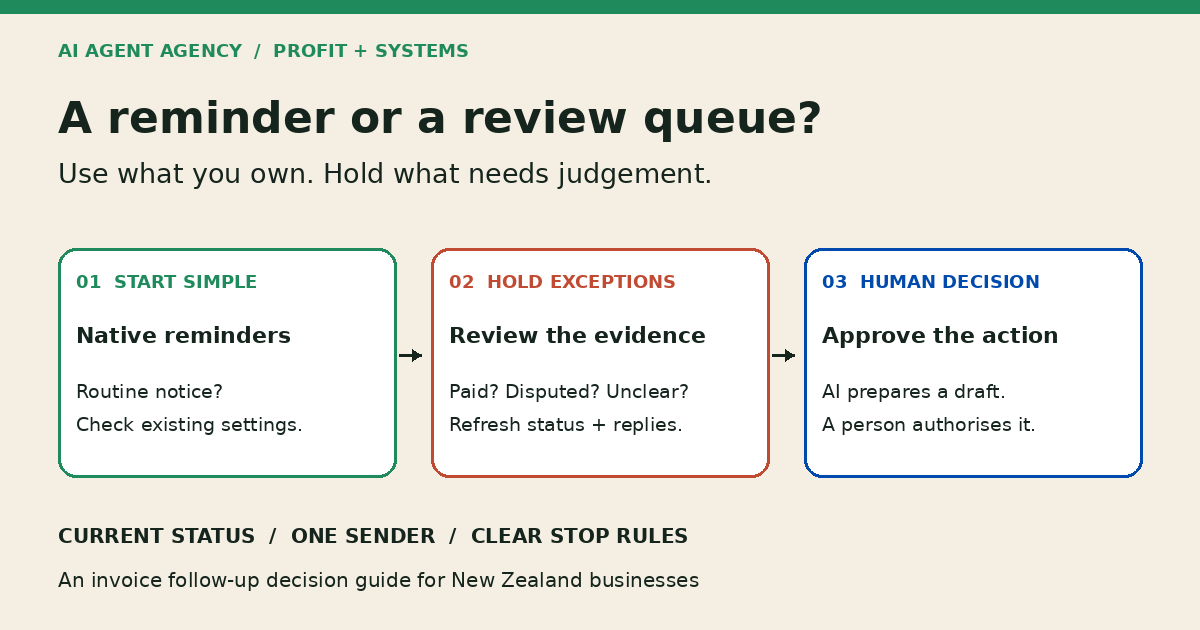
Start with Xero’s built-in reminders when you only need scheduled notices. Consider an AI-assisted review queue when staff must interpret replies, investigate exceptions or prepare personalised drafts. Refresh invoice status before action, pause uncertain accounts, and require human approval before an AI-prepared message is sent or payment terms change.
For New Zealand owners and bookkeepers, the question is not “Can AI chase invoices?” It is “Which part of our follow-up process needs help?” This guide compares reminder scheduling with exception handling. It is workflow guidance, not accounting, legal or debt-collection advice.
Do you need AI for invoice reminders?
You do not need a custom AI agent just to send scheduled reminders. Xero’s NZ invoicing page describes automated reminders before or after due dates, invoice payment visibility and aged receivables reporting. Check your current setup with your bookkeeper before buying another tool.
When existing reminders may be enough
If invoices are accurate, contacts are correct and customers mostly need a routine nudge, start by reviewing the settings you already have. Agree which accounts need personal handling and who checks replies. Do not add another sender without deciding how it interacts with Xero.
When the work is understanding the reply
“Paid yesterday”, “wrong person” and “we dispute the amount” need different decisions. An AI-assisted queue can summarise authorised records and suggest drafts for review. It should not decide that a payment cleared or that a dispute is resolved. Use the broader Xero finance-workflow guide for access boundaries.
Compare four ways to manage overdue-invoice follow-ups
Choose the smallest approach that handles your actual exceptions. Compare ongoing review work as well as software and implementation costs.
| Approach | Suitable starting point | What to verify |
|---|---|---|
| Native reminders | Routine notices linked to invoice timing | Settings, exclusions, reply owner and current invoice status |
| Specialist receivables software | A defined follow-up workflow that an existing product may cover | Integration, stop rules, approval settings and overlapping senders |
| AI-assisted review queue | Varied replies or context across approved sources | Source freshness, draft accuracy, reviewer capacity and permissions |
| Manual handling | Low volume, sensitive relationships or unresolved disputes | Named owner, next action and review date |
Specialist software is a real alternative to a custom build. For example, TabNudge markets Xero-connected, reply-aware follow-ups and draft approval. That is the supplier’s description, not an independently tested recommendation. Demonstrate your difficult cases in any product you consider; do not assume every tool has the same approval or cancellation behaviour.
Five checks before another reminder is prepared
A due date alone is not enough evidence for another message. Give the reviewer a clear record of the checks below.
1. Refresh the balance and invoice status
Record when the information was retrieved and whether it comes from the live accounting system or an export. If the connection fails or the export is stale, hold the draft. A customer’s reply is evidence to investigate, not authority to mark an invoice paid.
2. Check every existing sender
List native reminders, specialist tools, shared-mailbox drafts and staff follow-ups. Name one owner for the next action. Check both sent history and pending messages so two systems do not chase the same invoice. See the duplicate-action checklist for retry and replay controls.
3. Classify the exception without deciding it
Label partial payments, disputes, promised payment dates, wrong contacts and unclear replies for review. Preserve the original message beside the summary. If an invoice cannot be matched confidently, ask a person rather than guessing the customer or amount.
4. Prepare only the permitted action
Begin with read-only information, summaries and unsent drafts. Limit access to the records and correspondence needed for this workflow. Do not give the agent payment authority or permission to change accounting records. Keep bank-detail changes outside this queue.
5. Approve the final version, then recheck
The reviewer approves the recipient, wording and proposed action. Recheck payment status, new replies and pending reminders before release. Changed evidence should invalidate the old approval. Use AI approval gates to define who can send, hold or escalate. If the reviewer leaves, use the AI tool offboarding checklist before transferring the queue or restarting its connections.
Copy an invoice exception worksheet
Use one row per invoice requiring a decision. Store it in an approved business system with restricted access, not a public spreadsheet. Keep source links and timestamps with the row.
| Invoice reference | Current balance and status | Latest reply | Exception | Proposed action | Reviewer | Approval state |
|---|---|---|---|---|---|---|
| Illustrative INV-104 | Refresh from accounting source | “Paid yesterday” | Payment not yet verified | Hold reminder; ask bookkeeper to check | Named finance owner | On hold |
This is an illustrative worksheet entry, not a customer record or completed test. Record the actual reviewer’s name in use. Keep a next-review date so “hold” does not mean forgotten. Record what evidence clears the exception and who authorised resumption.
Test the uncomfortable cases before connecting live systems
Use authorised sample data and an unsent test queue. The expected behaviour below is a design requirement to verify, not a claim about your current tools.
- “Paid yesterday”: Hold further reminders while the bookkeeper checks payment and allocation. Resume only after review of current evidence.
- Disputed amount or partial payment: Show the original reply and current balance. Do not automatically demand the old amount or invent settlement terms.
- Wrong contact: Hold the message and route contact verification to the relationship owner. Do not guess a replacement address.
- Stale data or failed connection: Mark the result uncertain and block release, even if a draft was approved earlier.
- Overlapping reminder: Create a pending notice in the test setup and confirm the second workflow does not also release a message.
Check whether holds actually affect pending sends in every connected system. A label in an AI queue does not cancel a separately scheduled Xero reminder. Document the responsible person’s cancellation or exclusion procedure. Keep discounts, payment plans, write-offs and collection escalation with authorised people.
What should an AI Agent Assessment decide first?
Bring your current reminder settings, anonymised examples of difficult replies, a sender list and the time reviewers spend handling exceptions. Compare improving native settings, trying specialist software, preparing data first, building a scoped queue or keeping the process manual.
Define success before a pilot: correct source references, held uncertain cases, no unintended duplicate sends and a review workload your team can sustain. Measure actual results; this guide does not promise faster payments or recovered revenue.
Frequently asked questions
Do I need an AI agent if Xero already sends invoice reminders?
Not for scheduling alone. Review Xero’s existing settings first. Consider specialist software or an AI-assisted queue only when reply interpretation and exception preparation create enough work to justify another system and its review requirements.
What should happen when a customer says an invoice is already paid?
Pause the follow-up and ask the responsible person to check current payment and allocation records. Do not treat the reply as confirmed ledger payment, mark the invoice paid automatically or release another reminder while the uncertainty remains.
Can an AI agent agree payment plans or discounts?
It may prepare context and draft options within an agreed scope, but an authorised person must approve any commitment. Keep payment plans, discounts, write-offs, outbound messages and accounting record changes behind human approval.
Assess the workflow before buying an integration
Book the NZ$1,000 AI Agent Assessment to assess your invoice follow-up workflow, existing tools, exception workload, data access and approval requirements.
The Assessment stands alone with no obligation to buy implementation or management. It does not include building the integration. The right recommendation may be to improve what you already own rather than add AI.