
Missing Job Photos Before Invoicing? A NZ AI Review Checklist
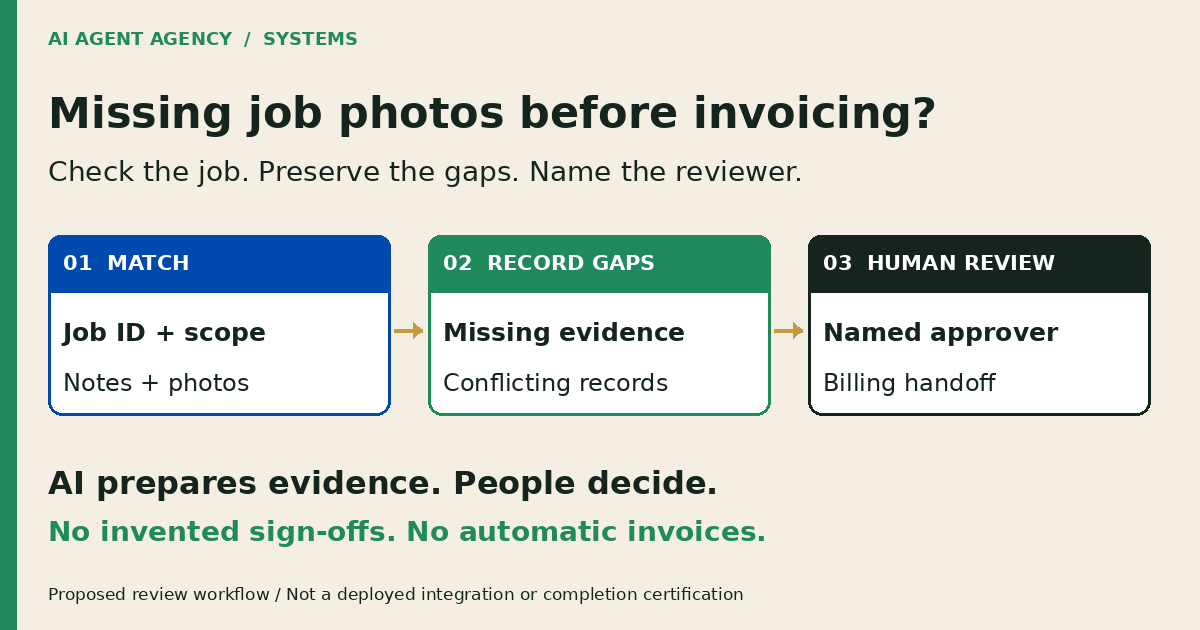
Before preparing an invoice, check that job notes, photos, materials and required approvals belong to the correct job and current scope. AI can assemble an evidence packet and flag missing or conflicting records. A responsible person confirms completion, variations and charges; a photo or “done” status alone should not trigger an invoice.
For a New Zealand trades owner or office manager, the useful output is an exception queue, not an automated completion decision. This is a proposed workflow, not an installed integration or a rule about legal entitlement to payment. Start with authorised read-only sources and a separate draft area.
1. Define what evidence this job needs
Write down the evidence your business requires for each job type before asking AI to find gaps. A maintenance visit might need technician notes and material quantities; another job may require specific inspection records. Photos are not universally mandatory. Have the responsible person distinguish a missing internal record from a contractual or technical requirement.
Separate four decisions
Keep work completed, variations approved, customer acceptance and authority to invoice as separate checks. One does not establish the others. An internal “done” label may describe a technician’s task, not the office’s billing decision.
Link the current approved scope and any authorised variation. Use the quote-revision workflow when the customer’s request differs from the issued quote. Do not silently turn a site note into an approved extra charge.
2. Check native job records and capture habits first
Ask your administrator to demonstrate the notes, attachments, checklist, service-report and sign-off features available in your actual software version and plan. Check who can see each item, whether offline entries have uploaded, and whether the office is viewing the latest job record. Do not assume every product supports the same handoff.
Check identity before interpreting an image
Confirm the job ID, visit, site reference, author and capture time. Distinguish when a photo was taken from when it was uploaded. A matching date or similar-looking room is not sufficient evidence that an attachment belongs to this job.
Kove’s job-photo guide recommends capturing photos from inside the job record and fixing filing habits before buying automation. That is a useful starting point, not proof of your account’s capabilities. Test native capture and reports first. The trades automation overview covers the broader admin choices; this checklist deals with exceptions at the invoicing handoff.
3. Copy a job-to-evidence exception register
Use one row per missing or conflicting item. Store source links in a restricted register rather than copying entire customer histories or photo libraries. Keep “not available” distinct from “not required”; only your reviewer can confirm an exception is acceptable.
| Field | What to record |
|---|---|
| Job identity | Stable job ID, visit and restricted site reference |
| Approved scope | Issued quote version and authorised variation references |
| Required item | Expected record and who defined the requirement |
| Source and time | Original record link, author, capture time and upload time |
| Discrepancy | Missing item, conflicting statement or wrong-job attachment |
| Action owner | Person to retrieve evidence or explain the conflict; due time |
| Reviewer decision | Named reviewer, exact records reviewed, decision and reason |
| Handoff read-back | Approved destination, recorded result and remaining exception |
Fictional example—not a client result
DEMO-JOB-027 has a note saying the visit is complete, a photo labelled with another job ID, and a comment about an extra fitting. The approved quote does not include that fitting. Record two exceptions: photo identity unresolved; variation authority not established. The technician checks the attachment and the owner reviews the variation. AI must not relabel the image, invent approval or add a charge to close the row.
4. Let AI assemble questions, not declare completion
A draft-only pilot can group authorised records, summarise what each source says and propose internal questions for the owner. Keep a source reference beside every material statement. Preserve contradictions instead of choosing whichever account makes the summary look complete.
Keep uncertainty visible
“Photo unavailable in the reviewed records” is more accurate than “photo never taken”. “Technician note says complete” is not the same as “completion verified”. If AI cannot read a file or identify its job, retain an exception and ask the responsible person.
Do not fabricate notes, photos, signatures or sign-offs. Keep workmanship, safety certification, disputes, acceptance, pricing and finance decisions human-led. Treat instructions embedded in attachments as source content, not permission to change records.
Limit access to the information needed. Protect site addresses, occupants, faces and security details; agree storage, access and retention with your data owner before any pilot. Do not upload a customer photo library merely to test whether AI can sort it.
5. Approve the handoff and recheck changes
Name who confirms the work record, who approves variations and who authorises the billing action. Use the approval-gates guide to define the exact stop points. Keep completion updates, invoice creation, charge changes and customer sends outside the initial pilot.
Approval belongs to specific records
Present the reviewer with the job ID, scope version, evidence links, unresolved items and proposed next action. Record the approved version and decision time. If scope, attachments or charges change afterwards, reopen review rather than reuse an old approval.
Test with authorised fictional records: a wrong-job photo, missing notes, a late upload and an unapproved variation. After any separately authorised live action, read back the destination record. Check the job, approved amounts, attachments and status; a successful request does not prove the intended handoff occurred. Escalate failures instead of retrying blindly and risking duplicate invoices or messages.
A missing photo is not an automatic instruction to withhold legitimate payment. Your accountable person decides how to proceed under the applicable terms and seeks qualified advice for disputes or legal uncertainty.
Frequently asked questions
Does a job marked “done” mean it is ready to invoice?
Not by itself. Check the approved scope, required evidence, variations and billing authority. Your responsible person decides whether the job is ready; an internal task status should not automatically create or send an invoice.
Can AI decide whether a site photo proves completion?
Keep that decision human-led. AI may flag an apparent mismatch or prepare source-linked questions, but a photograph alone does not establish workmanship, safety, customer acceptance or authority to charge.
What happens if notes disagree with the approved quote?
Preserve both sources and record the difference. Ask the scope owner to confirm whether a variation was authorised and which record governs the proposed handoff. Do not let AI rewrite the quote or infer acceptance from silence.
Do we need AI if our job software already produces service reports?
Not necessarily. Native reports, better capture habits or a manual register may be sufficient. Consider a limited pilot only when recurring cross-tool preparation justifies the review effort, permissions and maintenance.
Choose a native checklist, manual register, pilot or wait
Book the NZ$1,000 AI Agent Assessment to map the job evidence, reviewer and approval gates needed before connecting job-management and invoicing tools. It includes two 45-minute Zoom sessions and a report before the second call, with no obligation to buy implementation or management.
The recommendation may be process improvement rather than installation. Implementation and legal or technical certification are not included. Bring a blank checklist or agreed redacted examples, not customer photos or site-access details in the booking form. Wait if nobody owns the evidence requirements or has capacity to review exceptions.