
AI Purchase Order Matching NZ: What to Check When an Invoice Does Not Match
AI purchase order matching can help NZ businesses compare invoice, order and goods-receipt details, then prepare differences for human review. Start with approved source records and explicit matching rules. Missing receipts, unclear quantities, price differences and suspected duplicates stay unresolved until a named person checks the evidence and approves the next action.
Before adding AI, decide whether you need better records, existing software configuration or a document-preparation layer. A matching total is not payment approval. This guide covers invoice exceptions, not tax advice, fraud certification or a tested accounting integration.
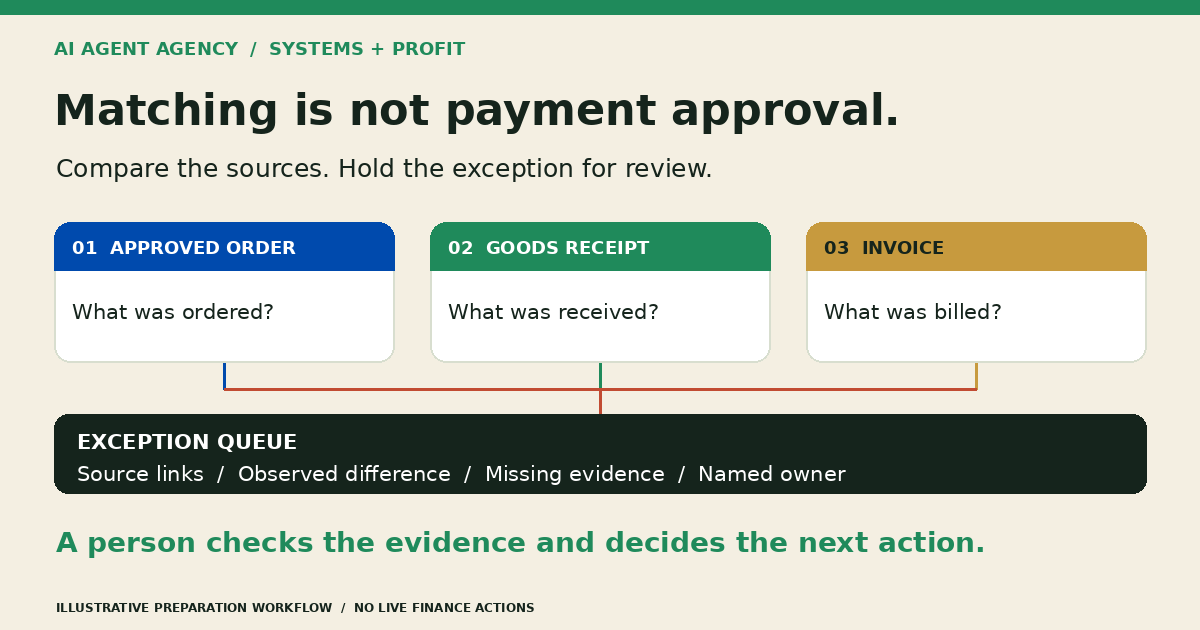
Why does this invoice not match the purchase order?
Check references and line items before treating a difference as an error. An invoice might relate to an amended order, a partial delivery, freight charged separately or a different unit of measure. The mismatch needs an explanation supported by records, not a plausible AI guess.
Compare the same version and basis
Locate the approved PO and any authorised changes. Check supplier identity, invoice reference, currency, quantities, unit prices, freight and whether amounts include or exclude GST. Route tax questions to your finance adviser; the agent should record the difference, not choose tax treatment.
Separate missing evidence from conflicting evidence
“No receipt found” does not mean “goods never arrived”. A receipt might be missing or filed elsewhere. “Receipt quantity differs” is a different exception. Keep these statuses separate so your buyer or receiving team knows what to investigate.
What does three-way matching actually compare?
Three-way matching compares what you ordered, what was recorded as received and what the supplier invoiced. Review the relevant line-level evidence rather than relying on a matching grand total. Equal totals can conceal different items or quantities.
- Purchase order: The approved items, quantities, prices and agreed charges.
- Goods receipt: The recorded delivery, acceptance status and any shortages or returns.
- Invoice: What the supplier is charging, including its reference and line details.
For services, agree what evidence of delivery or acceptance replaces a physical goods receipt. For purchases without a PO, use a separate approved review route; do not invent an order to force a three-way match.
When are existing accounting rules enough?
Use existing matching tools when records are structured and comparisons are repeatable. Ricoh NZ’s Medius overview describes matching invoice data against orders, receipts or contracts. Matching itself is not a reason to commission a custom agent.
Fix records before adding another layer
Ask your accounting or AP provider which matching, exception and approval features your setup supports. Standardise references and receipt capture first. AI may help prepare inconsistent PDFs or descriptions, but it cannot repair an unrecorded delivery.
Use the document-processing guide for extraction boundaries. Compare total preparation and reviewer effort against your current process, including corrections. If checking the output takes longer, simpler tools may be the better choice.
Build a reviewed invoice-exception queue
Keep one review record per exception, linked to the authoritative documents. Copy these fields into a restricted spreadsheet or your existing AP task system. The examples below are fictional illustrations, not client results or payment recommendations.
- Identity: Supplier, invoice reference, PO reference and receipt reference, where available.
- Source evidence: Restricted document links, versions, page and line references.
- Observed difference: Expected value, observed value and the exact field affected.
- Missing information: Receipt, approved variation, clearer scan or supplier clarification needed.
- Ownership: Named reviewer, next action, backup and review due date.
- Decision status: Unverified, awaiting evidence, under review or resolved by a named person; record who decided and when.
Example: missing receipt
The invoice and PO agree, but no receipt is linked. Flag “receipt evidence missing” and assign the receiving owner. Do not mark the invoice matched merely because price and quantity agree across two documents.
Example: partial delivery
An order covers 12 units, the receipt records 7 and the invoice bills 12. Flag the 5-unit difference between recorded receipt and invoice. Check later receipts, delivery terms and earlier invoices before deciding the treatment; the tool must not silently reduce or approve the bill.
Example: suspected duplicate
Two files share a supplier and invoice reference. Link both and check whether one is a rescan, revision or previously processed invoice. Label it “possible duplicate”, not proven fraud. A reviewer decides the disposition; keep the source files and decision history.
If a document dispute becomes a customer complaint, use the complaint triage and human-handover checklist for the separate complaint record. A proposed match does not settle the complaint or authorise a customer commitment.
Run five checkpoints before connecting live systems
Pilot in preparation-only mode using synthetic or appropriately authorised records. Keep supplier-bank changes, ledger writes, payment releases, tax judgement and external messages outside the agent’s permissions. Set finance access boundaries using the Xero and finance-workflows guide.
1. Define the source set
List approved POs, amendments, receipts, invoices and processing history. Use read-only copies or restricted exports first. Record which source wins when versions conflict and who resolves uncertainty.
2. Write explicit comparison rules
Define reference fields, units, currency and the treatment of freight or rounding differences. Your finance owner approves any tolerances; the model must not invent them. Unreadable fields remain “unclear”.
3. Prepare an independently checked test set
Have your finance reviewer establish expected outcomes before comparing agent output. Include clean matches, missing references, partial receipts, revised orders, repeated invoices and unreadable scans. Keep confidential data out of public examples.
4. Measure errors and review effort
Track missed exceptions, incorrect proposed matches, missing source references, corrections and reviewer time. Agree acceptance criteria using the AI agent acceptance-testing guide. A convincing summary is not evidence that the comparison is right.
5. Rehearse the stop and handover path
Test a failed extraction, unavailable source and unattended review task. Assign a backup and confirm a person can run the queue manually. Expand only after the workflow owner accepts the results and knows how to pause it.
Frequently asked questions
Can AI match an invoice when the PO number is missing?
It can suggest candidate orders using authorised supplier and line details, but a suggestion is not a confirmed match. Require a reviewer to identify the correct order or route the invoice through your non-PO process. Preserve uncertainty instead of assigning a reference automatically.
What should happen when goods arrive in separate deliveries?
Compare the invoice with the relevant receipts, earlier invoices and approved order. Keep outstanding quantities visible and flag missing evidence. A person checks the purchasing terms and decides what happens next; the agent should not assume every invoice must cover the entire order.
Does a clean match mean an invoice is approved for payment?
No. Matching is one check, not payment authority. Your authorised process still determines approval and release. Keep supplier-bank verification, finance judgement and payment permissions separate from the preparation workflow.
Do we need AI if our accounting software already supports matching?
Not necessarily. Configure and test the existing features first. Consider AI only where repeated interpretation of inconsistent documents creates enough preparation work to justify the extra review, cost and maintenance. Better receipt records may solve the problem without AI.
Assess your invoice-matching workflow before connecting data
Book the NZ$1,000 AI Agent Assessment to assess your invoice-matching workflow. Map source records, reviewer responsibilities, permissions and the first-build decision before connecting invoices or accounting data.
Bring a redacted example of a recurring exception and your current process. Do not upload invoices or bank details through the booking form. The Assessment stands alone; implementation is separate. The recommendation may be better records, existing software configuration or a reviewed preparation pilot.