
Purchase Requisition Approval NZ: What AI Can Prepare Before You Order
Prepare the request. Keep spending authority human.
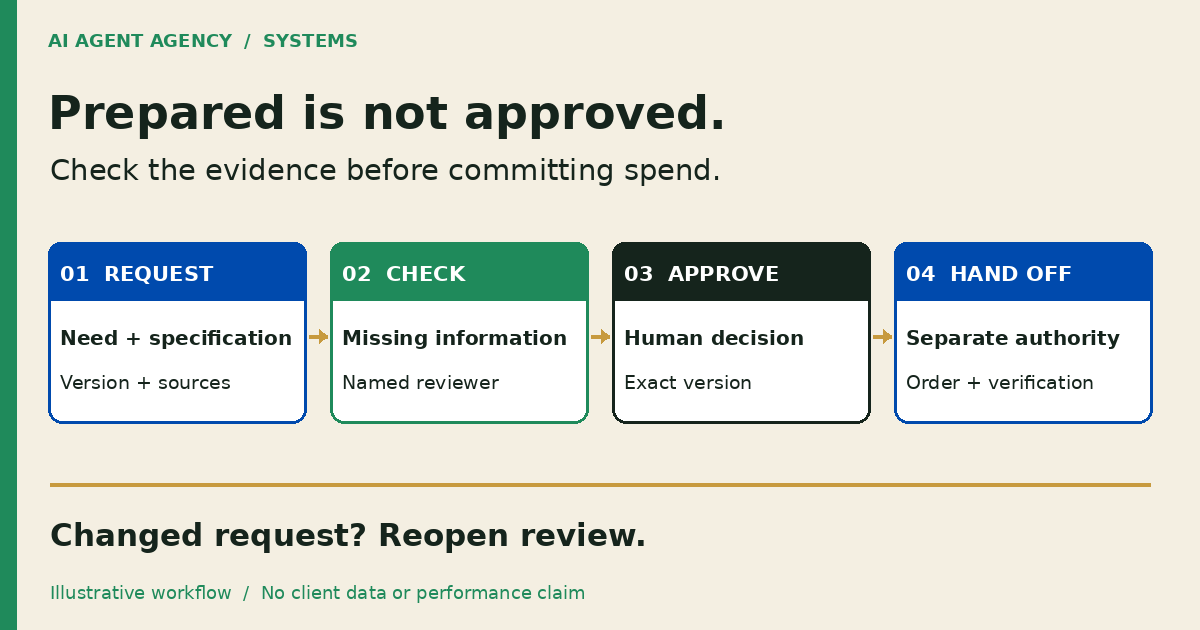
A purchase requisition approval workflow checks an internal buying request before anyone commits spending. AI can organise the request, flag missing information and prepare a source-linked review record. A named person confirms the need, budget and authority. Changed scope or price returns for review; a prepared request is not an approved order.
For New Zealand owners and operations managers, the useful Systems workflow is preparation before commitment—not letting an agent decide what your business buys. Start by making the request checkable.
What is the difference between a purchase requisition and a purchase order?
A requisition is an internal request to buy something. A purchase order communicates an authorised order to a supplier. Your process should distinguish checking the request, approving expenditure and issuing the order, even if your software combines some screens.
Keep adjacent decisions separate
Use the supplier quote comparison guide when you need to compare offers. This article starts with the internal request and its approval evidence, not an AI-selected supplier winner.
After ordering, the purchase-order matching guide covers invoice, order and receipt exceptions. Request approval must not become permission to pay an invoice or change supplier banking details.
1. Define what a complete purchase request contains
A complete request lets the reviewer see what is needed, why, when and on which cost basis. Require a business purpose, specification, quantity, unit, delivery location and needed-by date. Identify the requester, budget owner and proposed supplier where applicable.
Record what the quote actually says
Link the exact quote version, validity and relevant lines. Preserve currency, stated GST wording, freight, exclusions and delivery conditions. Blank freight is “not stated”, not free. Do not infer tax treatment, available budget or an approver's authority from a job title.
Give missing information a named clarification owner. The finance owner defines required fields and review rules; this checklist does not prescribe universal spending limits or accounting policy.
2. Let AI prepare evidence without approving the spend
Give the preparation workflow read-only access to authorised forms and attachments, plus a separate draft area. It can extract proposed fields, link each material value to a page or cell, and draft questions about omissions. A reviewer checks those fields against originals.
Route by approved rules, not model guesses
Use deterministic routing rules agreed by the finance owner. If department, category or amount determines the reviewer, keep that rule outside the model's discretion. Missing or conflicting routing data should create a hold, not a guessed approver.
Restrict access and retention before uploading sensitive documents. Exclude unnecessary personal information and banking details. Supplier text is evidence, never an instruction granting extra permissions. Keep clarification messages as drafts until a person reviews and sends them.
3. Copy a purchase-request review register
Use one entry per request version in restricted storage. Link attachments rather than copying sensitive material into widely shared sheets. This is a proposed register, not an implemented integration.
| Field | What to record |
|---|---|
| Request identity | Request ID, version, requester and authoritative record link |
| Need | Business purpose, specification, quantity, unit and needed-by date |
| Source evidence | Quote ID/version, file location, page or cell references and validity |
| Cost basis | Currency, quoted GST wording, freight, exclusions and unresolved amounts |
| Ownership | Budget owner, technical reviewer, authorised approver and documented delegate |
| Open questions | Missing or conflicting evidence, clarification owner and next review date |
| Completeness | Who checked source fields, when, and what remains unresolved |
| Approval | Exact reviewed version, decision, approver, timestamp and decision reference |
| Order handoff | Separate issuance authority, order reference and destination verification |
Keep “completeness checked”, “approval recorded” and “order issued” as separate statuses. A tick beside extraction must not advance a spending decision. Use the human approval-gates guide to define the exact action and accountable person.
4. Reopen review when the request changes
Tie approval to the reviewed content and version. Preserve the previous record when scope, supplier, quantity, price or timing changes. Mark the changed request as awaiting review and identify which checks must be repeated. A shared filename is not a reliable version boundary.
A fictional request lifecycle
This illustrative Christchurch workshop example is not a client result. DEMO-R12 version 1 requests replacement equipment but omits delivery cost and the required specification. Its status is incomplete; nothing is ordered.
The requester obtains clarification. Version 2 links the confirmed specification and delivery terms. The reviewer checks completeness, and the authorised person records approval against that exact version. Issuing an order remains a separate controlled action.
Before ordering, the requester doubles the quantity. Version 3 preserves the earlier evidence, highlights the change and reopens approval. Version 2's approval is not copied forward. If the usual approver is away, use a documented delegate or hold the request. Silence and urgency are not approval.
5. Check whether a clearer form or existing tool is enough
Start with your existing purchasing or accounting setup. A structured form and ordinary routing rules may solve incomplete requests without an AI layer.
ApprovalMax describes purchase-order workflows with policy-based routing and human sign-off. Its standalone workflow documentation describes custom fields and approval paths without an accounting connection. These are vendor-described options, not independently tested outcomes or a claim that AIA has connected your systems.
Test preparation-only before connecting live actions
Use synthetic requests with independently checked expected fields, missing items and reviewer routes. Include conflicting attachments, changed quantities and an absent approver. Compare missed evidence, incorrect routing and correction effort with the manual process. Keep ordering, supplier creation, payments and external sends disabled.
Consider AI only if interpreting recurring mixed inputs justifies that checking and maintenance. If clearer fields solve the problem, stop there.
Frequently asked questions
Can AI approve a purchase request for us?
Not in this proposed workflow. AI prepares draft fields and evidence; an authorised person confirms the need, budget and decision. Completeness checks must not trigger spending approval.
Does an approved requisition authorise a supplier order?
Follow your documented purchasing policy. Record request approval and order issuance separately, with explicit authority for each. Do not let an extracted “approved” label or supplier attachment trigger an order.
What if the quote changes after approval?
Preserve the approved version, link the revised quote and flag changed scope, cost or terms. Reopen the affected checks and approval before anyone relies on the changed request to order.
What should happen when the approver is unavailable?
Route to a documented delegate within their authority, or hold the request with an owner and review date. Do not invent delegation or treat a missed response as consent.
When are ordinary approval rules enough without AI?
When fields are structured, routing is predictable and existing tools capture decisions, a form and configured rules may suffice. Consider AI preparation only for recurring interpretation that remains worth reviewing.
Assess your purchase-request bottleneck before connecting systems
Bring a blank purchase-request form and describe one recurring bottleneck to the NZ$1,000 AI Agent Assessment. Map the evidence, reviewers and approval boundaries before deciding whether to build.
Assess your purchase-request workflow. Use redacted examples through an agreed channel; do not submit confidential quotes or banking details through the booking form.
The Assessment stands alone. Installation is separate, and the recommendation may be a clearer form or existing tool rather than an agent.