
Power Automate Owner Leaving? A Handover Checklist for NZ Businesses
Check the owner, connections and licence separately
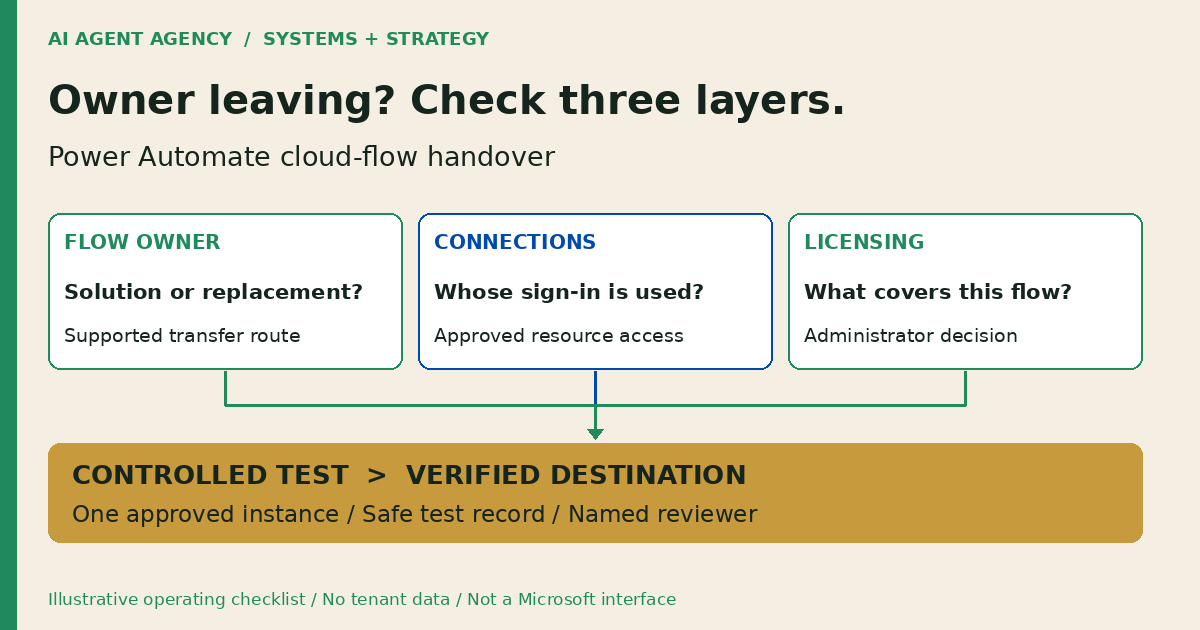
Before a Power Automate owner leaves your organisation, identify critical flows, assign continuing responsibility, review connection identities and licensing, then test the destination result. Confirm whether each flow is solution-aware: the ownership-transfer route differs. Adding a co-owner does not replace every connection. Microsoft documents these ownership distinctions.
Use this checklist when an employee or contractor is leaving your NZ business. It covers cloud-flow handover, not desktop automation or emergency account recovery. The worksheet is a suggested operating process, not evidence that we have inspected your tenant.
1. Find the flows your business actually depends on
Start with the business outcome, then record the technical details. Ask what would be missed tomorrow: an enquiry assigned, a document filed, or an exception sent to a reviewer.
Identify the environment and responsible people
Record the flow name and ID, environment, trigger, schedule, downstream system, current owner, incoming owner and backup contact. For scheduled work, write down the configured timezone and the expected NZ local execution time; do not leave the acceptance test as “runs overnight”.
Ask the authorised administrator to confirm the inventory. If the owner has already departed, Microsoft's orphaned-flow guide describes identifying ownerless flows in the Power Platform admin centre and assigning a new co-owner. Appropriate privileges are required; absence from an ordinary user's list is not a complete inventory.
Use the business-wide automation handover checklist for broader documentation. Keep this review focused on the actual Power Automate dependencies.
2. Choose the supported ownership-transfer route
Ask the administrator to classify each flow before changing it. A co-owner invitation and a primary-owner change are different operations.
Solution-aware cloud flows
Microsoft's owner-change procedure supports changing a solution-aware flow's primary owner through Details, with the required privilege. The old owner remains a co-owner: review that access separately.
Non-solution cloud flows
Microsoft says ownership cannot change in place. Where Dataverse is available, assess adding the flow to a solution. Otherwise, the documented options create a replacement through export/import, Save as or Send a copy. Ask the administrator to choose the supported route for your environment, not improvise a password handover.
Before approving a replacement, record its new identifier, activation plan and how the old instance will be handled. Do not turn on two versions against the same live queue without reviewing duplicate-action risk.
3. Review connections and licensing before sign-off
Treat connection access as its own checklist. An editable flow is not proof that its mailbox, file store or CRM actions use a continuing identity.
Check each trigger and action
Microsoft's sharing guide says an owner cannot modify another owner's connection credentials. Review each used connection, its authenticated identity, target resource and required permissions. Have an authorised operator select an approved existing connection or create a replacement where needed. For solution flows, include connection references in the review; do not assume a reference means the underlying sign-in has changed.
Keep evidence references, not passwords, tokens or connection secrets. Do not keep a departed person's account active merely to avoid fixing dependencies. Coordinate access containment with the administrator using the tool offboarding checklist; do not delay urgent security action for this worksheet.
Get a licensing decision
Microsoft distinguishes user and capacity licences. Ask your licensing administrator to check the actual flow, connector features and proposed ownership arrangement, then record the decision and review date. For application identities, include Microsoft's service-principal requirements in that review. Do not assume a Microsoft 365 subscription covers every premium feature, or that a service identity makes automation free.
4. Copy a flow-by-flow handover record
Use one private row per flow, with separate connection entries where necessary. Mark unknowns as unresolved and assign a person, rather than treating an empty cell as approval.
- Identity: Flow ID, environment, purpose, trigger and solution status.
- Ownership: Current owner, proposed owner, backup and authorised operator.
- Connections: Used connection identities, target resources and replacement decision.
- Entitlements: Licensing reviewer, decision, dependencies and next check.
- Cutover: Approved window, pending work, old/new instance status and pause plan.
- Evidence: Test record, run reference, destination observation, reviewer and timestamp.
Illustrative example: the enquiry task is missing
DEMO-FLOW-01 is fictional, not a client result. An incoming owner can edit an enquiry flow, but the handover sheet has no evidence that its task-creation step uses an approved continuing connection. Leave that item open for the administrator. Do not sign off because the flow appears in the incoming owner's dashboard.
For a small team, a restricted worksheet and a named administrator may be enough. You do not need an AI agent to complete routine ownership administration.
5. Test the handover without repeating live actions
Agree on the test and expected result before running it. Use an authorised test record and a safe destination; prevent customer messages, financial changes or sensitive CRM updates during the rehearsal.
Verify the business-system result
- Check pending runs, approvals and queued inputs; assign responsibility for unresolved work.
- Confirm which flow instance may run and which must remain stopped during cutover.
- Trigger the agreed test and inspect the relevant run steps.
- Read the destination record or approved output, checking its identifier, fields and responsible person.
- Record failures, the pause route and a next check after the planned access changes.
Use the result-verification checklist to distinguish a successful run from the intended business outcome. For scheduled flows, include an observed scheduled execution in acceptance evidence, not only a manual rehearsal.
If a flow supports website publishing, also use the WordPress missed-schedule checklist for the separate post status, site timezone and public-page checks. A successful approval flow does not prove the article is live.
Have the incoming owner and administrator review the record together. Sign off individual checks; keep uncertain connections or unobserved outcomes open. Never promise uninterrupted operation from a single test.
Frequently asked questions
Will my Power Automate flows stop immediately when the owner leaves?
Not necessarily. Microsoft's sharing guidance says a shared flow with an active owner can continue, but actions using the departed user's connections may fail. Review ownership, connections and entitlements separately instead of promising every flow stops or survives.
Is adding a co-owner enough to protect the connections?
No. Under Microsoft's sharing rules, another owner's connection credentials cannot simply be edited by the co-owner. Confirm the approved connection for every relevant trigger and action, then test it.
Can I change the owner of a non-solution cloud flow?
Not in place. Microsoft documents a solution route where Dataverse is available, or replacement-flow options otherwise. Review pending work and duplicate triggers before activating a replacement.
Should a service account or service principal own the flow?
Have your administrator assess it. Microsoft supports service-principal ownership with specific connection and licensing requirements. A service account is not permission to share passwords; neither identity removes the need for accountable human oversight.
Assess the workflow before adding another agent
If your workflows depend on one person's account or undocumented decisions, start with the NZ$1,000 AI Agent Assessment. Bring a redacted flow inventory to assess the workflow before adding an agent. Decide whether to repair deterministic automation, redesign ownership or scope an agent that prepares work for human approval.
The standalone Assessment is not emergency Microsoft support or guaranteed recovery. Installation and migration are separate scope. Do not submit credentials through the booking form.